
Choosing the right flight sim setup can make the difference between frustration and fast progress. The best beginner controls are comfortable, easy to map, and responsive enough to help you learn without overwhelming you.
Below, we’ve focused on flight simulator controls for beginners that offer a smooth first step into the hobby, whether you want a simple stick-and-throttle combo, a yoke setup, or a more complete cockpit-style system.
Best 10 Flight Simulator Controls for Beginners Picks for 2026
Beginner-Friendly HOTAS Starter

- Plug-and-play with preconfigured controls
- Detachable throttle for flexible setup
- 12 buttons and 5 programmable axes
Best For: New sim pilots wanting a simple PC HOTAS
Feature-Rich Throttle Console
Honeycomb Bravo Throttle Quadrant

- All-in-one panel with autopilot and annunciators
- Configurable for 1-4 engine aircraft
- 7 programmable keys and multiple switches
Best For: Beginners building a realistic cockpit-style throttle setup
Airbus-Style Starter Set
Thrustmaster TCA Captain Pack X

- 1:1 Airbus A320 sidestick and throttle
- 14 stick buttons plus 31 quadrant buttons
- Built-in thrust reverser and twist rudder
Best For: Beginners who want an Airbus-style airliner setup
Yoke System for New Pilots
Logitech G PRO Flight Yoke System
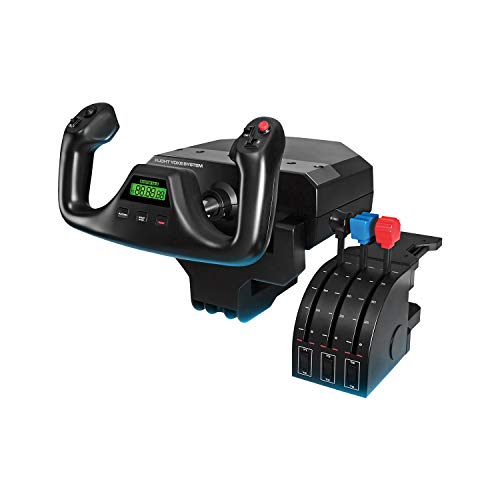
- Realistic yoke helps build muscle memory
- Includes throttle quadrant and desk clamps
- 54+ programmable controls with mode switching
Best For: New pilots who want a classic yoke-and-throttle layout
Best for Easy Setup
Thrustmaster T-Flight Hotas One

- Detachable stick and throttle design
- Adjustable resistance with 14 buttons
- Plug-and-play on PC and Xbox
Best For: New sim pilots who want an easy starter HOTAS
Advanced PC HOTAS
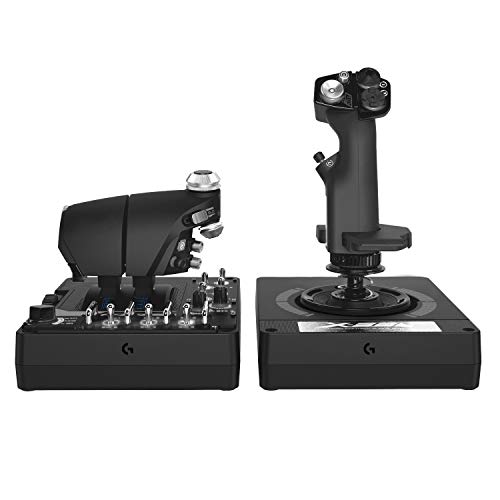
- 189 programmable controls
- Twin throttles with adjustable stick force
- PC-only with hall-effect sensors
Best For: PC users who want a highly customizable HOTAS
All-in-One Yoke System
Turtle Beach VelocityOne Flight
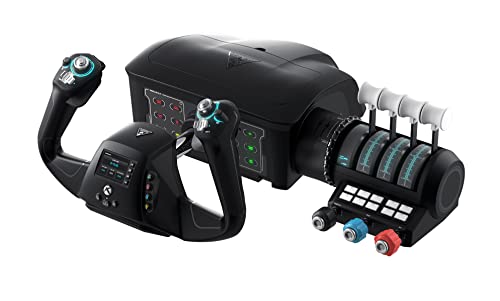
- Yoke, throttle quadrant, trim wheel, and rudder controls
- 180° yoke rotation with hall-effect sensor
- Built for Xbox and Windows flight sims
Best For: Beginners who want a complete yoke-based setup
Foldable Base for Flexible Setups
GTPLAYER Adjustable Flight Stand

- Compatible with many Logitech and Thrustmaster devices
- 20-degree and 20 cm adjustments help dial in comfort
- Carbon steel frame folds for compact storage
Best For: Beginners building a stable, space-saving sim rig
High-Detail HOTAS Bundle
Logitech G X56 with Rudder Pedals

- Includes throttle, joystick, and rudder pedals
- Large control set supports detailed PC mapping
- Adjustable pedal tension and toe brakes add realism
Best For: Beginners who want a complete PC flight control bundle
Simple Entry-Level Stick
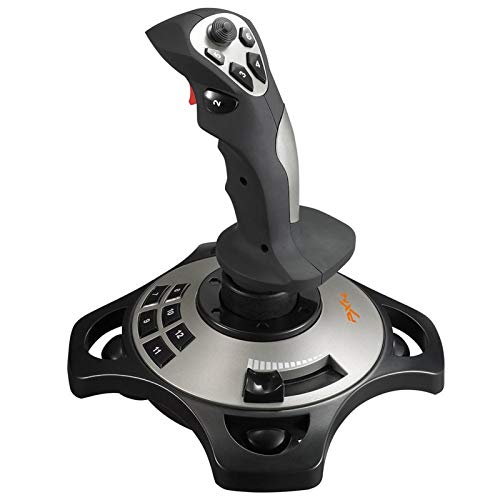
- Wired Windows PC joystick with throttle control
- 12 programmable buttons plus vibration feedback
- Suction cups help stabilize the base on smooth desks
Best For: Beginners who want a basic PC joystick to start flying
Beginner-Friendly HOTAS Starter – Thrustmaster T-Flight Hotas X
If you’re shopping for flight simulator controls for beginners, the Thrustmaster T-Flight Hotas X is a straightforward way to get started without a steep learning curve. Its plug-and-play setup, detachable throttle, and preconfigured controls make it easy to jump into PC flight sims and start building confidence from the first session.
Best For: New sim pilots who want an easy-to-use HOTAS with simple setup and flexible desktop or split-throttle placement.
Pros:
- Plug-and-play design with preconfigured controls for quick setup
- Detachable full-size throttle for compact or separated desktop layouts
- 12 programmable buttons and 5 axes for basic customization
- Adjustable stick resistance plus dual rudder control for smoother handling
Cons:
- PC-focused setup may not suit buyers wanting a broader platform ecosystem
- Fewer advanced cockpit controls than premium throttle quadrants
Overall, this is a practical entry-level HOTAS for beginners who want immediate usability and enough flexibility to grow with their sim setup. It emphasizes comfort and simplicity over complex cockpit replication.
Feature-Rich Throttle Console – Honeycomb Bravo Throttle Quadrant
For buyers focused on flight simulator controls for beginners, the Honeycomb Bravo Throttle Quadrant is a more advanced all-in-one panel that can still be learned progressively. It combines throttle levers, autopilot controls, gear, flaps, trim, and annunciators into one desktop unit, making it a strong long-term cockpit upgrade for simmers who want room to expand.
Best For: Beginners who want a realistic throttle-centric control panel they can grow into across GA and airliner flying.
Pros:
- All-in-one cockpit system with throttle, autopilot, gear, flaps, trim wheel, and annunciator panel
- Configurable for single-engine through four-engine aircraft
- 7 programmable keys plus multiple switches and indicator lights
- Works with Microsoft Flight Simulator, X-Plane 11 & 12, and Prepar3D
Cons:
- More complex than a basic starter joystick for first-time users
- No included yoke, so it’s not a full flight control set by itself
This is best viewed as a beginner-friendly upgrade for users who already know they want a more realistic cockpit layout. It offers a lot of capability, but the learning curve is higher than simpler stick-and-throttle options.
Airbus-Style Starter Set – Thrustmaster TCA Captain Pack X
If you want flight simulator controls for beginners with a more authentic airliner feel, the Thrustmaster TCA Captain Pack X is built around Airbus-inspired ergonomics. The 1:1 sidestick and throttle quadrant make it a strong choice for Microsoft Flight Simulator users who prefer a cockpit layout that mirrors modern commercial aircraft.
Best For: Beginners who want an Airbus-style setup for airliner flying on Xbox or PC.
Pros:
- 1:1 replica Airbus A320 sidestick and throttle quadrant
- 14 remappable buttons on the stick and 31 action buttons on the quadrant
- Built-in thrust reverser and twist rudder control
- Single-cable Ecosystem Hub keeps setup clean and simple
Cons:
- Airbus layout is specialized, so it may feel less universal than a generic HOTAS
- Best fit for civil airliner simulation rather than all flight styles
For new sim pilots who already know they want to fly airliners, this set gives a highly focused and immersive starting point. It balances realism with straightforward connectivity and lots of built-in controls.
Yoke System for New Pilots – Logitech G PRO Flight Yoke System
Among flight simulator controls for beginners, the Logitech G PRO Flight Yoke System is a strong fit if you want a more traditional airplane-style layout. The realistic yoke, throttle quadrant, and programmable buttons help new pilots build muscle memory while keeping the controls familiar for general aviation flying.
Best For: Beginners who want a classic yoke-and-throttle setup for learning standard aircraft handling.
Pros:
- Realistic yoke controls designed for new pilots to build muscle memory
- Includes flight yoke and separate throttle quadrant
- At least 54 programmable controls with mode switching
- Steel shaft and desk clamps for stable, accurate control
Cons:
- Requires optional software download for full use
- More desk space and setup effort than a simple joystick
This system makes sense for beginners who want to learn with a control style that resembles many real aircraft. It offers lots of assignable functions, but it’s best if you have room for a larger desktop cockpit setup.
Best for Easy Setup – Thrustmaster T-Flight Hotas One
If you’re shopping for flight simulator controls for beginners, the Thrustmaster T-Flight Hotas One is a straightforward way to move from keyboard flying to a real stick-and-throttle setup. Its detachable HOTAS design, adjustable resistance, and plug-and-play PC and Xbox support make it easy to start flying without a complicated setup.
Best For: New sim pilots who want an easy-to-use HOTAS with room to grow.
Pros:
- Detachable flight stick and throttle for flexible desk or lap setups
- Adjustable resistance and responsive trigger help with precise control
- 14 programmable buttons support takeoff, landing, and combat maneuvers
- Simple USB plug-and-play compatibility with Windows PC and Xbox Series X|S
Cons:
- Rudder pedals are not included
- Best value is strongest for users who want a basic HOTAS rather than a full cockpit-style system
Overall, this is a practical entry point if you want a beginner-friendly control upgrade that feels more immersive than a standard gamepad. It covers the essentials for many flight sim styles and leaves room to add pedals later.
Advanced PC HOTAS – Logitech G X56 HOTAS
For flight simulator controls for beginners who already know they want a serious PC setup, the Logitech G X56 delivers a much deeper control layout than a basic starter stick. It offers twin throttles, adjustable stick force, and a huge number of programmable controls, but it is best suited to users ready for a more complex desk setup.
Best For: PC sim players who want extensive controls and expect to grow into them.
Pros:
- 189 programmable controls for highly customizable flying
- Adjustable 4-spring system lets you tune stick force
- Twin throttles and mini analog sticks add more control options
- Hall-effect sensors provide accurate 16-bit aileron and elevator axis input
Cons:
- PC-only design with Windows and dual-USB requirements
- More complex than most beginner setups
- Likely overkill if you only want a simple first flight controller
In practice, the X56 makes sense when you want a controller you won’t outgrow quickly. It is feature-rich and precise, but its depth is better matched to users willing to spend time learning a larger control surface.
All-in-One Yoke System – Turtle Beach VelocityOne Flight
If you want flight simulator controls for beginners and prefer a yoke over a joystick, the Turtle Beach VelocityOne Flight gives you a complete all-in-one setup. It combines a yoke, throttle quadrant, trim wheel, and integrated rudder controls, so you can start with a more aircraft-style control scheme right away.
Best For: Beginners who want a complete yoke-based system for PC or Xbox.
Pros:
- All-in-one design includes yoke, throttle quadrant, trim wheel, and rudder controls
- True-to-life 180° yoke rotation with hall-effect sensor
- 12 analog axes, multiple POV and HAT switches, and dedicated pitch trim wheel
- Works with Xbox and Windows titles, including Microsoft Flight Simulator
Cons:
- Larger footprint than a basic stick-and-throttle setup
- May be more controller than a casual flyer needs at first
- Best suited to users who have space for a secured clamping system
This is a strong choice if you want a more realistic cockpit feel from day one. The integrated controls make it easy to learn the core flight inputs without piecing together separate peripherals.
Foldable Base for Flexible Setups – GTPLAYER Adjustable Flight Stand
If you want flight simulator controls for beginners without committing to a full cockpit, this GTPLAYER stand is a practical starting point. It gives you a stable mounting base for compatible flight and racing gear, with enough adjustment to help you find a comfortable position as you learn.
Best For: Beginners who want a sturdy, foldable stand for a more organized first sim setup.
Pros:
- Fits many mainstream flight and racing devices, including Logitech and Thrustmaster gear.
- Offers 20-degree steering rack adjustment and 20 cm height adjustment for better positioning.
- Built from high-strength carbon steel for stable, low-shake use.
- Folds for easier storage in smaller spaces.
Cons:
- Wheel, shifter, pedals, and other devices are not included.
- It is a stand only, so you still need separate controls to fly.
Overall, this is a sensible foundation if you are assembling beginner flight simulator controls and want room to upgrade later. The foldable design and broad compatibility make it useful for first-time sim pilots who need flexibility more than a full enclosed cockpit.
High-Detail HOTAS Bundle – Logitech G X56 with Rudder Pedals
For flight simulator controls for beginners who want a more complete setup right away, this Logitech G X56 bundle adds both a throttle-and-joystick combo and rudder pedals. It is aimed at detailed PC flight and space sim control, with a large button count and adjustable pedal feel for more precise handling.
Best For: New sim pilots who want an all-in-one HOTAS bundle with rudder pedals for deeper control.
Pros:
- Includes the X-56 throttle and joystick plus Pro Flight Rudder Pedals in one bundle.
- Offers military-grade-style precision and control options for flight and space sims.
- Mini analog stick controls and many buttons support detailed mapping and VR-friendly use.
- Pedals feature adjustable tension and differential toe brakes for more realistic taxiing and landing control.
Cons:
- Designed for Windows PCs only.
- May be more advanced and expensive than a simple entry-level stick.
This bundle makes sense if you want a fuller cockpit feel instead of starting with a single controller. It is a strong step up for beginners who are ready to learn with a more complete control layout from the start.
Simple Entry-Level Stick – PXN 2113 USB Flight Joystick
If you are shopping for flight simulator controls for beginners and want a simple first controller, this PXN 2113 keeps the learning curve low. It is a wired USB joystick for Windows PCs with vibration, throttle control, and a set of programmable inputs for basic flight sim play.
Best For: First-time PC sim players who want an affordable, easy-to-use joystick.
Pros:
- Windows PC compatible and USB wired for straightforward setup.
- Includes vibration, throttle control, a rapid-fire trigger, an 8-way hat switch, and 12 programmable buttons.
- Uses suction cups on the base to help keep it in place on smooth tables.
- Supports games like Microsoft Flight Simulator and X-Plane 10.
Cons:
- Only works with Windows PCs, not Mac, consoles, or Apple devices.
- Some users may need to adjust vibration strength in the driver for best results.
As a starter joystick, this is the most approachable option in the group. It gives beginners the core controls they need without adding pedals or a throttle quadrant, which keeps setup and learning simple.
How We Picked These Flight Simulator Controls for Beginners
We looked for controls that are approachable for new sim pilots, with a strong mix of simplicity, compatibility, and expandability. Priority went to devices with clear layouts, sensible button placement, stable inputs, and enough flexibility to grow with you as your skills improve.
We also weighed platform support, since many beginners want something that works on PC, Xbox, or both. Products that include throttles, trim, or extra mapped functions scored better because they reduce reliance on keyboard shortcuts.
Quick Comparison
Hotas setups are usually the easiest entry point if you want a more hands-on flying feel. Yokes are a better match for airliners and general aviation. Throttle quadrants, rudder pedals, and stands are useful upgrades once you want more realism and less desk clutter. All-in-one systems can simplify setup, while modular gear gives you more room to build a custom cockpit over time.
Key Buying Factors for Flight Simulator Controls for Beginners
Control Style
Start with the aircraft you expect to fly most. A joystick and throttle work well for fighters and many general aircraft, while a yoke is often more natural for civilian and commercial flying. If you are unsure, a Hotas is usually the most versatile beginner choice.
Ease of Setup
Look for plug-and-play compatibility, intuitive default mappings, and enough onboard controls to avoid constant menu diving. Beginners benefit from gear that is easy to mount, simple to configure, and comfortable in long sessions.
Upgrade Path
Some of the best Flight Simulator Controls for Beginners can later be expanded with rudder pedals, a dedicated throttle quadrant, or a mounting stand. That makes it easier to start small without buying everything twice.
Build Quality and Feel
Good resistance, stable base design, and durable switches matter more than flashy extras. A controller that feels consistent will help you build muscle memory and improve faster.
Who Should Buy Which Flight Simulator Controls for Beginners?
If you want the simplest entry into flight sims, choose a basic Hotas or joystick-throttle combo. If you prefer airliners or training-style flying, a yoke system is the better fit. If you want the most realistic setup and plan to upgrade over time, pick a modular ecosystem with a throttle quadrant, pedals, and a sturdy stand.
For most newcomers, the best choice is the one that matches your favorite aircraft, your available desk space, and how much setup you’re willing to handle on day one.