
Getting started with flight sims is much easier when your controls match your goals. A good bundle can reduce setup friction, improve precision, and make learning feel natural from the first flight.
In this roundup, we focus on beginner-friendly options that balance ease of use, platform support, and value so you can choose a setup that fits your space, budget, and preferred aircraft style.
Best 10 Flight Simulator Bundle for Beginners Picks for 2026
Beginner All-in-One Yoke
Turtle Beach VelocityOne Flight
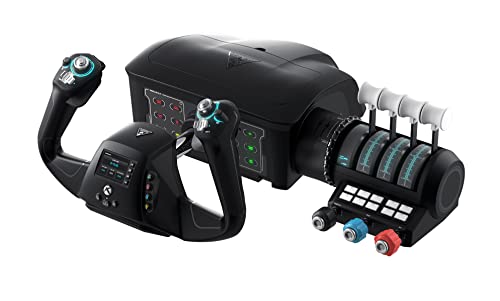
- Yoke, throttle, trim wheel, and rudder controls in one system
- 180° yoke rotation with hall effect sensing
- Full-color display helps with setup and learning
Best For: Beginners who want an integrated Xbox and PC flight control system
Adjustable Cockpit Frame
Marada Flight Racing Simulator Cockpit

- Supports flight and racing gear with interchangeable panels
- Highly adjustable seat, pedals, and control mounts
- Sturdy square-tube build aims to reduce wobble
Best For: Beginners who already own controls and want a dedicated cockpit frame
Starter HOTAS Bundle
Thrustmaster T-Flight Full Kit

- HOTAS stick and detachable throttle in one package
- Includes rudder pedals for better yaw control
- Official Xbox integration plus 14 mappable buttons
Best For: Beginners who want a complete HOTAS setup with pedals
Traditional Yoke Starter
Logitech G PRO Flight Yoke System
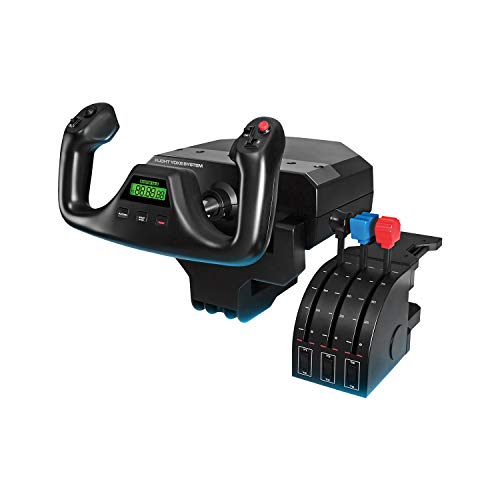
- Yoke and throttle quadrant in one PC-focused package
- Up to 54 programmable controls with mode switching
- Steel shaft and desk clamps support stable mounting
Best For: Beginners who want a classic civilian-flight yoke setup on PC
Beginner official HOTAS
T-Flight Hotas One MSFS 2024 Collector Edition

- Official Microsoft Flight Simulator 2024 licensing
- Detachable throttle for desk, lap, or cockpit use
- 5 axes, 14 buttons, and dual rudder control
Best For: Beginners on Xbox or PC who want an easy first HOTAS
Beginner realism upgrade
Logitech G Pro Flight Rudder Pedals
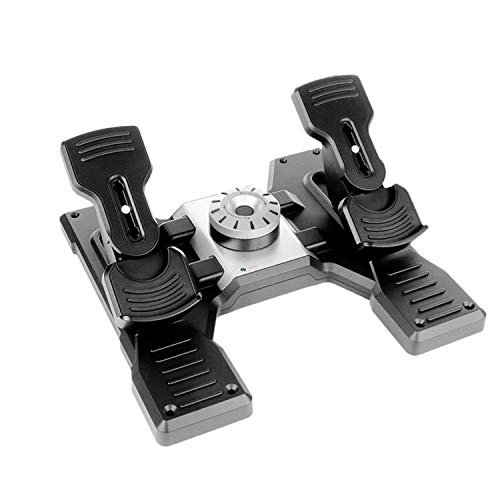
- Self-centering pedals with adjustable tension
- Differential toe brakes for runway control
- PC-compatible add-on for existing sim setups
Best For: PC beginners upgrading from a basic stick or HOTAS
Feature-rich HOTAS
Logitech G X56 HOTAS Throttle and Joystick
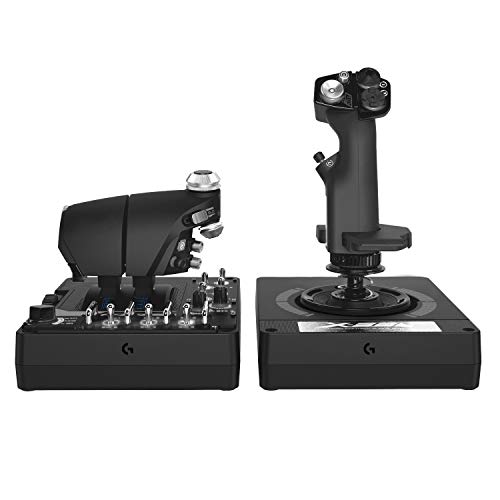
- 189 programmable controls for deep customization
- Twin throttles with hall-effect precision
- Adjustable spring system and VR-friendly layout
Best For: PC beginners who want a high-end setup they can grow into
Pro-Grade Starter Yoke Set
Logitech G Pro Flight Yoke + Rudder Pedals Bundle

- Realistic yoke control for beginner-friendly muscle memory
- Rudder pedals add self-centering steering and toe brakes
- 54 programmable controls across yoke inputs
Best For: Beginners who want a realistic yoke-and-pedal bundle
Easy Hotas Entry Point
Thrustmaster T-Flight Hotas X USB Flight Stick

- Plug-and-play setup is simple for first-time users
- Detachable throttle supports compact or split layouts
- 12 programmable buttons and 5 axes add flexibility
Best For: New sim pilots who want an easy HOTAS starter
Stable Cockpit Base
GTPLAYER Foldable Flight Racing Simulation Stand

- Fits many Logitech and Thrustmaster flight devices
- Adjustable height and 20-degree tilt for comfort
- Foldable steel frame saves storage space
Best For: Beginners who need a sturdy adjustable stand for existing controls
Beginner All-in-One Yoke – Turtle Beach VelocityOne Flight
If you’re looking for a flight simulator bundle for beginners, the Turtle Beach VelocityOne Flight gives you a true all-in-one control layout without needing to piece together separate hardware. Its yoke, throttle quadrant, trim wheel, and integrated rudder/brake controls make it easier to learn the basics of flight sim control while staying organized on a desk setup.
Best For: New sim pilots who want a complete, feature-rich control system for Xbox or Windows PC flying.
Pros:
- Universal all-in-one design with yoke, throttle quadrant, trim wheel, and rudder controls
- 180° yoke rotation with hall effect sensor for precise input
- Full-color flight management display helps you learn and configure the system
- Secure clamping system supports a variety of home setups
Cons:
- Designed around Xbox and Windows titles, so platform flexibility is limited
- More complex than a simple stick-and-throttle starter set
This is a strong beginner pick if you want a realistic cockpit feel from day one and prefer an integrated setup over mixing multiple pieces from different brands.
Adjustable Cockpit Frame – Marada Flight Racing Simulator Cockpit
For buyers building a flight simulator bundle for beginners, this Marada cockpit is best treated as the sturdy foundation that holds your controls in place. It supports flight and racing gear, has multiple interchangeable mounting panels, and offers a highly adjustable layout for a more comfortable first sim-rig setup.
Best For: Sim builders who already have compatible controls and want a stable, adjustable cockpit frame.
Pros:
- Works as either a flight sim cockpit or a racing sim cockpit
- Five interchangeable mounting panels for different gear setups
- Highly adjustable panels, pedals, seat position, and backrest angle
- Thick square-tube construction is designed for stability and low wobble
Cons:
- Electronic devices are not included
- Heavy and large compared with simpler desk-mounted options
This is less of an all-in-one starter kit and more of a cockpit frame for beginners who want room to grow and prefer a dedicated rig over a desk setup.
Starter HOTAS Bundle – Thrustmaster T-Flight Full Kit
If you want a flight simulator bundle for beginners that covers the essentials without getting too complicated, this Thrustmaster full kit is a strong choice. It combines a HOTAS stick-and-throttle setup with included rudder pedals, giving new pilots a straightforward way to practice takeoff, landing, and yaw control in one package.
Best For: New players who want a complete HOTAS bundle with pedals for Xbox and PC flight sims.
Pros:
- Complete HOTAS setup with detachable throttle and flight stick
- Included rudder pedals add smoother yaw control for taxiing and landings
- 14 mappable buttons and a hat switch cover many basic sim functions
- Official Xbox integration makes console navigation easier
Cons:
- Uses a flight-stick layout rather than a yoke, which may not suit every beginner
- Not as expansive as higher-end multi-piece simulator systems
For first-time sim pilots who want a practical, ready-to-fly bundle, this kit strikes a nice balance between accessibility and control depth.
Traditional Yoke Starter – Logitech G PRO Flight Yoke System
For a flight simulator bundle for beginners focused on traditional aircraft controls, this Logitech yoke system is a familiar place to start. The yoke and throttle quadrant mirror the layout of many civilian aircraft, and the realistic control feel can help new pilots build muscle memory while learning the basics of flight sim flying.
Best For: Beginner PC pilots who want a traditional yoke-and-throttle layout with lots of programmable controls.
Pros:
- Realistic yoke controls are designed to help new pilots build muscle memory
- Throttle quadrant is included in the box
- Up to 54 programmable controls with mode switching
- Robust steel shaft and secure desk clamps support stable desktop use
Cons:
- PC-only compatibility limits console use
- Requires optional software download for several flight sims
This is a practical starter system if you want a more authentic civilian-flight feel and plenty of controls to grow into over time.
Beginner official HOTAS – T-Flight Hotas One MSFS 2024 Collector Edition
If you want a flight simulator bundle for beginners that feels approachable right away, this officially licensed Thrustmaster HOTAS is built for simple plug-and-play use on Xbox Series X|S and PC. The detachable throttle, 5-axis control set, and adjustable resistance make it easier to learn the basics without jumping straight into a complex cockpit layout.
Best For: New sim pilots who want an official Microsoft Flight Simulator controller with straightforward setup and flexible desk or lap use.
Pros:
- Officially licensed for Microsoft Flight Simulator 2024 and compatible with Xbox Series X|S and PC
- Detachable throttle lets you use the stick and throttle together or separately
- 5 axes, 14 action buttons, rapid trigger, and hat switch provide a solid beginner control set
- Dual rudder options add more realistic handling for jets, helicopters, and prop aircraft
Cons:
- Rudder pedals are not included and must be bought separately
- More advanced sim users may want a larger control ecosystem later
As an entry-level HOTAS, this model balances simplicity and realism well. It gives beginners the core controls they need to get flying, while still leaving room to expand with pedals later.
Beginner realism upgrade – Logitech G Pro Flight Rudder Pedals
For a flight simulator bundle for beginners that you can build out over time, these rudder pedals are a practical upgrade once you outgrow basic stick controls. The self-centering design, adjustable tension dial, and differential toe brakes add a more realistic feel to taxiing, takeoff, and landing on a PC setup.
Best For: PC sim beginners who already have a joystick or HOTAS and want more realistic foot control.
Pros:
- Self-centering rudder pedals help improve directional control
- Adjustable tension dial lets you tune the feel for lighter or heavier aircraft
- Differential toe brakes add better runway and taxi control
- PC compatibility keeps the setup straightforward for Windows users
Cons:
- PC-only compatibility limits use on consoles
- Works best as part of a larger flight sim setup rather than a standalone starter buy
These pedals are less of an all-in-one beginner package and more of a smart expansion piece. If you are starting to care about realism, they make a clear difference in ground handling and coordinated turns.
Feature-rich HOTAS – Logitech G X56 HOTAS Throttle and Joystick
If you are shopping for a flight simulator bundle for beginners but want something that can grow with you, the Logitech G X56 is a feature-heavy HOTAS aimed at serious PC sim use. It brings twin throttles, 189 programmable controls, hall-effect sensors, and multiple spring options, so there is plenty here if you expect to spend time learning and customizing your controls.
Best For: PC beginners who know they want a deep control setup and plan to stay with flight or space sims long term.
Pros:
- 189 programmable controls offer a very wide command range
- Twin throttles and 16-bit hall-effect axes support detailed flying
- Adjustable 4-spring system lets you change stick force
- RGB lighting and VR-friendly layout make it a polished desktop setup
Cons:
- May feel overwhelming for absolute first-time sim users
- Requires two USB 2.0 ports and is PC-focused
The X56 is not the simplest starter option, but it is one of the most expandable. Beginners who want a richer controller set from day one will appreciate how much control it offers without needing immediate upgrades.
Pro-Grade Starter Yoke Set – Logitech G Pro Flight Yoke + Rudder Pedals Bundle
If you want a flight simulator bundle for beginners that feels closer to a real cockpit, this Logitech G Pro bundle is a strong place to start. The yoke gives you realistic primary flight control, while the rudder pedals add smoother directional handling and toe brakes for runway work.
Best For: Beginners who want a realistic desktop setup with yoke and rudder control from day one.
Pros:
- Realistic yoke controls help build proper flight muscle memory.
- Rudder pedals add self-centering control and differential toe brakes.
- 14 buttons, POV hat, and 3-position mode switch provide up to 54 programmable controls.
- Adjustable foot rests with non-slip materials improve comfort and fit.
Cons:
- Requires more desk space than a single stick controller.
- Best suited to users who want a more involved setup than a simple plug-in stick.
This is a practical upgrade if you want a more authentic entry into flight sim control. It focuses on realism and expandability, making it a good long-term beginner choice rather than a bare-minimum starter.
Easy Hotas Entry Point – Thrustmaster T-Flight Hotas X USB Flight Stick
The Thrustmaster T-Flight Hotas X is a solid flight simulator bundle for beginners if you want an easy, compact way to start flying. Its plug-and-play setup, detachable throttle, and adjustable resistance make it approachable without giving up core HOTAS control.
Best For: New sim pilots who want a simple HOTAS with customizable controls and quick setup.
Pros:
- Comfortable ergonomic design with a wide hand rest for longer sessions.
- Detachable throttle offers either a compact desktop layout or a split setup.
- 12 programmable buttons and 5 axes support customization.
- Adjustable resistance and dual rudder control improve precision.
Cons:
- Not as immersive as a full yoke-and-pedal setup.
- Best for PC use and simpler desk-based setups.
For beginners, this is one of the easiest ways to get airborne with real flight controls. It balances simplicity and flexibility well, especially if you want a responsive stick and throttle without a complicated cockpit build.
Stable Cockpit Base – GTPLAYER Foldable Flight Racing Simulation Stand
If your flight simulator bundle for beginners already includes a yoke, stick, pedals, or shifter, this GTPLAYER stand helps turn a desk setup into a more stable cockpit-style station. It is built for compatibility with a wide range of Logitech and Thrustmaster devices and adds height and angle adjustment for better positioning.
Best For: Beginner sim racers and pilots who want a sturdy, adjustable stand for an existing control setup.
Pros:
- Wide compatibility with many Logitech and Thrustmaster devices.
- 20-degree angle adjustment and height adjustment help fine-tune comfort.
- High-strength carbon steel construction is designed for stability.
- Folds for easier storage in tight spaces.
Cons:
- Devices such as wheel, shifter, and pedals are not included.
- Less useful if you only need a single controller and no stand.
This stand makes sense when you want a more organized, stable place for your controls without committing to a full cockpit frame. It is especially practical for beginners who need flexibility, storage-friendly design, and broad device support.
How We Picked the Best Flight Simulator Bundle for Beginners
We focused on beginner-friendly bundles and companion gear that make the first hours in a flight sim less frustrating. Priority went to simple setup, broad compatibility, intuitive control layouts, and enough adjustability to grow with you over time.
We also considered whether a setup is better suited to casual flying, airliners, helicopters, or a more cockpit-like experience. For a Flight Simulator Bundle for Beginners, the best choice is usually the one that matches your sim platform and play style without adding unnecessary complexity.
Quick Comparison: What Matters Most
Think in terms of three layers: primary controls, precision controls, and support gear. Primary controls are yokes or HOTAS setups. Precision controls include rudder pedals, while support gear covers mounts, stands, and cockpits that improve comfort and stability.
If you want the simplest path, start with a controller set that includes the essentials. If you already know you want more realism, a bundle with pedals or a stand can be a smarter long-term buy than upgrading piece by piece.
Key Buying Factors for a Flight Simulator Bundle for Beginners
Control Style
Choose a yoke if you want a traditional fixed-wing experience, especially for general aviation and airliners. Choose a HOTAS if you prefer space-saving controls or plan to fly fighter jets, bush planes, or helicopters. Yokes often feel more natural for beginners learning real-world procedures, while HOTAS setups can be easier to place on a desk.
Compatibility
Check platform support carefully. Some bundles are designed for PC only, while others work on Xbox and PC. Make sure your sim of choice and operating system match the hardware before you buy.
Pedals and Axes
More axes and better rudder control usually mean smoother taxiing, coordinated turns, and more accurate landings. That said, beginners do not always need the most advanced setup on day one. A good starter bundle should feel manageable, not overwhelming.
Stability and Ergonomics
If your controls slide around, immersion and accuracy both suffer. A stand, cockpit frame, or well-weighted base can make a major difference, especially if you fly often or use a larger yoke system.
Who Should Buy Which Flight Simulator Bundle for Beginners?
If you want the easiest all-around starting point, look for a simple yoke or HOTAS package with straightforward mapping and broad compatibility. If you care most about realism in prop planes and airliners, a yoke plus rudder pedals is usually the better long-term choice.
If you have limited desk space, a compact HOTAS or detachable stick-and-throttle setup is often the best fit. If you already own controls and want a more permanent layout, a flight stand or cockpit frame can transform the experience without replacing your core hardware.
For most first-time buyers, the right Flight Simulator Bundle for Beginners is the one that keeps setup simple, matches your favorite aircraft, and leaves room to expand later. Start with comfort and compatibility, then add realism as your skills grow.