
Building your first sim setup should feel exciting, not overwhelming. The right starter cockpit can make flying more comfortable, improve control placement, and help you stay immersed without wasting money on gear you will outgrow too quickly.
This roundup highlights beginner-friendly options across stands, yoke mounts, full cockpits, and control panels so you can match your budget, desk space, and favorite aircraft style with confidence.
Best 10 Flight Simulator Cockpit for Beginners Picks for 2026
Foldable Universal Stand
GTPLAYER Flight Racing Simulation Stand

- Fits many Logitech and Thrustmaster devices
- Adjustable height and steering angle
- Folds for easier storage
Best For: Beginners who need a stable, space-saving sim stand
Ready-to-Fly HOTAS
Thrustmaster T-Flight Hotas One MSFS 2024

- Official MSFS 2024 support on Xbox and PC
- Detachable throttle for flexible setups
- 5 axes and 14 buttons for flight control
Best For: Beginner sim pilots who want an easy HOTAS starter kit
Yoke Mount Stand
Wheel Stand Pro S Flight Stand for Saitek

- Built for the Saitek Pro Flight Yoke
- Quick-release clamps speed up setup
- Adjustable and portable frame
Best For: Beginners using a Saitek Pro Flight yoke system
All-in-One IFR Panel
Octavi IFR-1 Cockpit Controller

- Compact panel for IFR-style cockpit functions
- Controls COM, NAV, FMS, autopilot, and more
- Works with MSFS and X-Plane on PC/Mac
Best For: Beginners learning cockpit procedures and instrument management
Modular Starter Stand
Marada Universal Flight Racing Simulator Stand

- 40mm square-tube frame for stability
- Fully adjustable and modular layout
- Fits many flight and racing devices
Best For: beginners building a flexible cockpit frame
Yoke-and-Throttle Entry Pick
Logitech G PRO Flight Yoke System
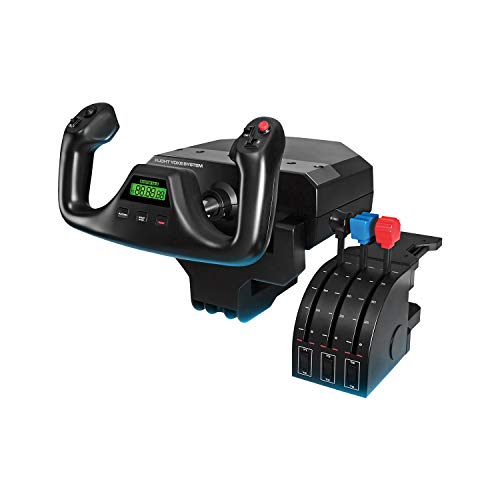
- Realistic yoke helps build muscle memory
- Includes throttle quadrant and desk clamps
- 54+ programmable controls for key functions
Best For: new pilots wanting a simple, realistic control setup
Full Rig Upgrade
Anman Flight Racing Sim Cockpit with Seat

- Reinforced frame supports up to 10Nm
- Includes ergonomic seat and monitor stand
- Works with both flight sticks and racing wheels
Best For: beginners ready for a complete dedicated sim station
Starter Cockpit Frame
Meza Pre-Cut Flight Sim Mounting Set

- Pre-cut frame for organized cockpit building
- Supports Logitech and Honeycomb yokes
- Dimmable LED strip adds ambient lighting
Best For: Beginner sim pilots who want a tidy, expandable cockpit foundation
Seat-Mounted Cockpit
Marada Flight Joystick Hotas Mount

- Chair-based cockpit with adjustable positioning
- Fits Thrustmaster, Logitech X56/X52, and Warthog
- Steel frame with locking rollers for stability
Best For: Beginners who want a stable chair-mounted cockpit
Autopilot Control Panel
Flight Simulator Digital Autopilot Panel

- Full-scale general aviation autopilot layout
- Plug-and-play USB with standard HID support
- Includes aluminum stand and backlighting
Best For: Beginner general aviation sim pilots wanting an easy desktop autopilot panel
Foldable Universal Stand – GTPLAYER Flight Racing Simulation Stand
If you’re building a flight simulator cockpit for beginners and want a simple foundation first, this GTPLAYER stand is a practical starting point. It supports many mainstream flight and racing devices, offers broad adjustability, and folds away when you need your space back.
Best For: New sim pilots who want a stable, adjustable stand that works with popular Logitech and Thrustmaster gear.
Pros:
- Compatible with a wide range of mainstream flight and racing devices.
- 20-degree steering rack adjustment and 20 cm height adjustment help dial in comfort.
- High-strength carbon steel construction is designed for stability with minimal shaking.
- Foldable design makes it easier to store in small spaces.
Cons:
- Flight and racing devices are not included.
- Best suited as a stand, not a full enclosed cockpit.
This is a solid entry-level platform if you want flexibility without committing to a larger cockpit frame right away. For beginners, the combination of compatibility, adjustability, and compact storage makes it an easy recommendation.
Ready-to-Fly HOTAS – Thrustmaster T-Flight Hotas One MSFS 2024
For a flight simulator cockpit for beginners, a good HOTAS can make setup feel much less intimidating, and this Thrustmaster bundle is built for exactly that. It offers official Microsoft Flight Simulator 2024 support, a detachable throttle, and enough controls to learn realistic flying without adding complexity too fast.
Best For: Beginner and intermediate sim pilots who want an easy plug-and-play HOTAS for Xbox or PC.
Pros:
- Officially licensed for Microsoft Flight Simulator 2024 with Xbox and PC compatibility.
- 5 axes, 14 buttons, rapid trigger, and a multidirectional hat switch provide complete flight control.
- Detachable throttle allows desk, cockpit, or lap use.
- Dual rudder control adds flexibility for jets, helicopters, and prop aircraft.
Cons:
- Rudder pedals are sold separately if you want to expand the setup.
- Not as feature-heavy as advanced multi-panel cockpit hardware.
This is one of the easiest ways to get into sim flying with a realistic control layout. It strikes a strong balance between beginner-friendly use and room to grow with extra accessories later.
Yoke Mount Stand – Wheel Stand Pro S Flight Stand for Saitek
If your flight simulator cockpit for beginners is centered around a yoke, this Wheel Stand Pro model is built to hold that style of control securely. It is designed specifically for the Saitek Pro Flight Yoke system, with quick-release clamps and a fully adjustable frame that aims to make setup and positioning straightforward.
Best For: Beginner sim pilots using a Saitek Pro Flight yoke who want a stable, adjustable mount.
Pros:
- Purpose-built for the Saitek Pro Flight Yoke system.
- Stable, portable, and adjustable design.
- Quick-release clamps make adjustments faster and easier.
- Full, stepless adjustment helps improve comfort with different seats.
Cons:
- Not compatible with Honeycomb gear.
- Flight system is not included.
This stand makes sense if you already know you want a yoke-based setup and need a dependable mounting solution. It is less universal than other options, but that specialization can be an advantage for beginners who have chosen the Saitek ecosystem.
All-in-One IFR Panel – Octavi IFR-1 Cockpit Controller
This compact controller is a different kind of choice for a flight simulator cockpit for beginners: it focuses on IFR-style navigation and cockpit management rather than stick-and-throttle flying. With controls for COM, NAV, FMS, autopilot, XPDR, and more, it helps streamline realistic sim workflows in a very small footprint.
Best For: Beginners who want a compact instrument panel for Microsoft Flight Simulator or X-Plane cockpit procedures.
Pros:
- Combines autopilot, FMS, radios, transponder, BARO, HDG, and VOR functions in one unit.
- Compact all-in-one design saves desk space.
- LED-backlit buttons and tactile controls support immersive use.
- Works with Microsoft Flight Simulator and X-Plane on PC or Mac.
Cons:
- Not compatible with Xbox.
- Focused on cockpit management, so it is not a primary flight control device.
For beginners who want to learn the cockpit side of flight simming, this is a very focused tool. It is best used as a companion to a joystick or yoke rather than as a standalone starter controller.
Modular Starter Stand – Marada Universal Flight Racing Simulator Stand
If you want a flight simulator cockpit for beginners without jumping straight into a full enclosed rig, this Marada stand is a practical place to start. It gives you a stable, adjustable frame for flight controls and racing gear, plus space for mouse and keyboard placement, so you can build out your setup gradually.
Best For: Beginners who want a flexible, modular cockpit frame that can grow with their sim gear.
Pros:
- 40mm square-tube structure is built for structural stability.
- Highly adjustable front-to-back, up-down, and left-right for dialing in position.
- Modular design supports different simulator setups and DIY upgrades.
- Compatible with a wide range of flight and racing hardware, including Logitech, Thrustmaster, Honeycomb, VKB, VPC, and Winwing devices.
Cons:
- Controls and peripherals are not included.
- Assembly may take time because of the many adjustment points and modular parts.
- Best suited for users who already have or plan to buy their own flight gear.
This is a strong beginner-friendly frame if you want flexibility over a bundled package. It focuses on adjustability and broad device support, making it easier to upgrade over time as your setup evolves.
Yoke-and-Throttle Entry Pick – Logitech G PRO Flight Yoke System
The Logitech G PRO Flight Yoke System is a straightforward choice if you want a flight simulator cockpit for beginners centered on realistic yoke controls. The included yoke and throttle quadrant give you the core inputs most new virtual pilots need, while the programmable buttons help keep common functions close at hand.
Best For: New sim pilots who want an easy-to-learn yoke setup with solid control mapping.
Pros:
- Realistic yoke controls are designed to help new pilots build muscle memory.
- Includes both a flight yoke and throttle quadrant in the box.
- Offers at least 54 programmable controls through buttons, POV hat, and mode switch.
- Desk clamps add secure mounting flexibility for a wide range of desks.
Cons:
- Requires optional software download for use with supported sims.
- It is a control set, not a full cockpit frame.
- Only works with Windows PCs.
For beginners who want the essential aircraft controls first, this package is easy to understand and practical to mount. It is less about building the physical cockpit and more about giving you a dependable, realistic control center.
Full Rig Upgrade – Anman Flight Racing Sim Cockpit with Seat
If you are shopping for a flight simulator cockpit for beginners but want something closer to a full all-in-one rig, this Anman cockpit is built for that bigger step. It combines a reinforced frame, adjustable ergonomic seat, and monitor stand, so you can set up a dedicated sim station instead of piecing everything together separately.
Best For: Beginners who want a complete cockpit-style setup with room to grow into more serious sim hardware.
Pros:
- Steel-reinforced frame supports direct-drive wheels up to 10Nm.
- Includes an ergonomic seat with lumbar/neck support and recline adjustment.
- Monitor stand supports displays up to 65 inches and 220 pounds.
- Universal mounting plates work with racing wheels and flight sticks for dual-mode use.
Cons:
- Much larger and more involved than a basic starter stand.
- Designed as a full rig, so it takes more space than a simple yoke setup.
- Best value for users ready to commit to a dedicated station.
This is the most complete option in the group, especially if you want a cockpit that can support both flight and racing use. It is a bigger investment in size and setup, but it gives beginners a more immersive, permanent sim environment.
Starter Cockpit Frame – Meza Pre-Cut Flight Sim Mounting Set
If you want a flight simulator cockpit for beginners that feels organized without adding complexity, this Meza mounting frame is a practical place to start. It gives you a pre-cut, pre-drilled structure for arranging a yoke, throttle quadrants, and flight panels into a cleaner desktop or freestanding setup.
Best For: Beginner sim pilots building a tidy, expandable home cockpit around Logitech or Honeycomb gear.
Pros:
- Compatible with Logitech yokes, Logitech flight panels, and Honeycomb yokes.
- Supports up to 2 throttle quadrants for a more complete control layout.
- Integrated dimmable LED light strip adds cockpit-style ambient lighting.
- Sturdy aluminum alloy build with rubber-tipped clamps for desk mounting.
Cons:
- Frame only; yoke, throttle quadrants, panels, and other controls are not included.
- Requires your own flight hardware to become a usable cockpit.
- Best suited to users who want a mounting solution rather than an all-in-one simulator.
For beginners who already have or plan to buy compatible flight controls, this kit offers structure, stability, and room to expand. It is less about plug-and-play simplicity and more about creating a cleaner cockpit foundation that can grow with your setup.
Seat-Mounted Cockpit – Marada Flight Joystick Hotas Mount
For a flight simulator cockpit for beginners who want the controls attached to a seat instead of a desk, this Marada mount focuses on stability and adjustability. It combines flight and racing-style support in one chair-based frame, while leaving your gaming devices out of the package so you can build around your existing hardware.
Best For: Sim racers and beginner flight sim users who want a more stable chair-mounted cockpit layout.
Pros:
- Adjustable fit for Thrustmaster, Logitech X56/X52, Hotas Warthog, and more.
- High-strength steel bracket with load-bearing up to 300 pounds.
- Five locking rollers help keep the setup stable during use.
- Backrest adjusts from 90 to 180 degrees for comfort and flexibility.
Cons:
- Gaming devices are not included.
- More involved than a simple desk mount.
- May be overkill if you only need a basic beginner setup.
This is a good pick if you want a more immersive, seat-based cockpit and plan to use popular HOTAS gear. It delivers stronger physical support than a basic stand, but it makes the most sense for users ready to commit space to a chair cockpit.
Autopilot Control Panel – Flight Simulator Digital Autopilot Panel
If your goal is a flight simulator cockpit for beginners that feels more like general aviation than a full custom rig, this autopilot panel is a focused upgrade. It adds real cockpit-style autopilot controls in a compact desktop-friendly format, with plug-and-play USB use and an included aluminum stand.
Best For: Beginner general aviation sim pilots who want an easy-to-use autopilot panel for desktop flying.
Pros:
- Full-scale general aviation layout with authentic cockpit details.
- Plug-and-play USB design with standard HID controller support.
- Integrated backlighting helps visibility during low-light flights.
- Includes an aluminum stand and also supports cockpit mounting holes.
Cons:
- Engineered exclusively for general aviation flight simulation.
- Base may need double-sided tape for stable desktop placement.
- Panel-only product, so it does not replace yokes, throttles, or other controls.
This panel is best if you want one realistic control module rather than a full cockpit build. It is beginner-friendly because setup is simple, but its value is highest for pilots who fly general aviation aircraft and want better autopilot handling.
How We Picked the Best Flight Simulator Cockpit for Beginners
For this Flight Simulator Cockpit for Beginners roundup, we looked for setups that are approachable to assemble, stable under use, and flexible enough to support common starter hardware from Logitech, Thrustmaster, Honeycomb, and similar brands. We also favored products that make sense for a first build: limited complexity, clear compatibility, and room to expand later.
Quick Comparison: What Type of Setup Fits You?
If you want the simplest path, a foldable stand or chair mount is usually the easiest entry point. If you fly primarily general aviation, a yoke-focused setup is the more natural choice. If your goal is to simulate airliners or advanced cockpit workflows, a panel kit or autopilot module may add more value than a larger frame. Full cockpit rigs offer the most immersion, but they also take more space and planning.
Key Buying Factors for a Flight Simulator Cockpit for Beginners
Compatibility
Check whether the cockpit supports your exact yoke, throttle quadrant, HOTAS, pedals, and monitor size. A “universal” frame is only useful if the mounting points actually fit your gear.
Stability and Rigidity
Beginners often underestimate how much a sturdy mount improves control precision. Wobble, flex, or shifting hardware can make takeoff, landing, and trim work feel frustrating.
Adjustability
Look for height, angle, and distance adjustments so you can dial in a natural seating position. Comfort matters more than most first-time buyers expect, especially during longer flights.
Space and Setup Time
Foldable stands and compact mounts are ideal if you share a room or fly at a desk. Larger cockpit frames are better only when you have the space to leave them assembled.
Upgrade Path
A good starter cockpit should let you add pedals, monitor mounts, or more advanced panels later. That way your first purchase remains useful as your sim setup grows.
Who Should Buy Which Flight Simulator Cockpit for Beginners?
If you are just starting out and want the easiest entry, choose a compact stand or chair-mounted solution. If you prefer a traditional airplane feel, prioritize a yoke system with a stable mounting base. If immersion is your main goal and you already know you will stay with the hobby, a full cockpit frame or integrated panel kit is worth considering. For most buyers, the best Flight Simulator Cockpit for Beginners is the one that balances compatibility, comfort, and room to expand without overcomplicating the first build.