
Choosing the right flight controls can make a huge difference when you are just getting started. The best beginner-friendly options keep setup simple, controls intuitive, and flying more comfortable from day one.
Whether you want a compact throttle, a full HOTAS, or an all-in-one cockpit system, this roundup focuses on practical picks that help new sim pilots learn faster and enjoy every flight more.
Best 10 Flight Simulator Throttle for Beginners Picks for 2026
Premium All-in-One Cockpit
Honeycomb Bravo Throttle Quadrant

- Configurable for 1-4 engine aircraft
- Includes autopilot, gear, flaps, and trim wheel
- 7 programmable keys for custom setups
Best For: Beginners who want a realistic cockpit controller that can grow with them
Easy Entry HOTAS

- Plug-and-play setup with preconfigured controls
- Detachable throttle fits compact or split layouts
- 12 programmable buttons and 5 axes
Best For: New sim pilots who want a simple PC stick-and-throttle combo
Compact Sim Quadrant
Logitech G Saitek PRO Flight Throttle Quadrant
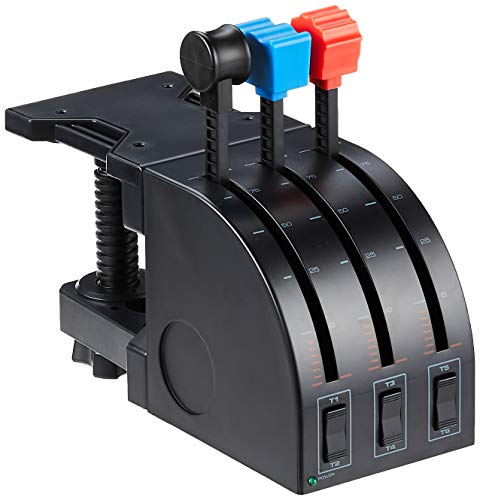
- 3 axis levers for flexible aircraft controls
- 3 two-way rocker switches add inputs
- Adjustable bracket and desk clamp included
Best For: Beginner and intermediate PC pilots wanting a compact throttle-only setup
Console-Friendly HOTAS
Thrustmaster T-Flight Hotas One

- Works with PC and Xbox Series X|S
- Detachable throttle for desk or lap use
- 14 programmable buttons and adjustable resistance
Best For: Beginners on PC or Xbox who want a versatile HOTAS
Vernier Precision Pick

- True vernier prop and mixture controls
- Throttle friction lock and push-pull design
- Windows and Mac compatible; no drivers needed
Best For: PC or Mac beginners wanting precise throttle, prop, mixture, and flaps control
Console-Friendly Starter
T-Flight Hotas One MSFS 2024 Edition

- Officially licensed for MSFS 2024
- Detachable throttle for flexible desk or lap use
- 5 axes, 14 buttons, and dual rudder control
Best For: New sim pilots on Xbox or PC who want a simple HOTAS
Feature-Rich Upgrade
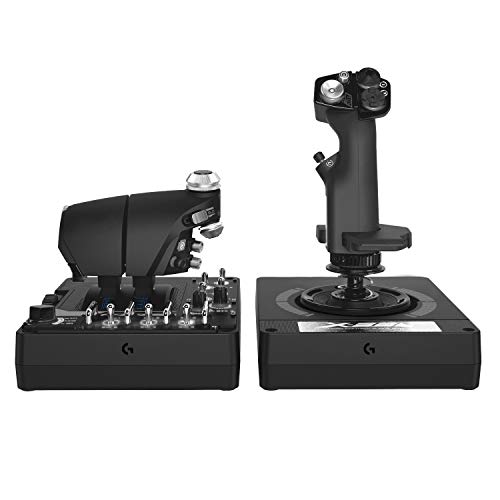
- Twin throttles with friction adjuster and lock
- 189 programmable controls for deep customization
- Hall-effect sensors and adjustable spring tension
Best For: PC simmers who want a highly customizable HOTAS to grow with
Airbus-Style Pick
Thrustmaster TCA Quadrant Airbus Edition

- Airbus-inspired throttle quadrant with detents
- Hall-effect sensors for precise, drift-free input
- Linear mode adds flexibility for different aircraft
Best For: Beginner sim pilots who want realism and room to grow
All-in-One Controller
Turtle Beach VelocityOne Flight
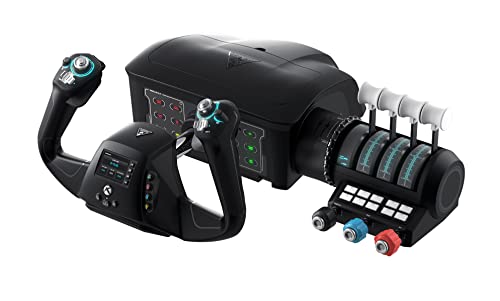
- Yoke, throttle quadrant, trim wheel, and rudder controls
- Hall-effect rotation plus a full-color setup display
- Works with Xbox and Windows flight sims
Best For: Beginners who want a complete control system in one box
Starter HOTAS Kit
Thrustmaster T-Flight Full Kit with Pedals

- Detachable throttle, stick, and included rudder pedals
- Five axes and 14 mappable buttons for control variety
- Hall-effect joystick and adjustable resistance improve feel
Best For: Beginners who want an all-in-one HOTAS with pedals
Premium All-in-One Cockpit – Honeycomb Bravo Throttle Quadrant
If you want a flight simulator throttle for beginners that can grow with you, the Honeycomb Bravo Throttle Quadrant is a strong all-in-one pick. It combines configurable throttle levers with autopilot, annunciator, gear, flap, trim, and reverser controls, so you can learn a more complete cockpit workflow without upgrading immediately.
Best For: Beginners who want a realistic, expand-as-you-learn cockpit controller for PC flight sims.
Pros:
- Configurable for single-engine through four-engine aircraft
- Includes autopilot panel, annunciator panel, gear lever, flap lever, and trim wheel
- 7 programmable keys plus multiple switches for custom setups
- Compatible with Microsoft Flight Simulator, X-Plane 11 & 12, and Prepar3D
Cons:
- More complex than a basic beginner throttle
- Designed for PC/Mac sim use, not a console plug-and-play option
- Large desktop footprint compared with simpler controllers
This is the most feature-rich option in the group, so it makes sense if you want beginner-friendly access to advanced controls instead of a stripped-down throttle. It is especially useful if you expect to move from casual flying into more realistic sim setups.
Easy Entry HOTAS – Thrustmaster T-Flight Hotas X
The Thrustmaster T-Flight Hotas X is a practical flight simulator throttle for beginners who want an easy first step into HOTAS controls. Its plug-and-play setup, detachable throttle, and adjustable resistance make it simple to start flying without a complicated setup process.
Best For: New sim pilots who want an affordable, straightforward stick-and-throttle combo for PC.
Pros:
- Plug-and-play installation with preconfigured controls
- Detachable real-size throttle for flexible desk layouts
- 12 programmable buttons and 5 axes for core sim functions
- Adjustable stick resistance and dual rudder control
Cons:
- Fewer advanced cockpit controls than a quadrant-style unit
- PC-focused and not as versatile as multi-platform options
- Less realistic for users wanting separate aircraft-style levers
For beginners, this is one of the easiest ways to get hands-on throttle control without overpaying for features you may not use yet. It is best if you value simplicity, comfort, and a quick learning curve over a full cockpit-style panel.
Compact Sim Quadrant – Logitech G Saitek PRO Flight Throttle Quadrant
If you are shopping for a flight simulator throttle for beginners but want a more dedicated throttle-only setup, the Logitech G Saitek PRO Flight Throttle Quadrant is a smart middle ground. It offers three axis levers, extra rocker switches, and interchangeable lever heads so you can build a layout that matches the aircraft you fly most.
Best For: Beginner and intermediate PC sim pilots who want a compact, customizable throttle quadrant.
Pros:
- 3 axis levers for throttle, flaps, mixture, or prop pitch setups
- 3 two-way rocker switches add more control options
- Additional lever heads help customize your configuration
- Includes an adjustable bracket and desk clamp for mounting flexibility
Cons:
- Throttle-only design means you still need a yoke or stick
- Windows PC compatibility only
- Less feature-packed than larger all-in-one cockpit systems
This unit is a good step up if you want more realism than a basic controller but do not need the size and complexity of a premium cockpit panel. It works best as part of a simple, expandable sim setup.
Console-Friendly HOTAS – Thrustmaster T-Flight Hotas One
The Thrustmaster T-Flight Hotas One is a strong flight simulator throttle for beginners who want an easy entry point on PC or Xbox. Its detachable throttle, adjustable resistance, and plug-and-play USB design make it straightforward to use while still offering enough controls for a wide range of flight sim styles.
Best For: Beginner pilots on PC or Xbox who want a simple, versatile HOTAS setup.
Pros:
- Works with Windows PC and Xbox Series X|S
- Detachable throttle supports desk or lap use
- 14 programmable buttons for core flight controls
- Adjustable resistance and dual rudder support for smoother handling
Cons:
- Less specialized than a dedicated throttle quadrant
- Not as cockpit-like as larger multi-panel systems
- Rudder pedals are sold separately if you want to expand the setup
If you want a beginner-friendly controller that works across platforms, this is one of the most flexible choices here. It gives you a real throttle feel without requiring a complex setup, which makes it an easy recommendation for first-time sim flyers.
Vernier Precision Pick – Flight Sim Stuff TPM + Flaps
If you want a flight simulator throttle for beginners but also need room to grow, this Flight Sim Stuff unit focuses on fine control rather than flashy extras. The true vernier prop and mixture controls, push-pull throttle, and flaps lever make it a practical pick for PC pilots using Microsoft Flight Simulator, X-Plane, or Prepar3D.
Best For: Beginners on PC or Mac who want precise throttle, prop, mixture, and flaps control.
Pros:
- True vernier prop and mixture controls allow fine adjustment and larger changes.
- Throttle includes a friction lock nut to help hold position.
- Flaps control uses an auto-return-to-center switch for simple operation.
- Works with Windows and Mac with no drivers needed.
Cons:
- Does not work with Xbox or PS.
- More specialized than a basic throttle-only setup.
This is a strong choice if you want a more realistic control layout without a complicated setup. Its focus on USB plug-and-play support and straightforward controls makes it approachable, while the vernier design gives you room to develop better throttle handling over time.
Console-Friendly Starter – T-Flight Hotas One MSFS 2024 Edition
This flight simulator throttle for beginners is a good entry point if you want an easy setup for Microsoft Flight Simulator 2024. The detachable throttle, 10-bit precision, and built-in rudder options make it a flexible starter HOTAS for Xbox and PC pilots.
Best For: New sim pilots on Xbox or PC who want a simple, officially licensed HOTAS.
Pros:
- Officially licensed for Microsoft Flight Simulator 2024 with Xbox and PC support.
- Detachable throttle lets you use the controls together or separately.
- Includes 5 axes, 14 buttons, rapid trigger, and a multidirectional hat switch.
- Offers dual rudder control through the joystick Z-axis or throttle lever.
Cons:
- Not as feature-heavy as higher-end HOTAS systems.
- Some advanced sim pilots may want more programmable controls.
For beginners, the appeal is the straightforward plug-and-play design and the flexibility to use the throttle in different setups. It gives you the core flight controls you need without adding a steep learning curve, while still leaving room to expand later with rudder pedals.
Feature-Rich Upgrade – Logitech G X56 HOTAS
Although it is more advanced than a typical flight simulator throttle for beginners, the Logitech G X56 is worth considering if you want a control set you can grow into. Its twin throttles, hall-effect sensors, adjustable spring system, and extensive programming options are built for PC simmers who want depth and precision.
Best For: PC simmers who want a highly customizable HOTAS they can learn on and grow with.
Pros:
- Includes twin throttles with a friction adjuster and throttle lock.
- Offers 189 programmable controls for extensive customization.
- 16-bit axes with hall-effect sensors support precise input.
- Adjustable stick force via a 4-spring system.
Cons:
- Requires Windows and two USB 2.0 ports.
- Likely more complex than a true beginner-focused throttle.
- PC-only, so it is not suitable for console use.
If you expect to spend serious time in flight or space sims, this is the most capable setup in the group. It is not the simplest starter option, but the amount of control and adjustment available can make it a long-term pick for users who want a more advanced training path.
Airbus-Style Pick – Thrustmaster TCA Quadrant Airbus Edition
If you want a flight simulator throttle for beginners that still feels authentic, this Airbus-inspired quadrant is an easy way to start. It gives you two axes, 16 buttons, detents, and thrust reversers, while the Hall-effect sensors help keep inputs precise over time. The option to switch into linear mode also makes it more flexible if you fly different aircraft in PC sims.
Best For: Beginner sim pilots who want a realistic throttle quadrant with room to grow.
Pros:
- Airbus-style layout with detents and thrust reversers for a more realistic cockpit feel
- Hall-effect sensors for drift-free throttle precision and long-term reliability
- Linear mode lets you disable detents when flying aircraft that need smoother control
- 16 buttons and 2 axes reduce the need to reach for the keyboard
Cons:
- PC-focused, so it is not the most universal option
- Best experience is tied to an Airbus-style control layout
This is a strong starter throttle if you want something more realistic than a basic lever set without getting overly complicated. It balances beginner-friendly operation with enough detail to support more serious flight sim setups later.
All-in-One Controller – Turtle Beach VelocityOne Flight
For a beginner looking for a flight simulator throttle for beginners that does more than just control power, this all-in-one system stands out. It combines a yoke, throttle quadrant, trim wheel, and rudder controls in one package, which makes it easier to build a full setup without buying multiple accessories. The hall-effect yoke rotation, modular throttle levers, and built-in flight management display make it approachable for new sim pilots on Xbox or Windows PC.
Best For: New sim pilots who want one complete control system instead of separate accessories.
Pros:
- Includes yoke, throttle quadrant, trim wheel, and rudder controls in one system
- Hall-effect sensor and full-color display add precision and setup guidance
- Works with Xbox and Windows 10/11 titles, including Microsoft Flight Simulator
- Secure clamping system helps it fit a variety of home setups
Cons:
- Larger and heavier than a simple throttle-only option
- May be more control system than a beginner needs if they only want basic throttle input
This is the easiest choice if you want an integrated setup that covers most core flight controls from day one. It is especially appealing for beginners who prefer a single, organized system over piecing together separate hardware.
Starter HOTAS Kit – Thrustmaster T-Flight Full Kit with Pedals
If you are shopping for a flight simulator throttle for beginners and want a straightforward way into HOTAS flying, this full kit is a practical entry point. You get a detachable throttle, flight stick, and included rudder pedals, which covers the essentials for flying, yaw control, and coordinated turns. The five axes, 14 mappable buttons, and adjustable resistance give new users enough control without making the setup feel overwhelming.
Best For: Beginners who want a complete HOTAS setup with pedals included.
Pros:
- Includes throttle, stick, and rudder pedals in one package
- Five axes and 14 mappable buttons support a wide range of flight sim controls
- Hall-effect joystick and adjustable resistance add better control feel
- Works with Xbox and PC, with console-friendly buttons for easier navigation
Cons:
- Bulkier than a standalone throttle quadrant
- More aimed at HOTAS users than simple throttle-only buyers
This kit makes sense if you want to start with a full control set instead of building piece by piece. It offers a good balance of accessibility, control coverage, and platform support for newcomers.
How We Picked the Best Flight Simulator Throttle for Beginners
We focused on controls that are approachable for new sim pilots, with an emphasis on ease of use, clear labeling, smooth throttle action, and good value. Compatibility also mattered, especially for PC and Xbox users who want a simple plug-and-play experience.
For a Flight Simulator Throttle for Beginners, the ideal pick is not always the most advanced one. It is usually the one that offers enough realism to feel rewarding without overwhelming you with extra switches, complex software, or a steep learning curve.
Quick Comparison: Which Type Suits You Best?
Basic throttle quadrants are best if you want straightforward engine control and plan to build your setup gradually. HOTAS systems pair throttle with a stick, which is often the easiest all-in-one entry point for beginners who want to fly fighters, general aviation, or space sims. More advanced quadrants and full control systems suit users who already know they want deeper immersion and more cockpit-style realism.
Key Buying Factors for a Flight Simulator Throttle for Beginners
Ease of Setup
Look for models with simple USB connections, clear software support, and minimal calibration. Beginners benefit from hardware that works well out of the box.
Throttle Feel and Resistance
A smooth, predictable throttle matters more than sheer feature count. Adjustable resistance, detents, and friction controls can help you make small power changes with confidence.
Button Layout and Learning Curve
More buttons can be useful, but only if they are easy to understand. Start with a layout you can memorize quickly so you spend more time flying and less time hunting for controls.
Platform Compatibility
Make sure the device matches your setup, especially if you use Xbox, PC, or both. Some beginner-friendly models are designed for cross-platform flexibility, while others are PC-focused.
Upgrade Path
If you think you may expand later, choose a throttle that can grow with your setup. Modular controls and ecosystem compatibility can save money in the long run.
Who Should Buy Which Flight Simulator Throttle for Beginners?
If you want the simplest first step, choose a basic HOTAS or throttle quadrant with a clean layout. If you fly mostly civilian aircraft, a quadrant-style unit may feel more natural. If you want all-around versatility, a HOTAS with good software support is often the best starter option. If you already know you want a more realistic cockpit experience, a larger all-in-one system may be worth the extra space and cost.
In short, the best beginner choice is the one that matches your flying style, platform, and comfort level today, while leaving room to grow tomorrow.