
A good home-studio webcam should deliver sharp video, dependable autofocus, and clean sound without demanding a complicated camera setup. The right choice depends on whether you prioritize 4K detail, low-light performance, tracking, microphone quality, or value.
We compared 10 popular webcams across resolutions, field of view, autofocus, audio features, privacy options, and overall flexibility for streaming, meetings, teaching, and content creation.
Best 10 Webcams for Home Studios Picks for 2026
Best Premium PTZ Webcam

- 4K video from a large 1/1.3-inch sensor
- Physical AI tracking follows movement
- Directional mics and Stream Deck support
Best For: Creators who need automated framing and strong low-light video
Best for 4K60 Control

- Records 4K video at up to 60 FPS
- Sony STARVIS 2 sensor with Prime Lens
- Camera Hub and 49mm filter support
Best For: Streamers who want high-frame-rate video and manual control
Best Versatile Meeting Webcam

- 4K at 30 FPS with autofocus
- Three adjustable fields of view
- Noise-canceling mics and privacy shutter
Best For: Users combining home-studio recording with video meetings
Best Compact Aluminum Webcam

- 4K video with a Sony 1/2-inch sensor
- PDAF autofocus and dual noise-reduction mics
- Compact aluminum body with magnetic privacy cover
Best For: Mobile or privacy-conscious creators who want plug-and-play 4K
Reliable Full HD Pick

- 1080p video at 30 fps
- Autofocus and automatic light adjustment
- Dual microphones; no privacy shutter
Best For: Straightforward Full HD home studio setups
Ultra-HD Studio Upgrade

- 4K video at 30 fps
- PDAF autofocus and dual microphones
- Privacy cover with tripod support
Best For: Detailed video and flexible home studio mounting
Flexible Low-Light Choice
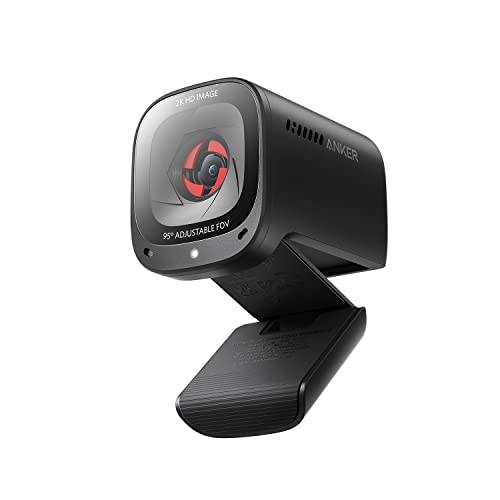
- 2K resolution with low-light correction
- 65°, 78°, or 95° software framing
- AI noise cancellation and privacy cover
Best For: Adaptable framing in compact or dim home studios
Best 4K Pick

- 4K video at 30 fps
- Fast PDAF autofocus
- Physical privacy cover and dual mics
Best For: Streamers and creators who need detailed video and responsive focus
Best Wide-Angle Value

- 1080p video with auto light adjustment
- Wide 90-degree field of view
- Dual mics and privacy cover
Best For: Calls and shared-frame setups on a practical budget
Best Simple Setup
Logitech Brio 101 Full HD Webcam

- Full HD 1080p video
- Automatic RightLight brightness adjustment
- Built-in privacy cover and microphone
Best For: Remote work and everyday video calls with minimal setup
Best Premium PTZ Webcam – Insta360 Link 2 Pro
For creators who want polished webcams for home studios, the Insta360 Link 2 Pro combines 4K video, a large 1/1.3-inch sensor, physical AI tracking, and directional microphones. Its PTZ design is especially useful when you move around during presentations or streams.
Best For: Streamers, presenters, and home-studio users who want automated framing and strong low-light performance.
Pros:
- Sharp 4K video with a large sensor and low-light capability
- Physical pan-and-tilt AI tracking keeps subjects in frame
- Directional noise-canceling microphones and natural bokeh support a polished setup
- Works with Stream Deck, major conferencing platforms, and streaming software
Cons:
- Not compatible with ARM-based Windows systems
- Windows Hello Face Recognition is not supported
- Its advanced features may be more than a simple desk setup requires
The Link 2 Pro is a strong flagship choice for webcams for home studios, particularly if hands-free tracking, flexible shooting modes, and creator-oriented controls matter as much as image quality.
Best for 4K60 Control – Elgato Facecam 4K
The Elgato Facecam 4K is built for home studios where frame rate and manual image control are priorities. It records 4K at 60 frames per second and pairs a Sony STARVIS 2 sensor with DSLR-like controls through Elgato’s Camera Hub software.
Best For: Streamers and video creators who want high-frame-rate 4K and hands-on control over their look.
Pros:
- Captures 4K video at up to 60 FPS
- Sony STARVIS 2 sensor and Prime Lens provide detailed imagery
- Camera Hub offers extensive visual adjustments and effects
- Supports standard 49mm lens filters and stores settings in built-in flash memory
Cons:
- It does not list built-in microphones among the supplied features
- Manual controls may require more setup than a basic plug-and-play webcam
- Its fixed prime-lens design may be less flexible for changing compositions
Among webcams for home studios, the Facecam 4K stands out for creators who want a controlled, camera-like workflow rather than automated tracking or all-in-one audio features.
Best Versatile Meeting Webcam – Logitech Brio Ultra 4K
The Logitech Brio Ultra 4K is a practical option for webcams for home studios that also serve as meeting spaces. It offers 4K at 30 FPS, adjustable fields of view, automatic light correction, autofocus, and dual noise-canceling microphones.
Best For: Home-office users, presenters, and streamers who need one webcam for meetings and content creation.
Pros:
- 4K video with autofocus and up to 5x digital zoom
- RightLight 3 helps compensate for glare and backlighting
- Three field-of-view presets support tighter or wider framing
- Dual microphones, privacy shutter, and Windows Hello add everyday convenience
Cons:
- 4K capture is limited to 30 FPS
- Digital zoom can reduce detail compared with optical framing
- Some control features rely on the Logi Options+ app
Brio is a well-rounded pick when flexibility and meeting features matter more than cinematic background effects or 60-FPS capture. Its broad compatibility also makes it easy to share across devices.
Best Compact Aluminum Webcam – Acer 4K Webcam
The Acer 4K Webcam suits compact webcams for home studios, combining a Sony 1/2-inch sensor with PDAF autofocus in a small aluminum body. It connects by USB, requires no drivers or wireless setup, and includes a magnetic privacy cover.
Best For: Mobile creators and privacy-conscious users who want compact 4K video with straightforward plug-and-play operation.
Pros:
- 4K video and a large Sony 1/2-inch sensor support detailed, brighter images
- PDAF provides fast and stable autofocus
- All-metal unibody construction is compact and designed for heat dissipation
- Dual noise-reduction microphones and a magnetic privacy cover are included
Cons:
- It lacks the PTZ tracking and specialized creator controls of the Insta360
- The supplied notes do not specify a maximum frame rate
- USB connection requires an adapter for some USB-A setups
This Acer is a sensible choice for small desks, travel kits, and privacy-focused workspaces. It delivers a relatively feature-rich 4K package without requiring an app, Wi-Fi, or Bluetooth.
Reliable Full HD Pick – Logitech C920x HD Pro
The Logitech C920x is a dependable choice for webcams for home studios when you want sharp Full HD video without moving to 4K. Its autofocus, automatic lighting adjustment, dual microphones, and 78-degree field of view suit calls, recording, and streaming.
Best For: Home studio users who prioritize reliable 1080p video and simple computer connectivity.
Pros:
- Records and streams Full HD 1080p video at 30 fps.
- Autofocus and automatic lighting adjustment help maintain a clear image in low light.
- Dual microphones capture natural sound for calls and recorded videos.
- Includes a three-month XSplit VCam license for background removal, replacement, or blur.
Cons:
- It does not include a privacy shutter.
- Video resolution tops out at 1080p rather than 2K or 4K.
The C920x remains a practical, well-rounded option for a home studio setup that needs polished video and straightforward USB operation. Choose it over higher-resolution models if dependable Full HD performance matters more than extra detail.
Ultra-HD Studio Upgrade – EMEET NOVA 4K Webcam
The EMEET NOVA is a strong choice among webcams for home studios when maximum image detail is important. It supports 4K at 30 fps, uses PDAF autofocus, includes dual microphones, and offers software controls for brightness, contrast, and saturation.
Best For: Creators and professionals who want 4K video, flexible positioning, and a built-in privacy cover.
Pros:
- Captures 4K video at 30 fps with a CMOS sensor.
- PDAF autofocus helps keep subjects sharp across its stated 7.9- to 118-inch focus range.
- Dual microphones capture voices from up to 8 feet away under suitable conditions.
- Offers a privacy cover, 360-degree horizontal rotation, vertical adjustment, and tripod support.
Cons:
- Video defaults to 1080p and requires compatible software or an app to switch to 4K.
- The fixed 73-degree field of view cannot be adjusted.
- It does not support facial tracking or disabling autofocus.
The NOVA delivers the highest stated resolution in this group, but its 4K mode requires an extra setup step. It is best suited to a controlled studio where detailed video and mounting flexibility outweigh the fixed framing.
Flexible Low-Light Choice – Anker PowerConf C200
The Anker PowerConf C200 is a versatile option among webcams for home studios, combining 2K resolution with low-light correction and adjustable framing. Its AI noise cancellation, dual microphones, and integrated privacy cover make it well suited to calls, streaming, and compact desk setups.
Best For: Home studio users who need sharper-than-1080p video, flexible framing, and improved audio in everyday environments.
Pros:
- Provides 2K resolution for detailed video.
- Low-light correction helps maintain image clarity in dim settings.
- Software-selectable 65-, 78-, or 95-degree viewing angles support different compositions.
- Dual microphones with AI noise cancellation and an integrated privacy cover add practical convenience.
Cons:
- It does not provide 4K resolution.
- Compatibility is specified for Windows 7 or later and macOS 10.11 or later.
The C200 strikes a useful balance between image quality and everyday flexibility. Its adjustable field of view is particularly helpful when switching between a tight solo shot and a wider home studio frame.
Best 4K Pick – EMEET C60E 4K PDAF Webcam
For creators building webcams for home studios, the EMEET C60E stands out with 4K video, fast PDAF autofocus, and a stable USB connection. Its 73-degree field of view keeps framing natural, while automatic light correction helps maintain a balanced image as conditions change.
Best For: Streamers, gamers, podcasters, and creators who want sharp 4K video with autofocus that follows movement.
Pros:
- Captures 4K video at 30 fps with an 1/2.8-inch CMOS sensor.
- PDAF autofocus helps keep moving subjects sharp.
- Includes two microphones and a physical flip privacy cover.
- Offers 360-degree horizontal rotation, tilt adjustment, and a tripod mount.
Cons:
- Uses USB 2.0 and a fixed 1.5-meter cable.
- Direct computer connection is recommended instead of a hub or dock.
- Tripod is sold separately.
The C60E is the strongest fit here when image detail and responsive focus matter most. It is a practical upgrade for a home studio where streaming quality and movement-friendly framing take priority.
Best Wide-Angle Value – EMEET C960 1080P Webcam
The EMEET C960 is a straightforward option for webcams for home studios, combining 1080p video, a wide 90-degree view, and dual omnidirectional microphones. Its plug-and-play USB setup and included privacy cover make it well suited to calls, classes, and shared-frame recording.
Best For: Video meetings, small-group calls, and budget-conscious home studio setups that benefit from a wider frame.
Pros:
- Records 1920 x 1080 video with automatic light and exposure adjustment.
- 90-degree wide-angle lens can include more people in the frame.
- Built-in dual microphones capture voice for communication.
- Includes a removable privacy cover and USB Type-A to USB-C adapter.
Cons:
- Fixed focus works within a stated range rather than tracking movement.
- Best image performance requires normal or good lighting.
- Does not include built-in speakers and is not compatible with Windows Hello.
The C960 keeps the essentials simple and affordable. Choose it when 1080p clarity, a broad field of view, and flexible USB compatibility are more important than 4K detail or advanced autofocus.
Best Simple Setup – Logitech Brio 101 Full HD Webcam
The Logitech Brio 101 is a compact choice for webcams for home studios when easy setup and dependable video calls are the priority. It delivers Full HD 1080p video, automatic light balancing, a built-in microphone, and a slide privacy cover through a familiar USB-A connection.
Best For: Remote workers, casual streamers, and home users who want a simple Full HD webcam for common calling platforms.
Pros:
- Full HD 1080p video supports meetings and streaming.
- RightLight automatically boosts brightness and reduces shadows.
- Integrated slide cover provides convenient privacy.
- Works with Zoom, Microsoft Teams, Google Meet, and other platforms without complicated setup.
Cons:
- Fixed focus is less flexible for subjects who move around.
- 60-degree viewing angle is narrower than the EMEET C960’s 90-degree view.
- Connects through USB-A only.
The Brio 101 is a sensible pick for a tidy, low-fuss home studio. Its Full HD resolution and automatic low-light assistance cover everyday calls well, while the privacy cover and USB-A setup keep operation straightforward.
How We Picked the Best Webcams for Home Studios
We selected models that cover the main needs of home-studio users, including live streaming, video calls, online teaching, podcasting, and recording. Our comparison considers video resolution and frame rates, sensor quality, autofocus performance, low-light handling, microphone capability, field of view, mounting flexibility, privacy features, software controls, and price.
Resolution is only one part of image quality. A well-tuned 1080p webcam can look better than a poorly lit 4K camera, while larger sensors, HDR, exposure controls, and reliable autofocus can make a meaningful difference in real rooms.
Quick Comparison
| Best For | Recommended Type | What to Prioritize |
|---|---|---|
| Professional streaming | 4K studio webcam | High frame rates, manual controls, clean HDMI or software integration |
| Tracking and presentations | AI PTZ webcam | Subject tracking, automatic framing, pan and tilt movement |
| Video meetings | 1080p or 4K autofocus model | Clear face detail, reliable exposure, privacy cover, microphone quality |
| Budget home studios | 1080p webcam | Consistent image quality, broad compatibility, simple setup |
| Low-light rooms | Larger-sensor or low-light model | Noise reduction, HDR, exposure controls, and good lens performance |
Key Buying Factors for Webcams for Home Studios
Resolution and Frame Rate
Choose 1080p for meetings and everyday streaming, 2K for a useful detail upgrade, or 4K when you crop footage, record tutorials, or want maximum clarity. A 60fps mode produces smoother motion, but it may require more light and computer bandwidth.
Autofocus, Framing, and Field of View
Phase-detection autofocus can lock onto a face or object quickly, which helps during demonstrations. A wider field of view suits shared desks and presentations, while a narrower view creates a more focused, studio-like composition. AI tracking and automatic framing are particularly useful when you move during a broadcast.
Lighting, Audio, and Controls
Look for HDR, low-light correction, and manual exposure or white-balance controls if your room lighting changes. Built-in microphones are convenient, but a dedicated USB or XLR microphone will usually sound better for serious production. Software controls can help you tune color, framing, focus, and image sharpness.
Compatibility and Privacy
Confirm support for your operating system, streaming apps, and USB connection type. A physical privacy shutter or cover is valuable for a camera that stays connected, especially in a shared workspace.
Who Should Buy Which Webcams for Home Studios?
Choose the Insta360 Link 2 Pro if automatic tracking, PTZ movement, and advanced image features matter most. The Elgato Facecam 4K is a strong fit for creators who want high frame rates and DSLR-like control. Logitech’s Brio models suit users who need dependable meeting and streaming performance, with the higher-end Brio targeting 4K and the Brio 101 emphasizing straightforward Full HD use.
The Acer 4K, EMEET NOVA, and EMEET C60E are appealing middle-ground choices for shoppers seeking 4K detail and autofocus without moving to a more elaborate camera system. The Anker PowerConf C200 offers a practical 2K option for improved detail on a reasonable budget.
For affordable, dependable Full HD video, the Logitech C920x and EMEET C960 remain sensible choices. Start by matching the camera to your lighting, movement, and recording needs rather than paying for resolution you will not use.