
The right conference-room camera can make hybrid meetings feel more natural, with clearer video, better microphone coverage, and less time spent adjusting equipment.
We compared 10 webcams for conference rooms across resolution, viewing angles, speaker tracking, connectivity, microphone performance, and room size to help you choose a practical fit.
Best 10 Webcams for Conference Rooms Picks for 2026
Best for Active Hybrid Meetings

- 360° 1080p video with automatic speaker tracking
- 18-foot audio pickup and integrated room coverage
- Expandable, plug-and-play setup for hybrid spaces
Best For: Hybrid rooms needing full-room visibility and speaker focus
Best for Small Rooms
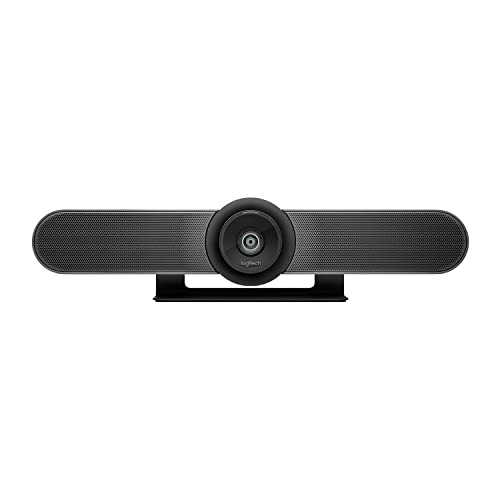
- 4K sensor with a wide 120° field of view
- Beamforming microphones cover up to 4 meters
- Supports BYOD and managed room deployments
Best For: Huddle rooms and small conference spaces
Best Compact 360° Value
PANOCORE360 All-in-One Meeting Camera
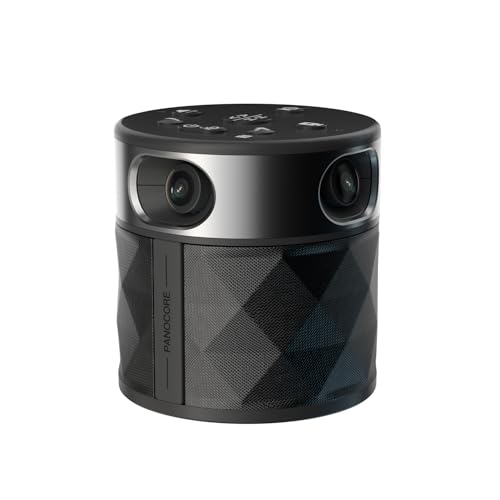
- 360° and dual-180° viewing modes
- Integrated speaker and three-mic array
- Plug-and-play compatibility with major platforms
Best For: Small to medium rooms using a single USB-connected computer
Best Desktop Conferencecam
Logitech BCC950 Webcam & Speakerphone

- 1080p video at 30 frames per second
- Integrated speakerphone and noise-canceling mic
- Remote-controlled pan, tilt, zoom, and call functions
Best For: Small desktop meetings and compact conference setups
Premium All-in-One Pick
Yealink UVC34 4K Conference Camera

- 4K video with a 120° field of view
- 8-mic array with 5-meter pickup
- Automatic privacy shutter and AI tracking
Best For: Huddle rooms needing integrated video and audio
Small-Room Value Pick

- 4K video with a 120° viewing angle
- AI framing and presenter tracking
- Dual noise-canceling mics up to 5 meters
Best For: Small rooms needing simple USB conferencing
Flexible PTZ System
TONGVEO 4K AI-Tracking Conference Camera

- 4K HDMI output with 3x optical zoom
- AI tracking and 350° pan rotation
- Wireless speakerphone with four microphones
Best For: Dynamic small-to-medium rooms and presentations
All-in-One 4K Pick
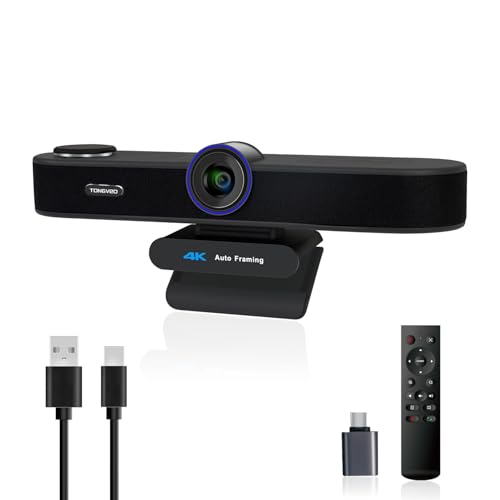
- 4K video with three field-of-view modes
- AI auto-framing and voice tracking
- Built-in microphones and 3W speaker
Best For: Small meeting spaces needing integrated 4K video and audio
Small-Room Conference System

- 1080p video at 60fps with 3x optical zoom
- AI face and speaker tracking
- Wireless Bluetooth speakerphone included
Best For: Small-to-medium rooms with 8–12 participants
360-Degree Room Coverage
TOUCAN SC360 Conference Camera
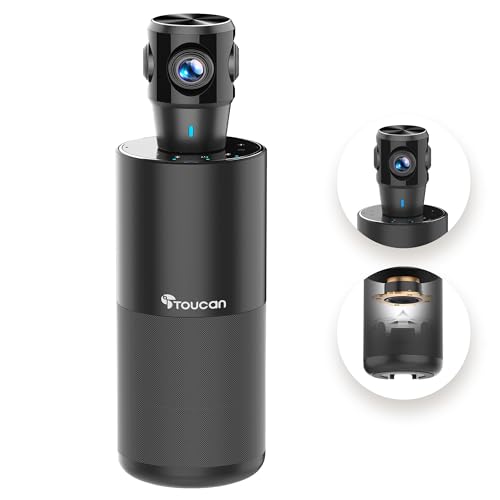
- 360-degree video capture for around-the-table meetings
- 1080p camera with four noise-reduction mics
- Built-in speaker and plug-and-play USB setup
Best For: Rooms where participants speak from multiple directions
Best for Active Hybrid Meetings – Owl Labs Meeting Owl 3
For teams comparing webcams for conference rooms, the Meeting Owl 3 stands out with 360° 1080p video, speaker tracking, and integrated room audio. Its automatic focus is designed to keep remote participants connected to in-room discussions.
Best For: Small to large hybrid meeting spaces that need a 360° room view and automatic speaker focus.
Pros:
- Captures 360° video in 1080p HD while focusing on active speakers.
- Built-in audio supports pickup up to 18 feet away.
- Plug-and-play USB setup and fleet management through The Nest.
- Can expand with additional Owls, an Owl Bar, or an Expansion Mic.
Cons:
- Its specialized 360° design may be more than a small room needs.
- Expansion accessories are needed for broader coverage in larger spaces.
The Meeting Owl 3 is a strong choice when participation and room awareness matter more than a conventional front-facing camera. Microsoft Teams certification and compatibility with Zoom, Google Meet, and Webex add deployment flexibility.
Best for Small Rooms – Logitech MeetUp 4K
The Logitech MeetUp is a practical pick among webcams for conference rooms, combining a 4K sensor, wide 120° field of view, microphones, and a compact all-in-one design. It is built specifically for huddle and small meeting rooms.
Best For: Small conference rooms and huddle spaces using USB or dedicated room-system deployments.
Pros:
- 4K video sensor with a 120° field of view and 5x HD zoom.
- Beamforming microphones capture voices up to 4 meters away.
- Motorized pan and tilt can extend the view up to 170°.
- Supports BYOD use and room solutions for Teams, Zoom, and Google Meet.
Cons:
- The Expansion Mic is sold separately.
- Its room-focused design may be less suitable for larger spaces without accessories.
MeetUp offers a conventional front-of-room setup with strong image detail and flexible mounting options. It is especially compelling for organizations standardizing compact rooms and managing devices remotely through Logitech Sync.
Best Compact 360° Value – PANOCORE360 All-in-One Meeting Camera
For buyers seeking compact webcams for conference rooms, the PANOCORE360 combines a 360° camera, speaker, and microphone array in one USB-powered unit. It offers speaker-focused and dual-180° viewing modes for small to medium rooms.
Best For: Small to medium meetings with up to 12 participants that need flexible room views and simple setup.
Pros:
- Four-camera system provides 360° capture with 1080p output.
- Auto speaker focus and dual 180° widescreen modes support different meeting layouts.
- Integrated speaker and three-microphone array include AI voice processing.
- Driver-free operation works with Zoom, Teams, Webex, and Google Meet.
Cons:
- Microphone pickup is specified at up to 10 feet, limiting larger-room use.
- Designed for small to medium rooms rather than expansive spaces.
The PANOCORE360 is notable for packing video, audio, local MicroSD recording, and vision processing into a lightweight device. Its USB power options also make it convenient for laptop-based conference setups.
Best Desktop Conferencecam – Logitech BCC950 Webcam & Speakerphone
The Logitech BCC950 is a straightforward option among webcams for conference rooms, pairing 1080p video with a built-in speakerphone and noise-canceling microphone. Its remote and base controls make common call adjustments easy.
Best For: Small desktop meetings and personal conference setups that need integrated video and audio.
Pros:
- Delivers 1080p video at up to 30 frames per second.
- Full-duplex speakerphone and noise-canceling microphone support conversations up to 8 feet away.
- Remote and base controls handle pan, tilt, zoom, volume, mute, and call functions.
- Plug-and-play USB connectivity with support for Windows and macOS.
Cons:
- Its 8-foot audio range is intended for smaller spaces.
- It lacks the 360° coverage and advanced speaker framing of newer room systems.
The BCC950 remains a convenient all-in-one choice when simplicity is the priority. It is best suited to compact meeting areas rather than rooms requiring broad participant coverage or sophisticated room management.
Premium All-in-One Pick – Yealink UVC34 4K Conference Camera
For teams comparing webcams for conference rooms, the Yealink UVC34 is an all-in-one option built around sharp 4K video, room-filling audio, and automated framing. Its 120° field of view, 8-microphone array, and plug-and-play USB setup make it practical for huddle rooms using Teams, Zoom, or other conferencing platforms.
Best For: Huddle rooms and small meeting spaces that need integrated video, microphones, and privacy protection.
Pros:
- 4K video with a 120° wide field of view captures participants clearly.
- Eight-microphone array offers up to 5-meter voice pickup with audio processing.
- AI auto framing and speaker tracking can keep meetings visually focused.
- Automatic electric privacy shutter and a 7-meter USB cable add convenience.
Cons:
- The system weighs about 1,620 grams, so it is less portable than compact webcams.
- Its feature set may be more than needed for a single-person desk setup.
The UVC34 stands out when a room needs one coordinated camera-and-microphone unit rather than separate peripherals. It is a strong fit for organizations prioritizing 4K image quality, broad compatibility, and hardware-level visual privacy.
Small-Room Value Pick – WYRESTORM FOCUS-210 4K Webcam
Among webcams for conference rooms, the WYRESTORM FOCUS-210 is designed specifically for small meeting spaces. It combines 4K video, a 120° viewing angle, AI framing, presenter tracking, and dual noise-canceling microphones in a USB plug-and-play setup for Zoom, Teams, or Webex.
Best For: Small conference rooms and compact team spaces where easy installation and automatic framing matter.
Pros:
- 4K resolution and a 120° wide-angle lens help include the whole group.
- AI auto framing detects and frames meeting participants.
- Presenter tracking follows an active speaker during presentations.
- Dual AI noise-canceling microphones capture voices up to 5 meters away.
Cons:
- The supplied USB-A to USB-C cable is listed at 5 feet, limiting placement flexibility.
- It is intended for small rooms rather than larger meeting spaces.
The FOCUS-210 is a straightforward choice for teams that want professional-looking 4K video without a complicated installation. Its room-specific design and automated tracking features make it especially useful for small-group meetings and presentations.
Flexible PTZ System – TONGVEO 4K AI-Tracking Conference Camera
For buyers seeking webcams for conference rooms with more installation and tracking flexibility, this TONGVEO kit combines a 4K PTZ camera with a wireless Bluetooth speakerphone. It offers AI subject tracking, 3x optical zoom, HDMI and USB 3.0 connectivity, and microphone pickup suited to small-to-medium rooms.
Best For: Small-to-medium conference rooms, presentations, worship spaces, medical settings, and setups needing PTZ movement or HDMI output.
Pros:
- 4K 30fps output, 3x optical zoom, and a 93° field of view provide flexible coverage.
- AI human and face tracking can follow a moving speaker.
- PTZ movement includes 350° horizontal and 180° vertical rotation.
- Wireless speakerphone offers four microphones, 5-meter pickup, and USB, Bluetooth, or dongle connections.
Cons:
- USB 3.0 output is listed as 1080p, while 4K 30fps output is available through HDMI.
- The multi-part system may require more setup than a basic USB webcam.
- The speakerphone battery is rated for approximately 6–8 hours of continuous use.
This system is a versatile choice when a fixed wide-angle webcam is not enough. Its PTZ range, optical zoom, tracking, and separate wireless speakerphone make it better suited to dynamic presentations and multipurpose rooms than simple desk-style conferencing.
All-in-One 4K Pick – TONGVEO 3-in-1 4K Webcam
For teams seeking webcams for conference rooms without adding separate audio equipment, this TONGVEO combines a 4K camera, dual microphones, and a 3W speaker. AI auto-framing, voice tracking, adjustable viewing angles, and a remote make it practical for group calls and presentations.
Best For: Small meeting spaces and hybrid teams that want an all-in-one 4K video and audio setup.
Pros:
- Captures up to 4K video at 30fps with a 118°, 100°, or 88° field of view.
- AI auto-framing and voice tracking help keep attendees or the active speaker in view.
- Built-in dual microphones and a 3W speaker support conversations without extra audio hardware.
- USB plug-and-play setup and compatibility with Zoom, Teams, Google Meet, and other platforms.
Cons:
- Uses 5x digital zoom rather than optical zoom.
- Audio pickup is specified for distances up to 16.4 feet, so larger rooms may need additional equipment.
This is a versatile choice when simple installation and integrated sound matter as much as image quality. Its adjustable field of view also lets it handle both group meetings and solo presentations.
Small-Room Conference System – TONGVEO AI PTZ Camera Kit
This TONGVEO system is designed for buyers comparing webcams for conference rooms that need dedicated video and speakerphone hardware. It pairs a 1080p AI-tracking PTZ camera with a wireless Bluetooth conference speaker, supporting USB 3.0 and HDMI connections for flexible room setups.
Best For: Small-to-medium conference rooms with meetings of roughly 8–12 people.
Pros:
- 1080p video at up to 60fps with 3x optical zoom and a 114° field of view.
- AI face and humanoid tracking can follow speakers while the PTZ camera pans and tilts.
- Full-duplex microphone array with echo cancellation supports pickup within 16.4 feet.
- Wireless speakerphone offers USB, Bluetooth 5.0, and dongle connections, with 6–8 hours of battery life.
Cons:
- The PTZ camera itself is wired, while only the speaker is wireless.
- Video resolution is 1080p rather than 4K.
- The system may be more equipment than needed for individual desk calls.
With both HDMI and USB 3.0 output, this kit suits rooms where connection flexibility and smooth 60fps video are priorities. Its stated room coverage and participant range make it a particularly practical fit for smaller team spaces.
360-Degree Room Coverage – TOUCAN SC360 Conference Camera
For teams evaluating webcams for conference rooms where participants sit around the space, the TOUCAN SC360 offers 360-degree capture rather than a conventional forward-facing view. Its 1080p camera, four noise-reduction microphones, speaker, and plug-and-play connectivity are designed to simplify group meetings.
Best For: Shared meeting rooms where attendees may speak from different directions.
Pros:
- 360-degree viewing helps capture participants around the room.
- 1080p video provides clear visuals for meetings, presentations, and slideshows.
- Four noise-reduction microphones and a built-in Bluetooth speaker support group conversations.
- Plug-and-play USB connection includes a Type-C male to USB-A female adapter for PC compatibility.
Cons:
- Video resolution is limited to 1080p.
- The 360-degree design may be less suitable when a narrow, front-facing composition is preferred.
- Its fixed-focus and autofocus specifications may not provide the same framing control as a PTZ camera.
The SC360 is a room-oriented option for teams that want broad coverage with minimal setup. Its omnidirectional format and integrated audio make it especially convenient for around-the-table discussions.
How We Picked the Best Webcams for Conference Rooms
We focused on features that affect real meetings rather than resolution alone. The lineup includes 360-degree cameras, wide-angle webcams, PTZ systems, and all-in-one units with built-in speakers and microphones. We considered video quality, pickup range, automatic framing or speaker tracking, compatibility with platforms such as Zoom and Microsoft Teams, connection options, controls, and overall suitability for different room layouts.
Because conference rooms vary widely, the best choice depends on seating distance, participant count, lighting, and whether your team needs a simple USB setup or a more complete audiovisual system.
Quick Comparison
| Room or use case | Features to prioritize | Best camera style |
|---|---|---|
| Small huddle room | Wide field of view, USB plug-and-play setup | Compact wide-angle webcam |
| Medium conference room | Longer microphone pickup, automatic framing | All-in-one camera or PTZ system |
| Mixed seating layouts | 360-degree coverage, speaker tracking | 360-degree meeting camera |
| Large or flexible room | Optical zoom, HDMI or USB 3.0, remote control | PTZ conference camera |
Key Buying Factors for Webcams for Conference Rooms
Field of View and Room Size
A wide-angle lens is useful for small rooms where people sit close to the camera. For larger spaces, a PTZ model with optical zoom can frame participants more effectively without relying only on digital cropping. A 360-degree camera can be especially useful when people sit around a table or speak from different directions.
Microphone Coverage and Audio Processing
Video quality cannot compensate for muffled voices. Check the stated microphone pickup range, the number of microphones, echo cancellation, and noise reduction. Built-in speakers can simplify installation, but dedicated room audio may be preferable for larger groups.
Tracking, Framing, and Controls
AI speaker tracking and automatic framing reduce manual adjustments, but performance can vary with lighting, movement, and multiple speakers talking at once. Remote controls, presets, and manual pan, tilt, and zoom remain valuable when predictable framing matters.
Resolution and Compatibility
1080p is usually sufficient for standard meetings, while 4K can provide sharper detail and more flexibility for cropping. Confirm that the camera works with your operating system and meeting platform, and check whether it connects through USB, HDMI, Bluetooth, or a combination of these.
Who Should Buy Which Webcams for Conference Rooms?
Choose a compact wide-angle webcam for a small team that wants simple plug-and-play meetings. A 360-degree model suits shared tables and rooms where participants speak from multiple directions. Select an all-in-one camera with microphones and speakers when minimizing cables and separate components is the priority. For larger rooms, frequent presentations, or precise camera control, a PTZ system with optical zoom and multiple outputs is usually the more flexible option.
Before buying, measure the room, count typical participants, identify where the camera will sit, and verify the computer or display connections. Those practical details will usually matter more than choosing the highest advertised resolution.