
Document cameras with built in lighting make it easier to show worksheets, books, 3D objects, and live demos without wrestling with extra lamps or poor room light.
In this roundup, we focused on models that deliver a brighter image, simple setup, and dependable compatibility for classrooms, hybrid learning, and video calls.
Best 10 Document Cameras with Built in Lighting Picks for 2026
Ultra-Detail Classroom Pick
INSWAN INS-2 4K Document Camera

- 4K Ultra HD with 13MP Sony sensor
- Built-in LED light with brightness control
- A3 coverage plus Documate software
Best For: Professional educators and art instructors needing large-format, well-lit capture
Flexible Demo Choice

- 3-level LED lighting with brightness control
- Manual image reversal for flexible display
- Foldable design with dual microphones
Best For: Teachers and presenters who need adjustable lighting and a compact build
Portable Smart Pointer Pick

- 8MP Sony sensor with UHD capture
- OKIOPoint AI pointer tracking
- Compact, portable classroom design
Best For: Teachers wanting a portable camera with interactive presentation tools
All-Around Teaching Pick

- 3-level LED fill light for clearer viewing
- 8MP image quality with A4/A3 coverage
- Built-in mic plus webcam mode
Best For: Teachers and remote presenters needing a versatile lit document camera
Premium Teaching Pick
OKIOCAM S2 Pro 13MP 4K USB Document Camera
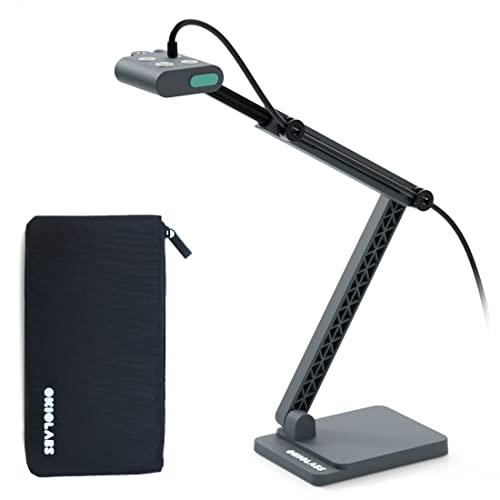
- 13MP sensor with 4K capture
- Integrated LED light for dim rooms
- OKIOPoint pointer for interactive demos
Best For: Teachers and presenters who want 4K detail with built-in lighting
Classroom Value Pick
USB Doc Camera with 3-Level LED Lights

- 3-level LED fill light for tough lighting
- 3-in-1 doc camera and webcam design
- Supports A3 documents with autofocus
Best For: Teachers needing an affordable camera with adjustable built-in light
Reliable Starter Choice
IPEVO V4K 8MP USB Document Camera

- 8MP Ultra HD capture up to 3264 x 2448
- Sony CMOS sensor for cleaner image quality
- Fast focus and 30 fps streaming
Best For: Users who want strong image quality and good low-light performance
Portable LED Presenter
INSWAN INS-3 Handheld USB Document Camera

- 2560x1920 capture at up to 30fps
- Built-in LED light with anti-glare sheet
- Works across Windows, Mac, iPad, and Chromebook
Best For: Portable teaching and live demos with built-in lighting
Classroom Lighting Pro
8MP USB Document Camera with LED Light

- 8MP image capture with mirror and flip controls
- 3-level LED lighting with warm, cool, and neutral modes
- Built-in dual microphones for teaching and calls
Best For: Teachers needing adjustable lighting and quick classroom image control
Compact LED Desk Cam
INSWAN INS-1 Classic USB Document Camera

- 8MP Sony sensor with up to 3264 x 2448 output
- Built-in LED light and anti-glare sheet
- Compact multi-joint design for desk use
Best For: Compact plug-and-play teaching and demo setups
Ultra-Detail Classroom Pick – INSWAN INS-2 4K Document Camera
If you want document cameras with built in lighting for teaching, art display, or larger-format presentations, the INSWAN INS-2 is built for clear overhead capture. Its 13MP Sony sensor, 4K output, and A3-size coverage make it a strong fit when you need to show books, two-page spreads, artwork, or demo materials on a big screen.
Best For: Professional educators and art instructors who need large-format capture with flexible positioning and built-in lighting.
Pros:
- Built-in LED light with brightness control helps improve visibility.
- 13MP sensor captures up to 4K Ultra HD at 30fps.
- Multi-joint arm supports flexible angle changes for A3 documents.
- Documate software adds annotation, OCR, recording, and whiteboard tools.
Cons:
- Higher-end feature set may be more than casual users need.
- Best suited to a desk or classroom setup rather than ultra-portable use.
- Requires compatible OS support for plug-and-play use.
Overall, this is one of the most capable document cameras with built in lighting for presentations where image quality and document size matter most. It balances professional capture features with broad compatibility for modern classroom workflows.
Flexible Demo Choice – Kitchbai 8MP USB Visualiser
This document camera with built in lighting is geared toward live demos, classroom teaching, and online meetings where brightness control matters. The Kitchbai visualiser adds a 3-level LED light, manual image inversion, and a foldable design, giving you practical control in changing room lighting.
Best For: Teachers and presenters who want adjustable lighting, image reversal controls, and a compact foldable design.
Pros:
- 3-level LED brightness adjustment helps in dark or bright rooms.
- Manual image reversal can flip the display left/right or up/down.
- 8MP sensor supports up to 2448P output at 30fps.
- Foldable, multi-joint design is easy to carry and reposition.
Cons:
- Top resolution is 2448P rather than true 4K output.
- Foldable build is compact, but not as substantial as heavier classroom units.
- Brightness and reversal controls are feature-rich but may take a little setup.
If you need a flexible classroom camera with built in lighting and strong adjustment options, this model covers the basics well. It is especially useful for teachers who move between lessons, demos, and video calls.
Portable Smart Pointer Pick – OKIOCAM S-4K Document Camera
If you are shopping for document cameras with built in lighting, the OKIOCAM S-4K stands out more for portability and classroom interaction than for extra light output. It uses an 8MP Sony Exmor R sensor with strong low-light performance, and the software adds AI pointer tracking to make live lessons more engaging.
Best For: Teachers who want a lightweight, portable document camera with smart presentation tools and dependable low-light performance.
Pros:
- 8MP Sony Exmor R sensor offers UHD capture up to 3264 x 2448p.
- Enhanced low-light performance and noise reduction support clearer images.
- OKIOPoint AI tracking follows your pointer during lessons.
- Compact design is easy to carry and store.
Cons:
- No built-in LED lighting is listed in the supplied notes.
- Maximum resolution is lower than true 4K models.
- Features focus more on software tools than on hardware lighting controls.
This is a smart choice if you value portability, live annotation tools, and responsive teaching features. It is less focused on built-in lighting than some rivals, so buyers needing stronger lamp assistance should compare carefully.
All-Around Teaching Pick – 4K A3 USB Document Camera
For buyers comparing document cameras with built in lighting, this model is built around classroom flexibility and broad compatibility. It offers 8MP imaging, A4/A3 support, a multi-joint arm, a built-in microphone, and a 3-level LED fill light for clearer overhead viewing in lessons or meetings.
Best For: Teachers and remote presenters who want an all-in-one USB document camera with lighting, webcam support, and broad platform compatibility.
Pros:
- 3-level LED fill light helps improve visibility in low-light settings.
- 8MP capture with 2448P resolution supports crisp classroom display.
- Multi-joint arm and rotatable head allow flexible top-view and selfie modes.
- Built-in microphone and webcam function support online teaching and meetings.
Cons:
- Resolution is 2448P rather than native 4K.
- Alloy build is sturdy, but the design is less compact than ultra-portable options.
- Best suited to desk-based use instead of travel-first setups.
In practical use, this is a versatile choice for classrooms, remote tutoring, and demo recording. Its lighting, microphone, and wide software compatibility make it a strong everyday teaching tool.
Premium Teaching Pick – OKIOCAM S2 Pro 13MP 4K USB Document Camera
If you want document cameras with built in lighting for polished demos, the OKIOCAM S2 Pro is built for sharp, low-fuss presenting. Its 13MP sensor, 4K capture, and integrated LED light make it a strong fit when you need clear images on paper, objects, or a tabletop setup, even in dim rooms.
Best For: Teachers, trainers, and remote presenters who want 4K detail plus built-in light for clearer live demos.
Pros:
- 13MP sensor with true 4K capture up to 3840 x 2160.
- Integrated LED light helps when ambient lighting is weak.
- 30 fps video and fast autofocus support smoother switching during presentations.
- OKIOPoint smart pointer adds interactive on-screen tracking in supported software.
Cons:
- Built-in software features may be more than casual users need.
- Requires USB compatibility and software setup for full presentation features.
The S2 Pro stands out if image quality and teaching tools matter more than bare-bones simplicity. It combines strong hardware with helpful software extras, making it a capable choice for live lessons, web conferences, and remote instruction.
Classroom Value Pick – USB Doc Camera with 3-Level LED Lights
For document cameras with built in lighting on a tighter budget, this PAKOTOO classroom model focuses on practical everyday use. It combines a USB document camera and webcam in one, adds a 3-level LED fill light, and includes auto focus and image inversion tools that are useful for teaching and remote video calls.
Best For: Teachers and remote learners who need a flexible USB doc camera with adjustable lighting.
Pros:
- 3-level LED fill light helps improve visibility in dark or uneven lighting.
- Works as both a document camera and webcam.
- Auto focus and image inversion features support classroom use.
- Captures A3-size documents and includes dual mic support.
Cons:
- Not plug and play, so setup takes a little more effort.
- Full compatibility may require selecting the USB Camera input in your system.
This is a sensible pick if you want a classroom-friendly camera that handles documents and webcam duties without extra complexity in the hardware. The adjustable light and A3 format make it especially useful for teaching materials and close-up demonstrations.
Reliable Starter Choice – IPEVO V4K 8MP USB Document Camera
The IPEVO V4K is a straightforward option if you are shopping for document cameras with built in lighting support in a sense of strong low-light performance, even though it does not include an actual lamp. Its Sony CMOS sensor, fast focusing, and high light sensitivity are designed to deliver clear images for live demo work, distance learning, and web conferencing.
Best For: Users who want a dependable, high-resolution document camera with strong low-light image performance.
Pros:
- 8MP Ultra HD capture up to 3264 x 2448.
- Sony CMOS sensor offers good noise reduction and color reproduction.
- Fast focus and 30 fps streaming help keep presentations smooth.
- Compatible with Mac, Windows, and Chromebook setups.
Cons:
- No built-in light is listed in the product features.
- Best high-performance streaming depends on meeting system requirements.
If you prioritize image quality, compatibility, and stable performance over extra lighting hardware, the V4K remains a solid classroom and meeting-room tool. It is especially appealing for users who already have decent room lighting and want a simple USB document camera.
Portable LED Presenter – INSWAN INS-3 Handheld USB Document Camera
If you want document cameras with built in lighting that can handle both classroom demos and remote presentations, the INSWAN INS-3 is built for flexibility. Its handheld design makes it easy to show books, small objects, artwork, or models, while the built-in LED light and anti-glare sheet help keep images usable in mixed lighting.
Best For: Teachers, presenters, and remote instructors who need a portable handheld document camera with built-in lighting and strong compatibility.
Pros:
- 2560×1920 live image quality with up to 30fps video
- Built-in LED light plus anti-glare sheet for tougher lighting conditions
- Dual-mode autofocus, 7-step brightness control, image flip, and built-in mic
- Works with Windows, Mac, iPad, and Chromebook for plug-and-play use
Cons:
- Handheld format may be less stable than fixed-arm designs for some setups
- Best compatibility on iPad requires USB-C and newer OS versions
The INS-3 stands out if you need mobility and lighting help in one package. It combines high-resolution capture with a useful software bundle, making it a practical choice for live instruction, conferencing, and detailed object viewing.
Classroom Lighting Pro – 8MP USB Document Camera with LED Light
Among document cameras with built in lighting, the Gawervan KB700 is aimed squarely at teachers who need quick image control and flexible illumination. Its 8MP resolution, touch-type 3-level LED light, and multiple exposure settings are designed to make handouts, worksheets, and 3D demos easier to see in classrooms or livestreams.
Best For: Educators who want a foldable USB document camera with adjustable lighting, mirroring controls, and built-in audio for hybrid lessons.
Pros:
- 8MP resolution with left/right mirror and up/down flip controls
- 3-level LED light with warm, cool, and neutral options
- 10-stage exposure adjustment helps reduce glare and handle backlighting
- Built-in dual microphones for online teaching and conferencing
Cons:
- Does not support HDMI or iPad use
- Best suited to USB-C workflows rather than broader video-output setups
The KB700 is a strong fit if lighting control matters as much as image quality. Its foldable design and classroom-focused features make it especially practical for teachers who move between rooms or teach remotely.
Compact LED Desk Cam – INSWAN INS-1 Classic USB Document Camera
If you are comparing document cameras with built in lighting for a compact desk setup, the INSWAN INS-1 offers a well-rounded mix of image quality and convenience. It pairs an 8MP Sony camera with built-in LED lighting, an anti-glare sheet, autofocus, and a multi-joint design that fits neatly on a desktop.
Best For: Users who want a compact, plug-and-play USB document camera for distance learning, live demos, and everyday teaching.
Pros:
- 8MP Sony camera with up to 3264 x 2448 resolution
- Built-in LED light, anti-glare sheet, and 7-step brightness control
- Autofocus with macro capability for close-up objects
- USB plug-and-play compatibility with Windows, Mac, iPad, and Chromebook
Cons:
- Desktop-oriented design is less portable than handheld options
- Uses a USB-A cable, so some newer devices may need an adapter
The INS-1 is a practical pick for anyone who wants a compact teaching camera with lighting built in. It is especially appealing if you value easy setup, solid resolution, and a proven desktop layout.
How We Picked the Best Document Cameras with Built in Lighting
We prioritized models with built-in LED lighting, clear image quality, easy USB connectivity, and broad device support. We also looked for practical teacher-friendly features such as autofocus, image inversion, microphone support, foldable or portable designs, and A3-size capture for larger documents.
Quick Comparison
The best options in this group generally fall into three buckets: ultra-portable cameras for fast setup, classroom-focused models with stronger lighting and mic support, and higher-resolution units for sharper text and detailed object viewing. If you need a simple, dependable classroom tool, choose for ease of use first; if you present fine print or detailed diagrams, prioritize resolution and focus performance.
Key Buying Factors for Document Cameras with Built in Lighting
Lighting Quality
Look for adjustable LED levels so you can match the light to the room and avoid glare on glossy pages. Better lighting helps maintain consistent visibility during live teaching and recorded lessons.
Resolution and Focus
Higher resolution helps text stay readable, but autofocus and color accuracy matter just as much. For math work, lab notes, and book pages, sharp focus is often more valuable than headline megapixels.
Capture Area and Flexibility
If you regularly display full worksheets, larger books, or art projects, check for A3 support and a flexible arm or multi-angle head. Smaller, handheld models work well for quick demos and mobile teaching setups.
Compatibility and Audio
Make sure the camera works with your operating system and teaching platform. Built-in mics can be helpful for distance learning, but external audio is still better for polished presentations.
Who Should Buy Which Document Cameras with Built in Lighting?
Teachers who want a plug-and-play classroom solution should lean toward models with strong lighting, dual microphones, and easy foldability. Remote instructors and presenters may prefer compact cameras with smart pointer or autofocus features. If image clarity is your top concern, choose a higher-resolution document camera with built in lighting and reliable software support. For the most flexible everyday use, look for a balance of brightness, portability, and simple setup rather than the longest feature list.