
Choosing the right camera can make drawing, painting, and crafting demos much easier to follow. The best document cameras for art demonstrations should deliver sharp close-up detail, stable framing, and simple controls.
Below, we’ve focused on models that balance image quality, lighting, compatibility, and everyday usability for classrooms, studios, and remote teaching.
Best 10 Document Cameras for Art Demonstrations Picks for 2026
Compact Classroom Pick
IPEVO V4K for Clean 8MP USB Capture

- 8MP video up to 3264 x 2448
- Up to 30 fps for smooth demos
- Fast autofocus with good color reproduction
Best For: Teachers needing an easy USB camera for art demos
Smart Tracking Choice
OKIOCAM S2-4K with AI Pointer Follow

- AI tracking follows your pointer in real time
- 8MP sensor with 30 fps streaming
- Strong low-light performance without extra lights
Best For: Presenters who want smart tracking and broad compatibility
Wireless Demo Option
IPEVO VZ-X with HDMI, Wi-Fi, and USB
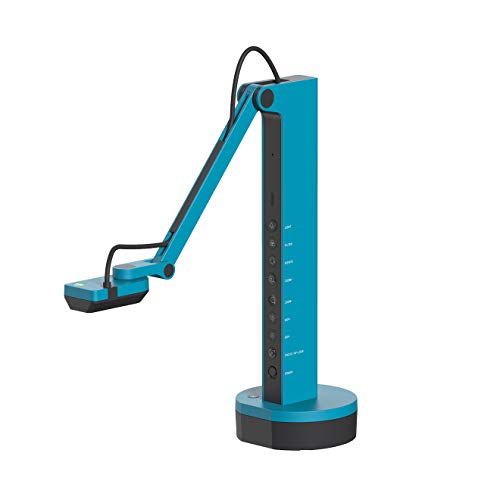
- Wi-Fi, HDMI, and USB connectivity
- 9-12 hour battery for long sessions
- Built-in LED and flexible multi-jointed stand
Best For: Teachers who want wireless mobility and multiple display options
Budget-Friendly A3 Pick
Foldable 4K USB Camera for Art Lessons

- A3-size coverage for larger materials
- 3-level LED brightness with manual control
- Foldable body with dual microphones
Best For: Users needing a compact A3 visualiser with adjustable lighting
Compact Ledger-Size Presenter
OKIOCAM T-4K 8MP USB Document Camera

- Captures ledger-size materials and open books
- 8MP Sony sensor with UHD capture up to 3264 x 2448p
- AI-tracking plus annotation and recording software
Best For: Portable demos of larger art pieces and documents
A3 Studio Helper
THUSTAR 8MP 4K Document Camera

- A3-size coverage with foldable multi-joint support
- 3-level LED lighting and manual brightness control
- Built-in dual microphones with plug-and-play setup
Best For: Art demos needing broader coverage and lighting control
Portable Landscape Demo Tool
OKIOCAM S-4K 8MP USB Document Camera

- Lightweight 269 g design for easy portability
- Letter-size landscape capture for small-space demos
- AI-tracking and annotation tools included
Best For: Portable art demos in tight spaces
Editor’s Pick

- 8MP autofocus for clear art demos
- Button-controlled image reversal
- Foldable body with A3-size coverage
Best For: compact USB art demonstrations with easy image flip
Most Feature-Rich
INSWAN INS-1 Classic USB Document Camera

- 8MP camera with autofocus and LED light
- Documate adds zoom, annotation, and recording
- Plug-and-play USB-A compatibility
Best For: art demos that benefit from software tools and recording
Best for Hybrid Teaching
Gawervan KB700 8MP USB Doc Camera

- 8MP image with autofocus and flip controls
- Dual microphones for online lessons
- Adjustable LED lighting and foldable body
Best For: live or hybrid art lessons with audio and video clarity
Compact Classroom Pick – IPEVO V4K for Clean 8MP USB Capture
If you need document cameras for art demonstrations, the IPEVO V4K is a straightforward USB option that focuses on sharp image capture and quick response. Its 8MP sensor, fast focusing, and lag-free streaming make it well suited for showing brushwork, sketch details, and step-by-step classroom demos without constant interruptions.
Best For: Teachers and artists who want a simple, plug-in USB camera for clear live demos on Mac, Windows, or Chromebook.
Pros:
- 8MP sensor captures up to 3264 x 2448 for detailed artwork and documents.
- Up to 30 fps at Full HD helps keep live demonstrations smooth.
- Fast autofocus reduces pauses when switching between materials.
- Sony CMOS sensor improves noise reduction and color reproduction, including in dimmer spaces.
Cons:
- No wireless or HDMI output; it is USB-focused only.
- Viewing area is more compact than some larger-basing classroom models.
- Requires a capable computer for the best lag-free streaming results.
Overall, the V4K is a practical pick if your priority is clean image quality, easy compatibility, and dependable performance for hands-on art instruction. It keeps the setup simple while still offering enough resolution for close-up teaching.
Smart Tracking Choice – OKIOCAM S2-4K with AI Pointer Follow
For document cameras for art demonstrations, the OKIOCAM S2-4K stands out if you want extra presentation tools beyond basic capture. It combines an 8MP Sony sensor with AI-powered OKIOPoint tracking, making it easier to keep viewers focused on the exact area of your sketch, painting, or reference material.
Best For: Instructors and presenters who want AI tracking, strong low-light performance, and broad device compatibility.
Pros:
- 8MP sensor captures up to 3264 x 2448 with smooth 30 fps streaming.
- OKIOPoint AI-tracking follows your pointer to help guide attention during lessons.
- Back-illuminated sensor improves low-light clarity without needing extra LED lighting.
- Wide compatibility includes Windows, Mac, Chromebook, iPadOS, and interactive displays.
Cons:
- Feature-rich software may be more than casual users need.
- Best results depend on using the included app for AI-tracking features.
- USB-C adapter support adds flexibility, but setup can be more involved than basic plug-and-play models.
This is a strong option if you want your camera to do more than just show the page. The tracking, low-light performance, and annotation-friendly software make it especially useful for live teaching and guided art walkthroughs.
Wireless Demo Option – IPEVO VZ-X with HDMI, Wi-Fi, and USB
If you want document cameras for art demonstrations with more placement freedom, the IPEVO VZ-X is built for flexible teaching setups. It offers Wi-Fi, HDMI, and USB connectivity, so you can move between a computer, projector, monitor, or mobile device while keeping your demo visible and easy to follow.
Best For: Art teachers and presenters who need wireless mobility, battery power, and multiple connection options.
Pros:
- Three connection modes: Wi-Fi, HDMI, and USB.
- 9-12 hours of battery life supports full classes and long sessions.
- Built-in LED light helps illuminate the viewing area.
- Fast focusing, good color reproduction, and a swiveling multi-jointed stand support flexible demonstrations.
Cons:
- Heavier than simpler USB-only document cameras.
- Wireless setup adds more options, but also more complexity than plug-and-play models.
- Maximum wireless range is best for room-to-room or classroom movement, not large-distance use.
The VZ-X makes sense when your teaching style benefits from freedom of movement and direct output to different displays. It is especially useful for live art demos where you may want to shift from a computer lesson to a projector-based presentation without changing gear.
Budget-Friendly A3 Pick – Foldable 4K USB Camera for Art Lessons
This 4K USB document camera is a practical choice for document cameras for art demonstrations when you want A3 coverage and simple USB setup. Its 8MP sensor, foldable body, and brightness controls make it useful for showing larger worksheets, finished artwork, or hands-on process work in a classroom or meeting.
Best For: Buyers who want a foldable, A3-size visualiser with adjustable lighting and built-in mics.
Pros:
- Supports A3-size coverage for larger art pages and materials.
- 3-level LED brightness and manual brightness control help in difficult lighting.
- Foldable design and multi-joint support make it easy to carry and position.
- Dual microphones and USB-C plug-and-play compatibility add convenience for teaching and web calls.
Cons:
- Manual image reversal and brightness adjustments may take extra setup time.
- USB-only design means no wireless or HDMI flexibility.
- Focus behavior is geared toward controlled demos rather than frequent wide changes in distance.
For buyers who need a compact visualiser with large-area coverage, this model offers a lot of utility for the price. It is best when you want an easy-to-store camera that still handles classroom demonstrations and live art presentations well.
Compact Ledger-Size Presenter – OKIOCAM T-4K 8MP USB Document Camera
If you need document cameras for art demonstrations, the OKIOCAM T-4K is a strong pick for showing larger pieces clearly without taking over your desk. Its compact body still captures ledger-size materials or both pages of an open book, which makes it useful for sketchbooks, prints, maps, and other detailed artwork.
Best For: Teachers, artists, and presenters who need a portable USB camera for showing larger-format art and documents.
Pros:
- Captures up to ledger-size materials and both pages of an open book.
- 8MP Sony Exmor R sensor with UHD capture up to 3264 x 2448p.
- Lag-free streaming up to 30fps in Full HD.
- Includes OKIOPoint AI-tracking and software tools like annotation, zoom, and recording.
Cons:
- Maximum-resolution frame rate drops to 25fps.
- Smaller than A3-focused options if you regularly demo oversized boards or sheets.
The T-4K is a good fit when portability matters but you still need room for larger art references. It balances image quality, software features, and a compact footprint well for live demonstrations.
A3 Studio Helper – THUSTAR 8MP 4K Document Camera
For document cameras for art demonstrations, the THUSTAR model stands out if you want a wider capture area and built-in lighting support. It is designed to handle A3-size coverage, show 2D and 3D objects, and offer manual brightness control so drawings, craft pieces, and mixed-media work stay visible during live demos.
Best For: Live demos that need A3 coverage, adjustable lighting, and built-in audio for online teaching or presentations.
Pros:
- A3-size coverage with a multi-joint, foldable design.
- 8MP capture with 4K output and up to 30fps live transmission.
- 3-level LED lighting plus manual brightness adjustment.
- Built-in dual microphones and plug-and-play compatibility with Windows, macOS, and Chrome OS.
Cons:
- Larger and heavier than ultra-compact classroom cameras.
- Maximum coverage is geared to A3 rather than oversized poster-sized work.
This is a practical all-in-one choice if you demo artwork in varied lighting and want extra flexibility from the arm, LEDs, and microphones. It leans more toward studio-style usability than minimalist portability.
Portable Landscape Demo Tool – OKIOCAM S-4K 8MP USB Document Camera
If your priority is a lightweight option for document cameras for art demonstrations, the OKIOCAM S-4K is built to stay out of the way while still showing detailed work clearly. It can capture letter-size materials in landscape orientation, making it a smart fit for sketch pages, small compositions, and tabletop demos where desk space is tight.
Best For: Artists and teachers who need a portable, space-saving camera for letter-size demos and live instruction.
Pros:
- Very compact and lightweight at 269 g.
- Captures letter-size materials in landscape orientation.
- 8MP Sony Exmor R sensor with UHD capture up to 3264 x 2448p.
- OKIOPoint AI-tracking and software tools for annotation, zoom, and recording.
Cons:
- Maximum-resolution capture runs at 15fps, lower than the T-4K.
- Letter-size focus may be limiting for larger art boards or A3 work.
The S-4K makes sense when portability and quick setup matter more than maximum capture area. It is a strong pick for small-space teaching setups and on-the-go demonstrations that still need sharp image quality.
Editor’s Pick – PAKOTOO 8MP USB Doc Camera
If you need document cameras for art demonstrations, this PAKOTOO model gives you the basics that matter most: 8MP detail, autofocus, and easy image reversal for showing sketches, paintings, and step-by-step techniques live. It supports A3-size coverage, has three brightness levels plus exposure adjustment, and folds down for simple storage between classes or studio sessions.
Best For: Teachers or presenters who want a compact USB document camera with manual image flip and adjustable lighting for art demos.
Pros:
- 8MP resolution with autofocus for crisp close-up views
- Image reversal works from the camera buttons without software
- 3-level LED light and 10 levels of exposure adjustment
- Foldable design with A3-size capture area
Cons:
- Does not support zoom or HDMI
- Not compatible with iPad
- Not plug and play; you must select “USB Camera” in system settings
For straightforward art instruction, this is a practical choice if you value simple controls and a clean overhead view. It is especially useful when you need to flip the image for handwriting, mirrored drawing demos, or canvas work without opening extra software.
Most Feature-Rich – INSWAN INS-1 Classic USB Document Camera
Among document cameras for art demonstrations, the INSWAN INS-1 stands out for its combination of 8MP imaging, autofocus, built-in LED light, and included software tools. The anti-glare sheet and multi-joint arm make it easier to handle paper, sketches, and small artwork on a desktop, while the Documate software adds digital zoom, annotation, rotation, and recording.
Best For: Creators and teachers who want more software controls for live art demos, annotations, and recordings.
Pros:
- 8MP SONY sensor with smooth 30 fps video
- Built-in LED light plus anti-glare sheet for better visibility
- Documate software includes zoom, annotation, rotation, and recording
- Plug-and-play USB-A setup with wide compatibility
Cons:
- USB-A cable may be less convenient for newer laptop-only setups
- Max viewing area is smaller than some A3-capable models
- Best software features depend on using Documate
This is a strong pick if your art demos need more than a basic live image. The software tools are useful for marking up techniques, zooming into brushwork, and recording demonstrations for later review.
Best for Hybrid Teaching – Gawervan KB700 8MP USB Doc Camera
This Gawervan KB700 is built for document cameras for art demonstrations when you want good image control and clear audio in the same setup. It offers 8MP resolution, image reversal, adjustable LED lighting, and built-in dual microphones, making it useful for live walkthroughs of drawing, painting, and mixed-media projects in class or online.
Best For: Teachers and presenters running live or hybrid art lessons who want video clarity plus built-in audio.
Pros:
- 8MP resolution with autofocus and manual image flip
- 3-level LED lighting and 10-stage exposure adjustment
- Built-in dual microphones for video calls and lessons
- Foldable, portable design with USB-C connectivity
Cons:
- Does not support HDMI
- Does not support iPads
- Needs USB camera selection in some apps instead of true plug-and-play
If you teach art across different rooms or through video meetings, this model has a balanced feature set. The lighting, focus, and audio make it easier to show fine details like line work, texture, and color changes without adding extra gear.
How We Picked These Document Cameras for Art Demonstrations
We prioritized practical features that matter most when showing hands, tools, textures, and step-by-step processes. That means clear resolution, strong close-focus performance, flexible mounting or positioning, built-in lighting, and broad device compatibility. We also considered whether the camera can handle both live teaching and recording without awkward setup delays.
Quick Comparison of What Matters Most
When comparing Document Cameras for Art Demonstrations, look first at image sharpness and how well the camera handles color and fine line detail. Next, check whether it supports the surface size you use most often, such as letter, legal, or A3. Connectivity also matters: USB is simplest, HDMI can be useful for direct display, and wireless adds flexibility if you move around a lot. If you teach in dim rooms or over textured materials, adjustable LED lighting can be a major advantage.
Key Buying Factors for Document Cameras for Art Demonstrations
Image Quality and Close-Up Detail
For art and craft demos, resolution is only part of the story. Autofocus speed, image clarity at short distances, and stable exposure are just as important. A camera that preserves line edges, brushwork, and color transitions will usually be more useful than one with a higher spec sheet but weaker real-world focus.
Lighting and Color Handling
Built-in LEDs can help reduce shadows from your hands and tools, but they should be adjustable so highlights do not wash out paper or paint. If you often demonstrate on glossy surfaces or dark materials, look for models with dimmable lighting and consistent white balance.
Workspace Size and Flexibility
Some setups are better for compact desks, while others are better for larger tables and A3-size layouts. If you switch between sketchbooks, full sheets, and finished pieces, choose a camera with a flexible arm or wide capture area. That makes Document Cameras for Art Demonstrations easier to adapt to different projects.
Compatibility and Ease of Use
Make sure the camera works with your computer and your teaching software. If you use Zoom, Google Meet, or OBS, confirm the model is compatible with your system and can be recognized quickly as a webcam or visualizer.
Who Should Buy Which Document Cameras for Art Demonstrations?
If you want the simplest setup, choose a USB model with autofocus and built-in light. If you teach in multiple rooms or need more placement freedom, a wireless or multi-connection option may be worth paying extra for. Teachers and classrooms should favor stable, easy-to-operate models, while artists and makers may prefer better control over capture area, lighting, and image inversion. In short, the best choice depends on how much space you have, how often you move the camera, and how much fine detail your demonstrations require.