
Choosing the right document camera for library archives can make preservation work faster, cleaner, and more consistent. The best models reduce glare, flatten curved pages, and capture fine text with enough detail for cataloging and reference.
In this roundup, we focus on practical features that matter in archive settings: large capture area, image clarity, OCR support, and easy workflow for books, documents, and oversized materials.
Best 10 Document Camera for Library Archives Picks for 2026
Large-Format Archiving Choice
VIISAN A2/A3 Book & Document Scanner

- A2/A3 overhead design for oversized archive materials
- Auto-flattening, fingerprint removal, and page splitting
- OCR exports to editable document formats
Best For: Digitizing oversized books, newspapers, manuscripts, and maps
Lightweight HD Presenter Pick
Lumens DC125 Ladibug Document Camera
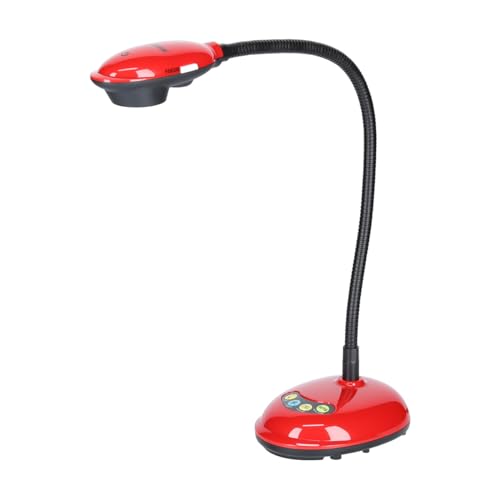
- 1080p/720p capture with autofocus
- USB and HDMI connectivity
- Lightweight, compact document camera
Best For: Basic archive viewing and simple capture in compact spaces
Balanced A3 Archive Scanner

- A3 overhead scanning for books and large documents
- 16MP camera with up to 300 DPI output
- Anti-glare LED lighting and OCR support
Best For: Libraries and offices needing dependable A3 digitization
High-Zoom Capture Pick
AVer Portable Flexarm Document Camera

- 23x total zoom for close detail work
- 13MP camera with 4K resolution
- Flexible gooseneck arm for easy positioning
Best For: Archive demonstrations and detailed close-up viewing
Archive Book Scanner
CZUR ET18 Pro Professional Document Scanner

- Patented flattening helps with curved book pages.
- 18MP camera captures A3 documents in high detail.
- ABBYY OCR creates searchable editable files.
Best For: libraries digitizing books, ledgers, and A3 archival pages
Live Presentation Camera
AVer F50+ 4K Versatile Document Camera

- 4K video and 10X optical zoom for clear viewing.
- HDMI and USB make setup straightforward.
- One-touch software simplifies operation.
Best For: live presentations and document demonstrations in archive settings
Flexible Presentation Camera
INSWAN INS-2 UHD 4K Document Camera

- 4K capture and 13MP sensor for clear display.
- A3 support and multi-joint arm handle large materials.
- Built-in LED and anti-glare sheet improve visibility.
Best For: classrooms and archive presentations with large documents or artwork
AI-Optimized Archiving Pick

- 13MP CMOS with built-in LED lighting
- One-key automatic correction and OCR support
- Foldable aluminum body with adjustable bracket
Best For: Library staff digitizing pages into PDF, Word, or text
High-Resolution Display Choice

- 8MP sensor with up to 3264 x 2448 capture
- Up to 30 fps live streaming at Full HD
- Works with Mac, Windows, and Chromebook
Best For: Live viewing and remote demos in archive or library settings
Flexible Desk Setup Option

- 8MP Sony camera with autofocus and 30 fps streaming
- Built-in LED plus anti-glare sheet for tricky lighting
- Documate software adds zoom, annotation, and recording
Best For: Compact desktop archiving with software editing tools
Large-Format Archiving Choice – VIISAN A2/A3 Book & Document Scanner
If you need a document camera for library archives that can handle oversized materials, this VIISAN model is built around A2 and A3 capture. It is aimed at books, manuscripts, newspapers, maps, and other large-format items, while the overhead design and software tools help turn tricky pages into clean digital files.
Best For: Libraries and archives digitizing oversized books, newspapers, manuscripts, and maps.
Pros:
- A2 large-format capture size for materials up to 594 x 420 mm.
- Auto-flatten, fingerprint removal, and double-page splitting help clean up book scans.
- Built-in OCR can convert scans to PDF, Word, Excel, EPUB, and text formats.
- 3-level LED lighting helps when working in darker setups.
Cons:
- Bundled software is not compatible with ARM-based Windows devices like Surface Pro X.
- Built-in LEDs are not recommended for bright-light conditions.
- Very glossy paper is not recommended.
For archive workflows that prioritize size and post-scan cleanup, this is a strong overhead option. Its biggest advantage is the combination of large-format coverage and software-assisted correction for bound or delicate materials.
Lightweight HD Presenter Pick – Lumens DC125 Ladibug Document Camera
The Lumens DC125 is a compact document camera for library archives when you want straightforward HD capture in a lightweight unit. It supports 1080p and 720p video, includes autofocus, and adds USB plus HDMI connectivity for flexible workstation use.
Best For: Basic archive viewing, live demonstration, and simple digital capture in compact spaces.
Pros:
- 1080p and 720p video capture for HD viewing.
- Autofocus and 8x digital zoom help frame material more easily.
- USB and HDMI Type A connectivity offer flexible setup options.
- Lightweight design makes it easier to move between workstations.
Cons:
- Effective still resolution is only 1.98 MP.
- Not built for the large-format capture sizes offered by overhead archive scanners.
- Designed more as a document camera than a specialized archival digitization tool.
This is a practical choice if you need a simple, portable camera for showing or capturing documents rather than deep archive conversion. It fits better in general presentation or light documentation workflows than in high-volume preservation scanning.
Balanced A3 Archive Scanner – VIISAN DL16 Book Scanner
The VIISAN DL16 is a document camera for library archives that focuses on A3 overhead scanning without pushing into larger-format complexity. With a 16MP camera, 300 DPI output, OCR, and anti-glare LED lighting, it is aimed at books, artwork, and large documents that need organized digital storage.
Best For: Libraries, study rooms, and office archives that need dependable A3 scanning for books and large documents.
Pros:
- A3 overhead scanning is suited to books, oversized pages, and large documents.
- 16MP capture with up to 300 DPI supports clear reference scans.
- Anti-glare LED lighting helps reduce shadows and reflections.
- Compatible with both Windows and Mac.
Cons:
- 300 DPI is lower than higher-resolution archival capture systems.
- Not intended for A2-sized materials.
- Software and lighting are focused on practical scanning, not advanced studio-style capture.
For many library archive tasks, this model strikes a useful middle ground between size support and simplicity. It is a good fit when you need A3 overhead digitization with OCR and glare control, but do not require the largest-format workflow.
High-Zoom Capture Pick – AVer Portable Flexarm Document Camera
The AVer Portable Flexarm Document Camera is a document camera for library archives when flexible positioning matters more than built-in scanning software. Its portable flexarm design, 23x total zoom, and 13-megapixel camera with 4K resolution make it useful for showing detailed materials at a desk or presentation station.
Best For: Archive demonstrations and flexible close-up viewing where zoom and image detail matter.
Pros:
- 23x total zoom helps frame small details more closely.
- 13-megapixel camera with 4K resolution supports detailed image output.
- Flexible gooseneck arm makes positioning easier.
- Portable design suits moving between work areas.
Cons:
- No archival scanning software features are listed in the supplied notes.
- Heavier than some compact document cameras at 8.28 pounds.
- Better suited to capture and presentation than bulk digitization workflows.
If your archive work depends on adjustable viewing and sharp close-up capture, this AVer model is a capable presentation-oriented option. It is strongest when the task is to display or inspect materials rather than process large scan batches.
Archive Book Scanner – CZUR ET18 Pro Professional Document Scanner
If you need a document camera for library archives that can also handle book scanning, the CZUR ET18 Pro is built around fast A3 capture and page-flattening tech. It uses an 18MP HD camera and ABBYY OCR to turn scans into searchable, editable files, making it a practical choice for digitizing bound materials and oversized documents.
Best For: Libraries and archive teams scanning books, ledgers, and A3 documents that need searchable output.
Pros:
- Patented flattening technology helps reduce curved-page distortion on books.
- 18MP / 4896 × 3672 resolution supports detailed capture of archival pages.
- ABBYY OCR can convert scans into editable PDF, Word, Excel, and more.
- Scans up to A3 size and can work in about 2 seconds per page once practiced.
Cons:
- Cable connection only; it does not support Wi‑Fi.
- Very glossy papers are not recommended.
- OCR language support has some limits, including Thai and Hebrew not supported.
For archive digitization workflows that prioritize speed, OCR, and book-page correction, the ET18 Pro covers a lot of ground. It is especially compelling when your materials include bound volumes or oversized pages that need fast, usable scans rather than just image capture.
Live Presentation Camera – AVer F50+ 4K Versatile Document Camera
The AVer F50+ is a strong document camera for library archives when you need 4K video, optical zoom, and simple connectivity for live presentations or demonstrations. With 10X optical zoom and one-touch software, it is geared toward showing documents clearly in real time rather than batch scanning.
Best For: Live archive presentations, teaching demonstrations, and close-up viewing of documents or objects.
Pros:
- 4K video capture delivers crisp live image quality.
- 10X optical zoom gives flexibility for close inspection.
- Supports HDMI and USB connectivity for easy integration.
- One-touch software keeps operation straightforward.
Cons:
- Heavier than compact document cameras at 8.9 pounds.
- Bulks more toward presentation use than portable scanning.
- No OCR or archival conversion features are listed.
If your archive work involves presenting documents to groups, the F50+ focuses on clarity and control. It is less about digitizing stacks of material and more about reliable, high-quality live display with enough zoom to examine details.
Flexible Presentation Camera – INSWAN INS-2 UHD 4K Document Camera
The INSWAN INS-2 is a versatile document camera for library archives when you need clear live display of large pages, artwork, or two-page spreads. Its 13MP sensor, 4K capture, built-in LED, and anti-glare sheet make it well suited for showing detailed materials in classrooms, reading rooms, or exhibitions.
Best For: Educators and archive staff who need flexible, plug-and-play presentation of large documents and artwork.
Pros:
- 4K Ultra HD capture with a 13MP SONY sensor for detailed viewing.
- Multi-joint arm and A3 support handle large documents and spreads.
- Built-in LED, anti-glare sheet, and brightness control help manage lighting.
- Plug-and-play UVC compatibility works with Windows, Mac, iPad, and Chromebook.
Cons:
- Focuses on presentation features rather than OCR-based archival workflows.
- Best results may depend on lighting and use of the anti-glare sheet.
- USB-connected setup is simple, but not as feature-heavy as dedicated scanning systems.
For archive environments that need a dependable camera for showing materials rather than mass digitization, the INS-2 is easy to recommend. It combines wide compatibility with practical tools like macro mode and built-in lighting for clear, flexible viewing.
AI-Optimized Archiving Pick – 13MP Foldable Scanning Camera
If you need a document camera for library archives, this NetumScan model is built around fast capture, OCR, and flexible scanning formats. Its 13MP sensor, automatic correction, and built-in LED lighting make it a practical choice for digitizing pages, notes, and other flat materials with minimal setup.
Best For: Archivists or librarians who want a foldable USB camera for efficient page-by-page digitizing and OCR-supported workflow.
Pros:
- 13MP CMOS sensor with built-in LED light for clear images in varied lighting
- One-key automatic correction helps straighten skewed pages quickly
- Supports word, PDF, and text formats with multi-language OCR recognition
- Foldable aluminum alloy body with adjustable bracket for portability
Cons:
- Requires a computer connection and software installation to begin scanning
- Designed for A4 capture size, so larger items may be limited
For archive-heavy work that values speed and text output, this is the most workflow-focused option in the group. It balances portability with useful scanning automation, though it is best matched to desk-based digitization rather than oversized materials.
High-Resolution Display Choice – V4K 8MP USB Document Camera
For a document camera for library archives, the IPEVO V4K stands out when image quality and smooth live viewing matter more than scan automation. Its 8MP sensor, high frame rate, and fast focusing are useful for showing archival pages, labels, and reference materials clearly during demonstrations or remote sessions.
Best For: Libraries that want a reliable USB document camera for live viewing, remote presentation, and frequent material switching.
Pros:
- 8MP sensor captures ultra high definition stills up to 3264 x 2448
- High frame rate supports lag-free live streaming up to 30 fps at Full HD
- Fast focusing helps when switching between items frequently
- Compatible with Mac, Windows, and Chromebook setups
Cons:
- Does not include scan-focused automation like OCR or batch scanning
- Best live performance depends on meeting stronger system requirements
This is a strong pick if your archive workflow emphasizes clear real-time display over bulk digitization tools. It is especially practical for libraries that demo materials, teach remotely, or need dependable cross-platform compatibility.
Flexible Desk Setup Option – INS-1 8MP USB Doc Camera
The INSWAN INS-1 is a practical document camera for library archives when you want a compact setup with useful lighting and software controls. Its 8MP Sony camera, built-in LED, anti-glare sheet, and bundled Documate software make it well suited for capturing pages and managing images on a desktop.
Best For: Libraries needing a compact plug-and-play document camera with software tools for image adjustment and recording.
Pros:
- 8MP camera with lag-free 30 fps streaming and autofocus
- Built-in LED, anti-glare sheet, and brightness control help with difficult lighting
- Documate software adds digital zoom, annotation, rotation, and recording
- Compatible with Windows, Mac, iPad, and Chromebook
Cons:
- Macro focus starts at 3.9 inches, which may still require careful positioning
- Best suited to desk use rather than highly portable field work
Among these options, this one offers the most balanced mix of hardware and bundled software for day-to-day archive handling. It is a good fit if you want a straightforward camera that can also help refine images after capture.
How We Picked the Best Document Camera for Library Archives
For a Document Camera for Library Archives, we prioritized image quality, usable capture size, page-flattening tools, lighting control, and compatibility with common archive workflows. We also favored models that can handle both bound books and loose documents without excessive setup.
Quick Comparison
High-resolution and large-format models are best for fragile books, newspapers, and oversized pages. More compact cameras are better for reference desks, live demonstrations, and general digitization where portability matters more than maximum capture area.
Key Buying Factors for a Document Camera for Library Archives
Resolution and Detail
Higher resolution helps preserve small type, annotations, stamps, and marginal notes. For archival use, aim for sharp, clean captures rather than marketing megapixels alone.
Capture Area and Book Handling
Large capture size matters when scanning folios, ledgers, or spread pages. Auto-flattening and dewarping tools are especially useful for bound volumes because they reduce distortion near the spine.
Lighting and Glare Control
Even lighting with adjustable LEDs helps when working with glossy covers, coated paper, or brittle pages that cannot be pressed flat. Anti-glare features can save significant retouching time.
OCR and File Workflow
OCR support is valuable for searchable PDFs and metadata work. Also check whether the camera software exports to common formats and fits your operating system.
Who Should Buy Which Document Camera for Library Archives?
If your archive work centers on oversized books or fragile bound volumes, choose a large-format camera with flattening tools. If you need a versatile desk setup for mixed materials, a balanced HD or 4K model may be the best fit. For classrooms, tours, or occasional digitization, a simpler portable unit can be enough.
Overall, the best Document Camera for Library Archives is the one that balances capture quality, handling safety, and workflow speed for the materials you digitize most often.