
A good webcam can make video calls clearer, livestreams more polished, and remote work easier without requiring a complicated camera setup. The options in this roundup cover everything from dependable 1080p meeting cameras to feature-rich 4K models.
We compared resolution, autofocus, microphones, viewing angles, privacy features, connectivity, and overall usability to help you find the right webcam for your setup and budget.
Best 10 Webcams Under 300 Picks for 2026
Dual-Camera Versatility
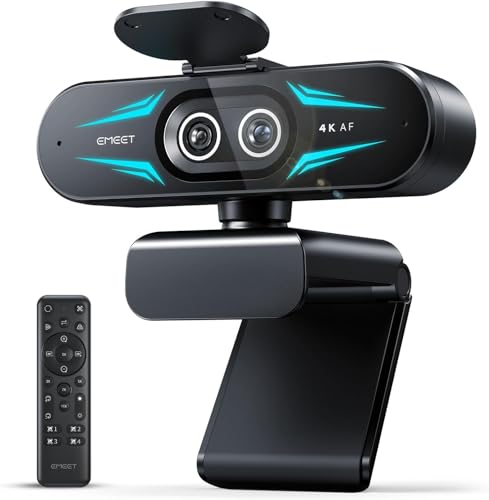
- Wide-angle and telephoto cameras
- Up to 11X hybrid zoom with PDAF
- Remote control, RGB lighting, and dual mics
Best For: Streaming, teaching, and product demonstrations
Simple Everyday Choice
Logitech Brio 300 1080p Webcam

- 1080p video at 30 frames per second
- Autofocus and low-light support
- Built-in privacy shutter
Best For: Routine video meetings and calls
Creator-Focused Clarity

- 4K at 30FPS or 1080p at 60FPS
- Sony sensor with PDAF autofocus
- Privacy cover and noise-canceling mics
Best For: Streaming and content creation
Flexible 4K Connectivity

- 4K video at 30 frames per second
- PDAF autofocus and automatic light correction
- USB-A to USB-C adapter included
Best For: Mixed-device offices, meetings, and streaming
Reliable Everyday Pick

- 1080p Full HD video
- Automatic light balancing
- Built-in sliding privacy cover
Best For: Remote work, classes, and everyday video calls
Privacy-Focused Value
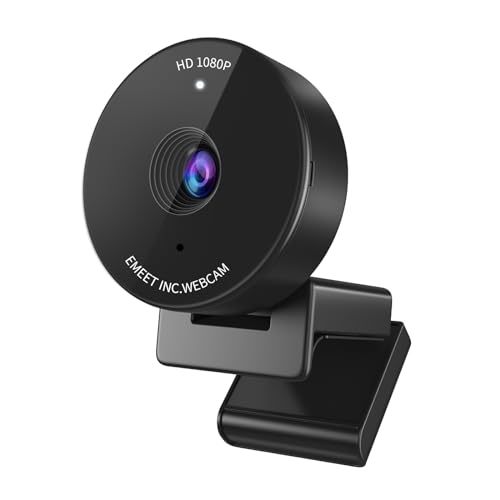
- 1080p video at 30fps
- Physical privacy cover
- Focused 70-degree field of view
Best For: Solo calls, classes, and privacy-conscious users
Low-Light Feature Pick
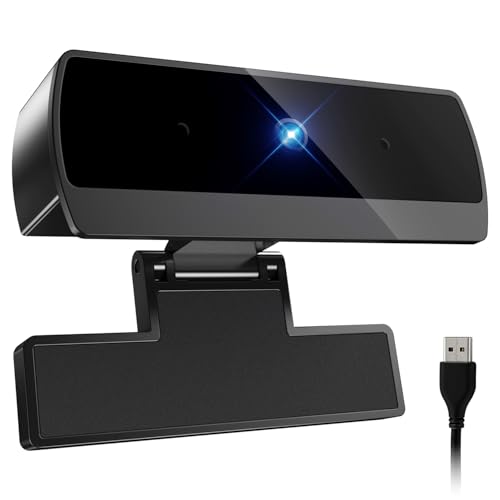
- 1080p video at 30fps
- Large-aperture low-light design
- Autofocus and plug-and-play setup
Best For: Dimly lit calls, streaming, and flexible desk setups
Best All-in-One Conference Webcam

- 1080p camera with four mics and two speakers
- Adjustable 60°–98° field of view
- Noise cancellation and low-light correction
Best For: Home offices and team video meetings
Best Simple Wide-Angle Webcam

- 1080p video at 30fps with a wide-angle lens
- Automatic light correction and noise-reducing mic
- Slide-on privacy cover and plug-and-play setup
Best For: Calls, remote learning, and basic streaming
Best Versatile Plug-and-Play Webcam

- 1080p video with HDR and auto light correction
- Dual noise-reducing microphones
- 360° rotation, privacy cover, and broad compatibility
Best For: Calls, streaming, and multi-platform setups
Dual-Camera Versatility – EMEET C60E 4K Webcam
For shoppers comparing webcams under 300, the EMEET C60E stands out with two camera views in one compact setup. Its wide-angle camera handles people and backgrounds, while the telephoto camera supports detailed close-ups for demonstrations, teaching, streaming, and meetings.
Best For: Streamers, instructors, and presenters who need both wide scene coverage and close-up framing.
Pros:
- Dual-camera design offers wide-angle and telephoto views.
- Supports up to 11X hybrid zoom with PDAF autofocus, except in 4K, 60FPS, and YUY2 modes.
- Remote and EMEET STUDIO controls provide zoom, color, brightness, focus, and RGB adjustments.
- Includes two omnidirectional microphones and RGB lighting.
Cons:
- The zoom function is unavailable in 4K, 60FPS, and YUY2 modes.
- USB connectivity is listed as USB 2.0 Type-A.
The C60E is a specialized choice rather than a basic webcam. Its dual-camera layout and remote-controlled framing can simplify product presentations and live content, particularly when switching between a full scene and close-up detail matters.
Simple Everyday Choice – Logitech Brio 300 1080p Webcam
If you want a straightforward option among webcams under 300, the renewed Logitech Brio 300 focuses on essential video-calling features. It records in 1080p at 30 frames per second, includes autofocus and low-light support, and has a built-in privacy shutter.
Best For: Everyday Zoom, Microsoft Teams, and Google Meet calls where simple setup and privacy are priorities.
Pros:
- Full HD 1080p video at 30 frames per second.
- Autofocus and automatic exposure support convenient video calls.
- Built-in privacy cover helps block the lens when not in use.
- Compact 2.56-ounce renewed design.
Cons:
- Limited to 1080p resolution and 30 frames per second.
- The listing specifies a 90-day limited warranty.
- The product is renewed rather than new.
The Brio 300 is best suited to users who value uncomplicated conferencing over advanced streaming controls. It lacks 4K and higher frame-rate modes, but its autofocus, low-light mode, and privacy shutter cover the basics for routine calls.
Creator-Focused Clarity – EMEET S600 4K Webcam
The EMEET S600 is a strong contender for webcams under 300 when image quality and fast focusing are priorities. Its Sony 1/2.55-inch sensor supports 4K at 30 frames per second or 1080p at 60 frames per second, with light balancing and software controls for further adjustment.
Best For: Streamers, content creators, and video callers who want 4K detail or smoother 1080p footage.
Pros:
- Sony sensor delivers 4K video at 30 frames per second.
- 1080p at 60 frames per second provides a smoother option.
- PDAF autofocus and automatic light adjustment help maintain clear footage.
- Built-in privacy cover and dual noise-canceling microphones add practical convenience.
Cons:
- At 4K, the field of view is fixed at 73 degrees.
- Advanced image and audio customization requires EMEETLINK software.
The S600 balances plug-and-play use with creator-oriented controls. It is a practical upgrade for users moving beyond basic conferencing, especially if they need 4K detail, 60FPS Full HD, or improved microphone processing.
Flexible 4K Connectivity – UGREEN 4K Webcam
For buyers comparing webcams under 300 across different devices, the UGREEN 4K webcam offers broad compatibility and a USB A-to-C adapter. It combines 4K video at 30 frames per second with PDAF autofocus, automatic light adjustment, dual microphones, and a built-in privacy cover.
Best For: Home offices, conference rooms, and streamers using a mix of USB-A and USB-C devices.
Pros:
- 8MP sensor supports 4K at 30 frames per second.
- PDAF autofocus tracks subjects from approximately 0.33 to 16.4 feet.
- Dual microphones capture audio from up to 16.4 feet away.
- Includes USB-A to USB-C adapter, privacy cover, and tripod compatibility.
Cons:
- It switches to 1080p at 60 frames per second if the hardware or software does not support 4K at 30FPS.
- The listed viewing angle is 70 degrees, which may be narrower for larger groups.
The UGREEN model is a versatile pick when device compatibility matters as much as image quality. Its adapter and driver-free setup make it easy to move between computers, while autofocus and light correction support everyday calls and broadcasts.
Reliable Everyday Pick – Logitech Brio 101
The Logitech Brio 101 is a straightforward choice among webcams under 300 for video calls, remote work, and casual streaming. It provides 1080p Full HD video, automatic light balancing, a built-in microphone, and simple USB-A plug-and-play setup.
Best For: Remote workers and students who want a dependable Full HD webcam with built-in privacy protection.
Pros:
- 1080p Full HD video for meetings and streaming
- RightLight automatically helps reduce shadows in low light
- Integrated sliding privacy cover
- Works with Teams, Zoom, Google Meet, Windows, macOS, and Chrome OS
Cons:
- Uses a USB-A connection rather than USB-C
- Fixed-focus design may offer less flexibility for varied distances
- Built-in audio is mono
Choose the Brio 101 if you value ease of use and privacy over advanced controls. Its 60-degree viewing angle and included USB-A cable make it especially practical for a single-person desk setup.
Privacy-Focused Value – EMEET C950 1080p Webcam
The EMEET C950 is a practical option among webcams under 300, pairing 1080p video with a physical privacy cover and a compact design. Its 70-degree field of view keeps the frame focused on one person, while EMEETLINK software allows image adjustments.
Best For: Individuals who want a compact webcam with a narrow personal framing and physical privacy control.
Pros:
- 1080p video at 30 frames per second
- Physical sliding privacy cover
- 70-degree view helps limit background exposure
- Built-in omnidirectional microphone and broad platform support
Cons:
- Chrome OS compatibility may vary by version and model
- Fixed-focus lens offers limited framing flexibility
- Best image and audio results require suitable lighting and positioning
The C950 makes sense for solo calls, online classes, and home-office use where privacy matters. Its relatively tight viewing angle is less suited to group presentations, but it can help keep a busy room out of frame.
Low-Light Feature Pick – Diccik 1080P Webcam
This Diccik webcam is an appealing choice among webcams under 300 for users who want Full HD video, autofocus, and enhanced low-light performance without installing drivers. Its large-aperture design, CMOS sensor, and 5-foot braided USB cable support flexible desk setups.
Best For: Streamers, remote workers, and callers who often use a webcam in dim or changing light.
Pros:
- 1080p video with smooth 30fps capture
- F2.2 aperture and large sensor are designed for low-light performance
- Autofocus provides more flexibility than fixed focus
- Plug-and-play compatibility with Windows, macOS, Linux, Zoom, Teams, OBS, Skype, and YouTube
Cons:
- Uses a USB connection and does not list USB-C specifically
- Product details contain inconsistent sensor and aperture specifications
- No physical privacy cover is listed in the supplied features
The Diccik model stands out on paper for low-light capability and autofocus, making it useful when your desk lighting is not ideal. Consider it if those features matter more than having a built-in privacy shutter or established-brand ecosystem.
Best All-in-One Conference Webcam – EMEET C980 PRO 1080P
If you need webcams under 300 for meetings or home-office calls, the EMEET C980 PRO stands out by combining a 1080p camera, four microphones, and two speakers in one USB device. Its adjustable field of view and low-light correction make it practical for group calls and varied rooms.
Best For: Home offices, team meetings, and users who want built-in video, microphone, and speaker hardware.
Pros:
- Combines Full HD 1080p video with four microphones and two speakers.
- Active noise cancellation and auto echo cancellation help improve call audio.
- Offers a 60°–98° adjustable viewing angle and automatic low-light correction.
- Includes a privacy cover and supports plug-and-play use on Windows and macOS.
Cons:
- Fixed focus may be less flexible than autofocus for changing distances.
- The manufacturer advises against using it with a USB hub because of power limitations.
The C980 PRO is a strong choice when simplifying a conference setup matters more than portability. Its integrated speakers and microphone array reduce the need for separate audio accessories.
Best Simple Wide-Angle Webcam – Shcngqio TWC29 1080p
Among webcams under 300, the Shcngqio TWC29 is a straightforward option for video calls, remote learning, and streaming. It pairs 1080p video with a wide-angle lens, automatic light correction, a noise-canceling microphone, and a slide-on privacy cover.
Best For: Everyday video calls, online classes, and basic streaming setups that need easy USB installation.
Pros:
- Records 1080p video at 30fps through a wide-angle lens.
- Automatic light correction helps balance brightness in changing conditions.
- Built-in noise-reducing microphone is designed to limit ambient sound.
- Includes a privacy cover and a universal adjustable clip.
Cons:
- Uses fixed focus rather than autofocus.
- Manufacturer warranty is listed as 90 days.
- Some mobile-device use may require supported OTG functionality.
The TWC29 focuses on the features most users need for routine calls without requiring driver installation. Its wide-angle view and privacy cover add useful flexibility for home and study spaces.
Best Versatile Plug-and-Play Webcam – NIVEOLI 1080p HD Webcam
For shoppers comparing webcams under 300, the NIVEOLI 1080p HD webcam offers a compact setup for calls, gaming streams, and online meetings. It includes HDR, dual noise-reducing microphones, automatic light correction, a privacy cover, and a 360° rotating head.
Best For: Users who need a flexible webcam for laptops, desktops, streaming, and multiple operating systems.
Pros:
- Provides 1080p video at 30fps with HDR for challenging lighting situations.
- Dual noise-reducing microphones capture stereo audio while filtering background noise.
- Includes a built-in privacy cover and adjustable mounting clip.
- Works with Windows, Mac, Linux, and Android, with a 360° rotating head.
Cons:
- Fixed focus may limit flexibility for close-up or distance changes.
- The supplied specifications contain an inconsistent style name listing, so buyers should verify the intended model.
The NIVEOLI is appealing if platform compatibility and physical adjustability are priorities. Its privacy shutter, HDR, and dual microphones give it a well-rounded feature set for everyday communication and streaming.
How We Picked the Best Webcams Under 300
We focused on webcams that offer meaningful benefits for video calls, streaming, online teaching, content creation, and everyday desktop use. Our evaluation considered image resolution, sensor quality, autofocus performance, low-light handling, microphone capabilities, field of view, privacy controls, mounting flexibility, and plug-and-play compatibility.
We also looked at how each model fits its intended use. A basic 1080p webcam may be the better choice for routine meetings, while a 4K model with a larger sensor or advanced autofocus can be worthwhile for streaming and detailed presentations. Models with built-in speakers, dual cameras, or wider viewing angles were considered for users with more specialized needs.
Quick Comparison
| Feature | What to Look For | Best For |
|---|---|---|
| 1080p resolution | Clear, efficient video for common calls | Meetings, classes, and general use |
| 4K resolution | Sharper detail and more cropping flexibility | Streaming and content creation |
| Autofocus | Keeps faces or objects sharp as they move | Presenters and demonstrators |
| Wide or adjustable FOV | Fits more people or background into the frame | Group calls and streaming setups |
| Privacy cover | Physically blocks the lens when not in use | Home offices and shared spaces |
Key Buying Factors for Webcams Under 300
Resolution and Image Quality
Full HD 1080p is sufficient for most meetings and video calls, particularly when your internet connection is limited. Choose 4K if you stream, record tutorials, crop footage, or want more detail. Remember that your computer, software, lighting, and upload speed can limit the practical benefit of higher resolution.
Autofocus, Lighting, and Field of View
Autofocus is useful when you move toward or away from the camera, while fixed-focus designs can be perfectly adequate for a stationary desk setup. Auto light correction helps in uneven conditions, but a front-facing lamp or window usually improves results more than software alone. A narrow field of view keeps attention on one person; a wider angle accommodates groups, instruments, or demonstrations.
Microphones, Privacy, and Compatibility
Built-in microphones are convenient, but headset or standalone microphones generally deliver better consistency in noisy rooms. Look for a physical privacy shutter or cover if you want a clear hardware barrier. USB webcams are usually easy to install, but confirm the connector, operating-system support, and compatibility with your preferred meeting or streaming software.
Who Should Buy Which Webcams Under 300?
- For everyday meetings: Choose a straightforward 1080p model with reliable auto light correction, a privacy cover, and plug-and-play USB connectivity.
- For streaming and recording: Prioritize 4K capture, a quality sensor, dependable autofocus, and a field of view that suits your desk or studio.
- For group calls or demonstrations: Look for a wide-angle or adjustable camera that keeps multiple people or larger objects in frame.
- For privacy-conscious users: Select a webcam with a physical shutter or sliding cover rather than relying only on software controls.
- For simple all-in-one setups: A model with integrated speakers and microphones can reduce desk clutter, though dedicated audio equipment may sound better.
The best Webcams Under 300 are not necessarily the ones with the highest resolution. Match the camera’s strengths to your lighting, workspace, software, and primary use before paying for features you may not need.