
The right webcam can make streams, tutorials, calls, and recorded videos look far more polished without the complexity of a mirrorless camera. The best webcams for content creators combine sharp resolution with dependable autofocus, flattering exposure, clear audio, and useful framing controls.
We selected 10 creator-focused models ranging from compact 4K cameras to AI-powered PTZ webcams. Use the guide below to narrow the list by workflow, lighting, framing needs, and budget.
Best 10 Webcams for Content Creators Picks for 2026
Premium AI Tracking Pick

- 4K video from a large 1/1.3-inch sensor
- Physical AI pan-and-tilt tracking
- Directional mics and Stream Deck integration
Best For: Creators who move around while streaming or presenting
Studio Control Pick

- 4K capture at 60 FPS
- Sony STARVIS 2 sensor with Prime Lens
- Camera Hub controls and 49mm filter support
Best For: Creators who want manual, DSLR-like image control
Long-Session Streaming Pick

- 1/1.3-inch sensor with 4K/30fps
- Fast PDAF autofocus and AI imaging
- Aluminum body designed for extended streaming
Best For: Streamers who want manual controls and sustained operation
Built-In Lighting Value Pick

- 4K video and 1080p/60fps streaming
- Tri-tone adjustable ring light
- PDAF autofocus and privacy shutter
Best For: Creators who want an easy setup with integrated lighting
Premium 4K Control

- 4K at 30fps or 1080p at 60fps
- Manual image controls plus AI enhancement
- Noise-reducing mics and built-in privacy cover
Best For: Creators who want detailed video and extensive image control
Portable AI Framing

- 4K video with a 1/2-inch CMOS sensor
- AI framing, autofocus, and gesture control
- Only 40.5 grams with USB-C plug-and-play setup
Best For: Mobile creators who want compact 4K video with automatic framing
Dual-View Streaming
EMEET C60E Dual-Camera 4K Webcam
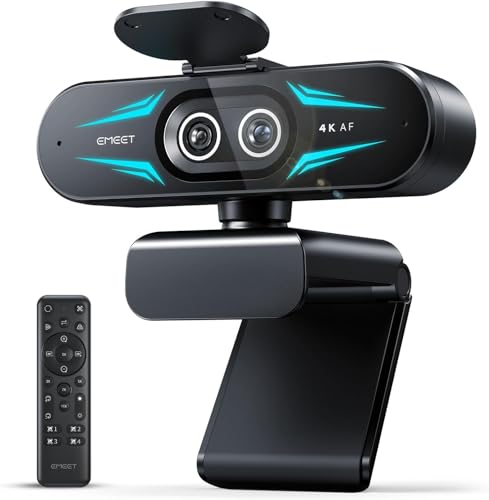
- Wide-angle and telephoto cameras for flexible framing
- Up to 11X hybrid zoom with PDAF autofocus
- Remote control, RGB lighting, and dual microphones
Best For: Presenters and streamers switching between full scenes and close-ups
Premium PTZ Pick

- 4K HDR video from a 1/2-inch sensor
- AI PTZ tracking and PDAF autofocus
- Gesture, smartphone, and creator-focused modes
Best For: Mobile streamers and presenters wanting automated framing
High-Value 4K Choice

- 4K/30fps and 1080p/60fps capture
- Sony sensor with PDAF autofocus
- Privacy cover and noise-canceling microphones
Best For: Streamers seeking plug-and-play 4K performance
Flexible AI Tracking Pick

- 4K capture with a 1/2-inch CMOS sensor
- Customizable AI tracking and preset positions
- Landscape, portrait, and upside-down modes
Best For: Creators switching between scenes and shooting orientations
Premium AI Tracking Pick – Insta360 Link 2 Pro
For content creators who want polished, flexible footage, the Insta360 Link 2 Pro combines 4K video with a large 1/1.3-inch sensor, AI tracking, and creator-focused controls. Its PTZ design is especially useful when you move around during streams, presentations, or demonstrations.
Best For: Mobile streamers, presenters, and creators who want strong low-light performance and automated framing.
Pros:
- 4K video and a large sensor support detailed footage with improved low-light performance.
- Physical pan-and-tilt AI tracking keeps you or a group in frame.
- Directional beamforming microphones, natural bokeh, and Stream Deck integration support polished workflows.
- DeskView, Whiteboard, and 4K Portrait modes add useful shooting flexibility.
Cons:
- It is not compatible with ARM-based Windows systems or Windows Hello Face Recognition.
- Advanced features require the dedicated Link Controller software.
The Link 2 Pro is a strong choice when framing automation and overall versatility matter as much as resolution. It offers more creator-oriented features than a basic fixed webcam, though buyers should confirm system compatibility first.
Studio Control Pick – Elgato Facecam 4K
The Elgato Facecam 4K is aimed at creators who prefer hands-on control over their image. It records 4K at 60 frames per second and pairs a Sony STARVIS 2 sensor with Elgato Camera Hub software for detailed, DSLR-like adjustments.
Best For: Streamers and video professionals who want high-frame-rate 4K and manual image customization.
Pros:
- Captures 4K video at up to 60 FPS for smooth, highly detailed footage.
- Sony STARVIS 2 sensor and Prime Lens technology support sharp, vibrant images.
- Camera Hub provides creative effects and manual settings.
- Supports standard 49mm lens filters and saves settings with built-in flash memory.
Cons:
- Its fixed prime-lens design does not offer the PTZ tracking of some creator webcams.
- Its strongest features are geared toward users willing to adjust settings in software.
Choose the Facecam 4K if image control and smooth 4K60 capture are priorities. Lens-filter support also makes it a particularly adaptable option for creators building a more deliberate studio look.
Long-Session Streaming Pick – YoloLiv YoloCam S3
The YoloLiv YoloCam S3 is a practical choice for content creators who need sharp video, fast autofocus, and dependable operation for extended streams. Its 1/1.3-inch sensor supports uncompressed 4K/30fps or 1080p/60fps, while the aluminum body is designed to dissipate heat.
Best For: PC and Mac streamers who want manual controls, fast autofocus, and stable long-duration operation.
Pros:
- Large 1/1.3-inch sensor delivers 4K/30fps or 1080p/60fps video.
- Fast PDAF autofocus helps maintain sharp close-ups and movement.
- AI-enhanced exposure, white balance, HDR, and low-light imaging support consistent footage.
- Aluminum construction is designed for 24/7 streaming, and the mount supports tripods.
Cons:
- Picasso Resolve color grading is currently available only on Windows.
- The camera lacks the physical pan-and-tilt tracking offered by PTZ models.
The YoloCam S3 stands out for creators who value image tuning and sustained streaming over automated camera movement. It is a well-rounded fit for PC or Mac setups, with the most advanced color workflow currently favoring Windows users.
Built-In Lighting Value Pick – NexiGo N680E Pro
The NexiGo N680E Pro is a convenient option for content creators who want 4K video without assembling a separate light. Its built-in tri-tone ring light, PDAF autofocus, and 1080p/60fps support make it suitable for streaming, recording, and video calls.
Best For: Newer streamers and creators who need simple plug-and-play setup with integrated lighting.
Pros:
- 4K sensor provides detailed video, while 1080p/60fps supports smooth streaming.
- Built-in ring light offers three color temperatures and stepless brightness adjustment.
- PDAF autofocus and dual noise-reducing microphones support clear, consistent recordings.
- Privacy shutter, tripod mount, and broad platform compatibility add practical convenience.
Cons:
- It uses USB-A, so some newer devices may require an adapter.
- Its 80-degree field of view is narrower than some wider-angle creator cameras.
The N680E Pro makes sense when convenience is the priority. Its integrated light reduces setup complexity, while autofocus, privacy protection, and plug-and-play operation cover the essentials for a straightforward creator workstation.
Premium 4K Control – Logitech MX Brio
The Logitech MX Brio is a strong choice among webcams for content creators who want detailed 4K video and hands-on control over their image. It records in 4K at 30fps or 1080p at 60fps, while autofocus, auto-exposure, auto white balance, and AI-enhanced image quality help maintain a polished look in changing light.
Best For: Creators who want high-resolution streaming, adjustable image settings, and broad computer-platform compatibility.
Pros:
- Supports Ultra HD 4K at 30fps and 1080p at 60fps.
- Offers manual controls for ISO, shutter speed, tint, and vibrance, plus an Auto mode.
- Dual beamforming microphones reduce background noise, and the built-in privacy cover blocks the lens.
- Show Mode tilts the camera down to share desk notes or sketches.
Cons:
- 4K video is limited to 30fps.
- Its feature-rich controls may be more than casual callers need.
The MX Brio stands out when image control matters as much as resolution. Its software integration and adjustable picture settings suit creators refining a repeatable streaming setup, while the privacy cover and desk-sharing mode add practical flexibility.
Portable AI Framing – OBSBOT Meet 2
The OBSBOT Meet 2 is a compact option among webcams for content creators who need 4K video without carrying a bulky setup. Its 1/2-inch CMOS sensor is designed to capture more light, while AI framing, autofocus, gesture controls, and a lightweight 40.5-gram design support flexible filming and streaming.
Best For: Mobile creators, streamers, and remote workers who value compact size, automatic framing, and simple USB-C setup.
Pros:
- Combines 4K resolution with a larger 1/2-inch CMOS sensor for brighter, clearer images.
- AI framing and autofocus adjust composition and focus for individuals or groups.
- Gesture controls can activate framing and adjust zoom without manual operation.
- Dual omnidirectional noise-canceling microphones help reduce wind, keyboard, and ambient noise.
Cons:
- The ultra-compact design may provide fewer physical controls than larger webcams.
- The camera may become hot during use, which the supplied notes describe as normal.
Meet 2 is particularly appealing if portability and automated composition are priorities. It plugs in through a single USB-C connection, while OBSBOT Center provides additional customization for creators who want more control.
Dual-View Streaming – EMEET C60E Dual-Camera 4K Webcam
The EMEET C60E takes a specialized approach to webcams for content creators by combining wide-angle and telephoto cameras. It is built for streams, demonstrations, teaching, and presentations where you may need to switch between a full scene and a close-up without physically repositioning the camera.
Best For: Streamers, instructors, and product presenters who need flexible wide and close-up framing.
Pros:
- Dual-camera design supports panoramic views and detailed close-ups.
- Offers up to 11X hybrid zoom with PDAF autofocus for stable framing.
- Remote and EMEET STUDIO controls allow adjustments to zoom, color, brightness, focus, and RGB lighting.
- Includes two omnidirectional microphones with a stated 9.8-foot capture radius.
Cons:
- Zoom is not supported in 4K, 60fps, or YUY2 modes.
- Uses a USB 2.0 Type-A connection rather than USB-C.
- The dual-camera and RGB design may be more specialized than needed for standard video calls.
The C60E is best understood as a framing tool for presentation-heavy content rather than a basic webcam. Its wide-angle and telephoto views can simplify product demos and teaching, while remote control helps make live adjustments without interrupting the stream.
Premium PTZ Pick – Insta360 Link 2
For content creators seeking webcams for content creators, the Insta360 Link 2 combines a 1/2-inch sensor, 4K video, HDR, and PTZ movement in a compact setup. Its AI tracking, PDAF autofocus, and software controls make it well suited to creators who move during streams, presentations, or recordings.
Best For: Mobile streamers, presenters, and creators who want automated framing with premium image quality.
Pros:
- 4K capture with HDR and a 1/2-inch sensor for detailed video.
- AI tracking physically pans and tilts to follow movement.
- PDAF autofocus, AI noise cancellation, and natural bokeh options.
- Gesture, smartphone, DeskView, and Whiteboard controls add flexibility.
Cons:
- Not compatible with ARM-based Windows systems or Windows Hello Face Recognition.
- Its broad feature set may require time in the Link Controller software.
The Link 2 is a strong choice when framing automation and image customization matter as much as resolution. It is especially compelling for creators who record standing or moving content rather than remaining fixed at a desk.
High-Value 4K Choice – EMEET S600
The EMEET S600 is a practical option among webcams for content creators, offering 4K at 30fps, 1080p at 60fps, and a Sony 1/2.55-inch sensor. PDAF autofocus, automatic light adjustment, customizable viewing angles at 1080p, and dual noise-canceling microphones support streaming and recording without an elaborate setup.
Best For: Streamers and creators who want sharp 4K video, smooth 1080p capture, and straightforward plug-and-play setup.
Pros:
- Supports 4K at 30fps and 1080p at 60fps.
- PDAF autofocus helps maintain sharp subjects across changing scenes.
- Dual noise-canceling microphones and adjustable 1080p FOV.
- Built-in privacy cover and flexible rotation and tilt.
Cons:
- The field of view is fixed at 73 degrees in 4K.
- Advanced image and audio adjustments require EMEETLINK software.
The S600 balances high-resolution output with useful everyday controls and a built-in privacy cover. It makes sense for creators who want strong core specifications without needing PTZ tracking or gesture-based operation.
Flexible AI Tracking Pick – OBSBOT Tiny 2 Lite
The OBSBOT Tiny 2 Lite gives content creators a flexible PTZ option among webcams for content creators, with 4K capture, a 1/2-inch CMOS sensor, and multiple AI tracking modes. Its preset positions, portrait support, gesture controls, and SDK, OSC, Stream Deck, and global hotkey compatibility make it useful for creators managing varied shooting setups.
Best For: Streamers, educators, and creators who switch between tracking modes, camera positions, and landscape or portrait content.
Pros:
- 4K at 30fps and 1080p at 60fps capture.
- Supports upper-body and hand tracking with customizable tracking areas.
- Preset positions can store separate parameters and tracking modes.
- Landscape, portrait, and upside-down shooting modes support varied setups.
Cons:
- The Lite version omits Whiteboard Mode and voice control.
- Its advanced SDK and control integrations may be more than casual users need.
The Tiny 2 Lite is a strong fit for creators who value repeatable camera positioning and adaptable framing. It keeps setup approachable while offering deeper controls for users who want to integrate the webcam into a more advanced production workflow.
How We Picked the Best Webcams for Content Creators
We focused on features that affect real-world production rather than resolution alone. Each model was evaluated by its stated image quality, sensor and autofocus capabilities, frame-rate support, microphone design, mounting flexibility, privacy features, software controls, and suitability for streaming or recording. AI tracking and PTZ movement were considered especially useful for creators who present, teach, demonstrate products, or move around a set.
Because lighting and software compatibility can vary by setup, treat specifications as a starting point. Check your computer’s available USB ports, operating system support, preferred streaming application, and whether advanced controls require a companion app.
Quick Comparison
| Best For | Recommended Type | Features to Prioritize |
|---|---|---|
| Professional studio streaming | 4K studio webcam | High frame rates, manual controls, clean HDMI-like workflow, strong exposure options |
| Presenters and educators | AI-tracking PTZ webcam | Automatic framing, gesture controls, smooth tracking, reliable autofocus |
| Low-light rooms | Large-sensor 4K webcam | Good dynamic range, HDR, noise reduction, manual exposure |
| Podcasts and demonstrations | Wide-angle or dual-camera model | Flexible framing, telephoto capability, clear microphones |
| Simple plug-and-play setups | USB 4K webcam | Broad app compatibility, privacy shutter, automatic exposure and focus |
Key Buying Factors for Webcams for Content Creators
Resolution and Frame Rate
4K provides extra detail and cropping flexibility, particularly for recorded video. For live streaming, platform limits may make 1080p the practical output, while 60fps is valuable for gaming, demonstrations, and smoother movement. Confirm that your computer and software can handle the selected resolution and frame rate.
Sensor, Lighting, and Exposure
A larger sensor can improve detail and low-light performance, but it does not replace a good key light. Look for HDR, manual exposure, white-balance control, and dependable automatic adjustments if your lighting changes during a broadcast.
Autofocus, Framing, and Camera Movement
PDAF autofocus helps keep faces and products sharp. AI framing and PTZ movement are worthwhile when you stand, teach, or move across a workspace. If you remain seated, a fixed webcam with strong manual controls may offer a simpler and more predictable setup.
Audio, Privacy, and Connectivity
Built-in noise-canceling microphones are convenient, but a dedicated USB or XLR microphone usually delivers better sound. A physical privacy shutter is useful for shared workspaces. Also verify USB cable length, mounting options, and compatibility with OBS, Zoom, Teams, and your preferred editing or streaming tools.
Who Should Buy Which Webcams for Content Creators?
Choose a studio-oriented 4K model if image control and high-frame-rate recording matter more than automatic tracking. Choose an AI PTZ webcam for presentations, fitness instruction, classrooms, or any setup where you move around. Choose a large-sensor or HDR model if you often work in uneven or dim lighting. Choose a dual-camera or wide-angle webcam for product demonstrations, interviews, and flexible room coverage. For casual creators who want fast setup, a USB plug-and-play webcam with autofocus, a privacy shutter, and built-in microphones is usually the best balance.