
Looking for a robot arm kit for beginners that is actually fun to build and easy to learn from? The best options balance simple assembly, clear instructions, and just enough coding or control features to keep new users engaged.
In this roundup, we focus on beginner-friendly kits for kids, teens, and first-time STEM builders, with picks that range from basic science projects to more advanced programmable arms.
Best 10 Robot Arm Kit for Beginners Picks for 2026
Best for Hands-On Learning

- ABS and aluminum alloy construction
- Numbered parts and detailed instructions
- Simple programming with remote control
Best For: Kids who want a beginner-friendly robotics project with building, coding, and movement control.
Best for Playable Builds
UNCLE BRICK Tracked Robot Arm Kit

- Remote and app control add replay value
- Tracked base moves like a small tank
- Large 1,468-piece build with spare gears
Best For: Kids, families, and hobbyists who want a hands-on robotic arm with real movement.
Best for Programming and Expansion
LeArm 6DOF Open Source Robotic Arm
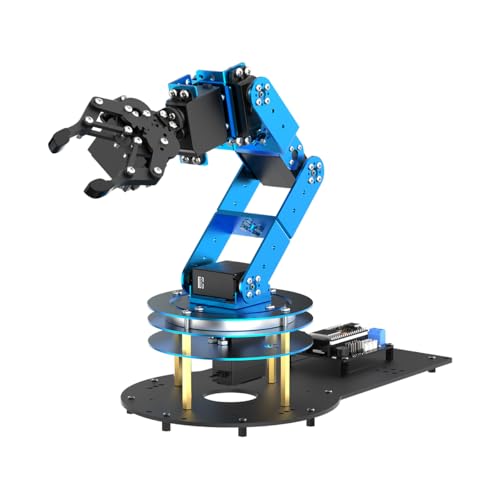
- ESP32 and Arduino-compatible for coding projects
- 6 smart servos with inverse kinematics
- App, PC, and wireless controller support
Best For: Students and beginners who want a learn-as-you-grow robotic arm kit with coding and upgrade potential.
Best for Hands-On STEM Builds
Robot Arm Kit with 270° Motion

- Real motors, microcontroller, and circuits
- 270° motion with multi-axis control
- Guided wooden build for beginners
Best For: Kids, teens, and adults starting robotics through a hands-on build project.
Best for Hands-On Coding
Hiwonder xArm1S Arduino Robot Arm
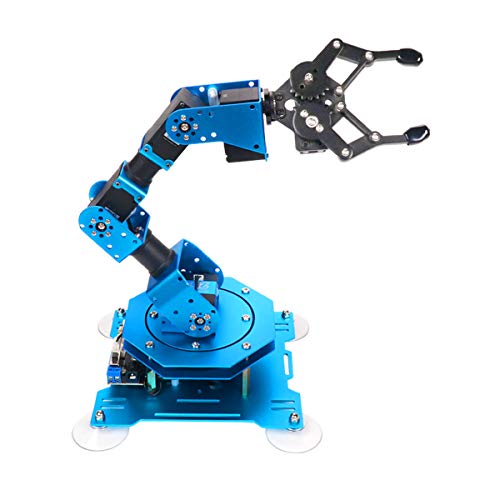
- 6DOF full-metal arm with strong servo torque
- PC, app, mouse, and wireless controller support
- Great for coding practice and STEM experimentation
Best For: Beginners who want a capable desktop robot arm for coding and robotics projects.
Best for Open-Source Learning
miniArm Arduino 5DOF Robot Arm Kit

- Arduino-compatible with open-source programming support
- Multiple control options: app, knobs, and offline editing
- Expandable for sensors, coding practice, and STEM projects
Best For: Students and beginners who want a customizable robot arm they can learn programming with.
Best Simple Pick
4DOF Robot Arm Kit for Beginners
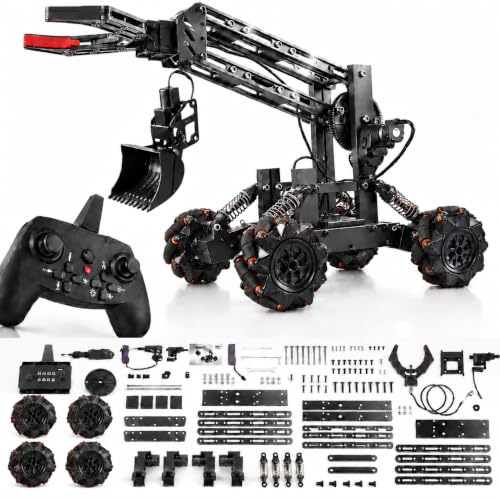
- 2-in-1 arm and excavator-style build
- Includes remote, battery, USB cable, and DIY tools
- Supports grabbing, movement, and beginner programming
Best For: Kids and teens who want a hands-on STEM robotics kit with extra play value.
Best for Hands-On Learning – Robotic Arm Kit for Kids 8-12
If you want a robot arm kit for beginners that keeps setup approachable while still teaching real STEM skills, this one is a solid fit. It combines a buildable robotic arm, simple programming, and remote-control play, so kids can learn by assembling, testing, and adjusting the arm’s movements.
Best For: Kids ages 8-12 who want an educational robot kit with coding basics, motion control, and a hands-on building experience.
Pros:
- Made from ABS and aluminum alloy for a sturdier feel
- Includes detailed instructions and numbered parts for easier assembly
- Supports simple programming plus grabbing, lifting, and angle movement
- Remote control adds extra play value for longer-distance use
Cons:
- Remote requires 4 AA batteries, which are not included
- Programming and assembly may still need parent help for younger beginners
- More of a learning kit than a pure toy, so it takes patience to assemble
Overall, this robot arm kit for beginners is a good choice if you want a project that balances fun and education. It’s especially appealing for kids who like building challenges and want an intro to robotics without jumping straight into a complex advanced kit.
Best Multi-Mode STEM Kit – ACEBOTT 4-in-1 Smart Robot Arm Kit
If you want a robot arm kit for beginners that does more than sit on a desk, this ACEBOTT set is a strong pick. It combines a 5DOF robot arm with a tank car build, plus coding support through Arduino and Scratch, so kids can start simple and grow into more advanced projects.
Best For: Kids and teens ages 12-16 who want a hands-on STEM kit with both building and coding activities.
Pros:
- 4-in-1 design adds variety with a robot arm and tank car build
- Compatible with Arduino and Scratch for beginner-friendly coding
- App and remote control make it easy to explore right away
- 5DOF arm gives more movement and play value than basic kits
Cons:
- Best suited to older kids, not younger beginners
- May feel complex if you only want a simple plug-and-play toy
- Programming features can take time to learn fully
This is a flexible option if you want a robot arm kit for beginners that can evolve with the user’s skills. The mix of building, control modes, and coding makes it a practical choice for families looking for longer-term STEM value.
Best for Learning & Memory Playback – Robot Arm for Arduino Kit
This robot arm kit for beginners is a hands-on way to learn basic electronics, coding, and mechanical assembly without feeling overwhelming. It comes with step-by-step tutorials, joystick control, and a memory function that can record and repeat movements, making it a practical pick for guided practice.
Best For: Beginners, teens, and adults who want a DIY robot project that teaches building, programming, and simple automation.
Pros:
- Step-by-step assembly and programming tutorials make it easier to get started.
- 4-axis arm can grab and move objects in multiple directions.
- Records up to 170 actions and repeats them for simple automation demos.
- Good educational value for electronics, math, science, and coding practice.
Cons:
- Requires two batteries, which are not included.
- More of a learning kit than a polished plug-and-play robot.
- Best suited to patient builders who are comfortable with DIY assembly.
For shoppers comparing a robot arm kit for beginners, this model stands out for its teaching focus and repeat-action feature. It is a solid choice if you want an affordable learning project that turns assembly time into a useful intro to robotics and programming.
Best for Playable Builds – UNCLE BRICK Tracked Robot Arm Kit
If you want a robot arm kit for beginners that goes beyond a display-only build, this UNCLE BRICK set is a strong pick. With 1,468 pieces, remote control, and app control, it offers a hands-on STEM project that can keep kids and hobbyists engaged after assembly.
Best For: Builders ages 8-14, families, and adult hobbyists who want a remote-controlled robot arm with more play value than a static model.
Pros:
- Remote and app control make it more interactive than a standard display kit
- Tracked base adds tank-like movement, turns, and better floor mobility
- Gripper and arm motion create a more complete robotics learning experience
- Includes spare gears, which is helpful for a challenging mechanical build
Cons:
- 1,468 pieces make this a time-intensive project for true beginners
- Grip strength is limited to lighter objects on smoother surfaces
- May be more complex than a first-ever robot arm kit for beginners
This is a better fit for shoppers who want an engaging robot arm kit for beginners with real movement and control, not just a shelf model. It balances STEM learning with playability, making it a solid choice if you want a project that feels rewarding after the build is done.
Best for Programming and Expansion – LeArm 6DOF Open Source Robotic Arm
If you want a robot arm kit for beginners that goes beyond simple demo moves, this LeArm 6DOF kit is built for learning, coding, and secondary development. It pairs ESP32 and Arduino support with multiple control methods, so you can start with app or PC software and grow into custom programming as your skills improve.
Best For: Students, hobbyists, and STEM learners who want a hands-on robotic arm kit with tutorials, open-source code, and room to expand.
Pros:
- ESP32-based, fully compatible with Arduino programming
- 6 smart servos and inverse kinematics for smooth motion
- App, PC software, and wireless controller control options
- 200+ tutorials, sample experiments, and open-source resources
Cons:
- More technical than a toy-grade beginner robot arm
- Advanced features may feel overwhelming at first
- Sensor upgrades may require additional parts and setup
Overall, this is a strong robot arm kit for beginners who want to learn real robotics rather than just assemble a basic arm. Its open-source design, tutorial support, and expansion options make it a better long-term educational platform than many entry-level kits.
Best for Hands-On STEM Builds – Robot Arm Kit with 270° Motion
If you want a robot arm kit for beginners that feels more like a real engineering project than a toy, this set is a strong pick. It combines wooden construction, motors, a microcontroller, and circuit components so kids can see how electronics translate into movement while building practical STEM skills.
Best For: Kids, teens, and adults who want a guided, hands-on introduction to robotics, circuits, and mechanical assembly.
Pros:
- Includes motors, a microcontroller, and circuit boards for real robotics learning
- 270° rotation and multi-axis control make the finished build feel interactive
- Step-by-step wooden assembly helps beginners build patience and problem-solving skills
- Works well for solo projects, family STEM nights, or classroom use
Cons:
- More challenging than a simple snap-together toy
- Best suited to kids who enjoy building and following instructions
- Wooden parts may feel less durable than plastic on heavy use
Overall, this is a thoughtful robot arm kit for beginners who want to learn by building something that actually moves. It offers a satisfying balance of challenge and accessibility, making it a solid option for STEM gifting or first robotics projects.
Best for Hands-On Coding – Hiwonder xArm1S Arduino Robot Arm
If you want a robot arm kit for beginners that goes beyond simple assembly, the Hiwonder xArm1S gives you a solid mix of coding practice, motion control, and real-world robotics play. Its 6DOF design, multiple control options, and strong metal build make it a practical learning platform for Arduino-style projects and introductory automation work.
Best For: Beginners who want a feature-rich desktop robot arm for coding, graphic programming, and interactive STEM projects.
Pros:
- 6DOF full-metal arm with strong servo torque for grasping and transport tasks
- Multiple control methods: PC, app, mouse, and wireless controller
- Good learning range for programming actions and experimenting with robotics concepts
- Can lift objects up to 500g, which is impressive for a beginner kit
Cons:
- More advanced than a very basic starter kit, so setup may take time
- Best results will come from users willing to learn software and coding workflows
Overall, the xArm1S is a strong pick if you want a robot arm kit for beginners that still feels serious and expandable. It is better suited to curious learners who want room to grow than to users looking for the simplest plug-and-play toy.
Best for Hands-On STEM Learning – Robot Arm Kit for Kids & Teens
If you want a robot arm kit for beginners that feels more like a real build than a toy, this wooden STEM project is a strong pick. It combines basic circuits, motors, and mechanical assembly, so kids and teens can see how motion and electronics work together while following a step-by-step build.
Best For: Kids, tweens, and teens who enjoy hands-on science projects, plus parents and teachers looking for a challenging but approachable engineering kit.
Pros:
- Teaches simple robotics and circuit concepts through assembly and play
- No soldering required, which makes it more approachable for beginners
- Wooden build and clear tutorial create a satisfying engineering challenge
- Good gift option for STEM-minded kids and family projects
Cons:
- 6 AA batteries are required and not included
- The build may be challenging for younger children without help
- More of a learning project than a fast, out-of-the-box toy
This is a solid robot arm kit for beginners who want a practical intro to engineering rather than a simple snap-together activity. It rewards patience, builds confidence, and offers a real sense of accomplishment once the arm is assembled and working.
Best for Open-Source Learning – miniArm Arduino 5DOF Robot Arm Kit
If you want a robot arm kit for beginners that goes beyond a simple build-and-play toy, miniArm is a solid pick. It combines Arduino compatibility, open-source code, and multiple control methods, so you can start with basic operation and grow into programming, sensor expansion, and secondary development as your skills improve.
Best For: Students, hobbyists, and first-time builders who want an Arduino-based robot arm they can learn from and customize.
Pros:
- Arduino-compatible Atmega328 platform with open-source programs and tutorials
- Supports app control, knob control, and offline action editing
- High-performance hardware with digital servos and expansion ports for sensors
- Good foundation for STEM learning, coding practice, and robotics projects
Cons:
- Starter kit does not include several expansion sensors shown in the full setup
- Learning curve may be steeper than a fully pre-programmed beginner toy
- Best results come from users willing to experiment with code and calibration
As a robot arm kit for beginners, miniArm stands out most for learners who want room to grow. It is less about instant novelty and more about hands-on engineering, which makes it a better long-term educational buy for coding and robotics practice.
Best Simple Pick – 4DOF Robot Arm Kit for Beginners
If you want a robot arm kit for beginners that mixes play with real STEM learning, this VANLINNY set is a solid pick. It combines a 4DOF robotic arm with a car/excavator-style build, so kids can experiment with building, controlling, and basic programming in one project.
Best For: Kids and teens who want an educational robotics kit with multiple ways to build, drive, and test simple programming skills.
Pros:
- 2-in-1 design switches between robotic arm and excavator-style play.
- Includes remote control, battery, USB cable, and DIY tools for assembly.
- Made from ABS and aluminum alloy for a sturdier classroom-style build.
- Supports grabbing actions, movement control, and beginner programming practice.
Cons:
- More of a guided STEM project than a simple plug-and-play toy.
- Best suited to kids who enjoy building and experimenting, not just action play.
This is a strong robot arm kit for beginners if you want something educational, interactive, and a little more versatile than a basic single-function kit. The 2-in-1 format adds extra value for families looking for a gift that keeps kids engaged beyond the first build.
How We Picked the Best Robot Arm Kit for Beginners
We prioritized kits that are approachable for first-time builders, offer meaningful hands-on learning, and include the core parts needed to get started without unnecessary complexity. For a Robot Arm Kit for Beginners, that usually means clear tutorials, manageable assembly, stable control options, and a learning curve that matches the intended age group.
We also looked for better-than-average educational value, including Scratch, Arduino, app-based control, or repeat-movement programming when appropriate. Durability, parts quality, and whether the kit feels complete out of the box were also important.
Quick Comparison
If you want the simplest path, choose a basic science-style kit with fewer axes and guided learning. If you want more room to grow, look for 5DOF or 6DOF arms with coding support. Hybrid kits that add a tracked car or remote/app control can be appealing for younger builders who want more play value alongside STEM learning.
Key Buying Factors for a Robot Arm Kit for Beginners
Assembly Difficulty
Check whether the kit is designed for kids, teens, or older beginners. Fewer moving parts, simpler wiring, and good visual instructions can make a big difference.
Control and Programming Options
Some kits rely on basic remote control, while others support Scratch, Arduino, or PC software. If the goal is learning, choose the most beginner-friendly coding environment available.
Degrees of Freedom
More DOF usually means more capability, but also more complexity. A 4DOF or 5DOF arm is often a better starting point than a full 6DOF system unless the builder already has some technical experience.
Learning Support
Tutorials, sample programs, and step-by-step documentation matter as much as the hardware. A strong Robot Arm Kit for Beginners should help users succeed even if they have never built electronics before.
Age and Goal Fit
Match the kit to the user’s main purpose: fun STEM introduction, coding practice, classroom project, or a more advanced robotics challenge.
Who Should Buy Which Robot Arm Kit for Beginners?
Choose simpler science and project-style kits for younger kids or absolute beginners who mainly want a hands-on introduction to engineering. Pick Scratch- or app-controlled kits for learners who want an easier entry into coding and robotics. Go with Arduino-based or 6DOF arms if the buyer wants a more advanced challenge, better expandability, and long-term STEM growth.
For most shoppers, the best choice is the kit that matches current skill level, not the most feature-packed one. The right beginner robot arm should be fun on day one and still offer room to learn on day ten.