
The best compact MIDI controllers give you hands-on control without taking over your desk, making them useful for home studios, travel rigs, and live setups.
This roundup compares mini keyboards, pad controllers, sequencers, and compact control surfaces so you can match the right layout, features, and workflow to your music software.
Best 10 Compact Midi Controllers Picks for 2026
Best All-Arounder

- 25 velocity-sensitive mini keys with eight MPC pads
- Knobs, display, DAW controls, and performance modes
- USB-C, MIDI Out, and included production software
Best For: Portable beat making, songwriting, and versatile DAW control
Best Beginner-Friendly Keyboard

- 25 velocity-sensitive slim keys
- Pads, encoders, faders, display, and arpeggiator
- Includes Ableton Live Lite and instrument software
Best For: New producers building a compact keyboard-based setup
Best Slim DAW Control

- Low-profile USB control surface
- Eight-channel mixer-style layout
- Track, marker, mute, and DAW controls
Best For: Compact laptop-based mixing and track management
Best for Hardware Sequencing
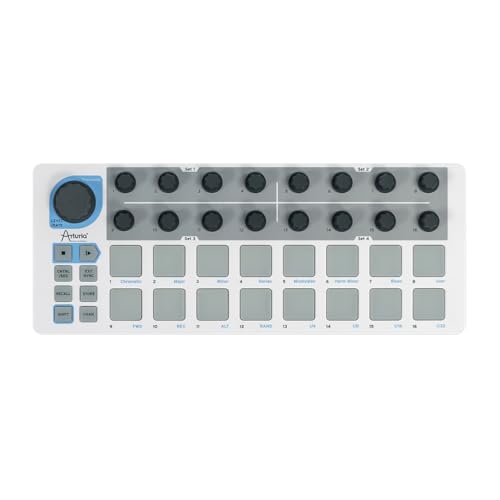
- 16 pads and 16 step-sequencing encoders
- Controller and sequencer modes can run together
- MIDI, USB, and CV connectivity
Best For: Electronic music, clip launching, and hardware synth setups
Best All-Around Choice

- 25 velocity-sensitive mini keys and eight MPC-style pads
- Eight knobs, arpeggiator, and pitch/modulation control
- USB-powered with software bundle for Mac and Windows
Best For: Home-studio producers and beat makers wanting an all-in-one controller
Best Slim Control Surface

- Low-profile USB control surface for compact setups
- Adds track selection and marker-advance controls
- Supports major DAW software and eight mixer channels
Best For: DAW users needing space-saving software and mixer control
Best Pad Controller

- Eight RGB-backlit MPC-style pads for triggering sounds
- Eight assignable knobs for DAW and plug-in control
- Slim USB-powered design with four programmable presets
Best For: Beat makers and mobile producers focused on pads and tactile control
Portable Piano-Feel Pick
M-Audio Keystation Mini 32 MK3

- 32 velocity-sensitive mini keys
- USB plug-and-play for Mac and Windows
- MPC Beats and Melodics lessons included
Best For: Mobile producers and beginners wanting extra key range
Creative Control Pick

- 25 velocity-sensitive mini keys
- Built-in arpeggiator and clock
- Eight programmable preset slots
Best For: Portable production with customizable DAW control
Standalone Performance Pick

- Built-in sounds and speaker
- Eight MPC pads and four knobs
- Battery or USB power options
Best For: Beat makers seeking portable standalone performance
Best All-Arounder – Akai MPK Mini IV
The Akai Professional MPK Mini IV is a strong all-around choice among compact midi controllers. Its 25 velocity-sensitive mini keys, MPC pads, assignable knobs, display, and performance modes cover beat making, software instruments, and portable songwriting without taking up much space.
Best For: Producers who want one compact controller for keys, finger drumming, DAW control, and travel setups.
Pros:
- Combines 25 mini keys, eight RGB-feedback MPC pads, eight knobs, and a full-color display.
- Includes arpeggiator, Chord, and Scale modes for songwriting and live jamming.
- Offers USB-C, full-size MIDI Out, mapped DAW controls, and a broad software bundle.
Cons:
- Mini keys provide portability but less playing surface than a full-size keyboard.
- Its many controls and software features may be more than beginners need.
Choose the MPK Mini IV if flexibility matters most. It is particularly well suited to creators who want keyboard performance, pad triggering, and hands-on production controls in a single portable unit.
Best Beginner-Friendly Keyboard – Arturia MiniLab 3
The Arturia MiniLab 3 is an approachable option for shoppers comparing compact midi controllers. It pairs 25 velocity-sensitive keys with pads, encoders, faders, a display, and bundled software, giving new producers a practical way to control instruments and tracks.
Best For: Beginners and home producers who want an easy keyboard-centered controller with hands-on mixing controls.
Pros:
- Provides 25 slim keys with velocity response for expressive software-instrument playing.
- Includes 16 RGB-backlit velocity- and pressure-sensitive pads, eight encoders, and four faders.
- Features an arpeggiator, clickable browsing knob, display, pitch and modulation touch controls, and bundled software.
Cons:
- Its slim keys and compact format may not suit players seeking a traditional keyboard feel.
- The listed supported software and compatibility details are more limited than some broader controller setups.
The MiniLab 3 makes sense when you want a straightforward, visually accessible controller with more than just keys. Its white finish and integrated browsing and mixing controls also make it a tidy addition to a small desk.
Best Slim DAW Control – Korg nanoKONTROL2
The Korg nanoKONTROL2 takes a different approach to compact midi controllers: it is a low-profile control surface rather than a traditional keyboard. Its eight-channel layout and dedicated buttons are designed for practical software mixing and track management in a very small footprint.
Best For: Laptop-based producers who need compact mixer-style control for tracks and DAW functions.
Pros:
- Low-profile design measures about 12.8 by 3.27 by 1.18 inches.
- Provides control across eight mixer channels.
- Supports track selection, marker advance, mute controls, and major DAW software including Ableton Live.
Cons:
- It has no traditional piano keys for playing melodies or chords.
- Its supplied notes identify USB connectivity but do not list MIDI Out or CV connections.
The nanoKONTROL2 is best viewed as a space-saving DAW companion, not an all-purpose keyboard. Pick it when faders and track buttons matter more than playing virtual instruments.
Best for Hardware Sequencing – Arturia BeatStep
The Arturia BeatStep stands out among compact midi controllers for combining pad control, knob-based sequencing, and broad connectivity. Its 16 velocity- and pressure-sensitive pads can trigger parts or operate in step-sequencer mode, while MIDI, USB, and CV connections support software and hardware workflows.
Best For: Electronic musicians who want a compact sequencer and controller for software instruments, clips, and external gear.
Pros:
- Combines 16 velocity- and pressure-sensitive pads with 16 encoders.
- Supports controller and sequencer modes simultaneously, with 16 pattern memories.
- Includes MIDI, USB, and CV connectivity for software, MIDI hardware, and analog equipment.
Cons:
- It does not provide a conventional piano-key layout.
- Its sequencing and connectivity options may require more setup than a basic keyboard controller.
BeatStep is a compelling choice for rhythm-focused and hardware-oriented setups. Its ability to sequence through CV while controlling software or clips gives it a broader creative role than a simple pad controller.
Best All-Around Choice – Akai MPK Mini MK3
The Akai Professional MPK Mini MK3 is a versatile option for shoppers comparing compact midi controllers for production, beat making, and virtual instrument control. Its 25 velocity-sensitive mini keys, MPC-style pads, assignable knobs, arpeggiator, and pitch/modulation thumbstick provide broad hands-on control in a portable format.
Best For: Home-studio producers, beat makers, and musicians who want keys, pads, and software controls in one compact controller.
Pros:
- Combines 25 velocity-sensitive mini keys with eight backlit MPC-style pads.
- Offers eight assignable 360-degree knobs plus a four-way pitch and modulation thumbstick.
- Includes a built-in arpeggiator, programmable mappings, and a software starter bundle.
- USB-powered and compatible with Windows and Mac DAWs.
Cons:
- Mini keys may be less suitable for players who prefer a full-size keyboard.
- Its wider feature set may be more than needed for users seeking a pad-only controller.
Choose the MPK Mini MK3 when you want one compact unit to cover melodic input, drum programming, parameter tweaking, and basic production workflow.
Best Slim Control Surface – Korg nanoKONTROL2
The Korg nanoKONTROL2 is a slim, compact midi controller designed for hands-on software control rather than playing notes. Its low-profile layout supports track selection, marker advancement, and control across eight mixer channels, making it useful where desk space is limited.
Best For: Laptop-based producers and DAW users who need a low-profile control surface for software mixing and navigation.
Pros:
- Low-profile design takes up minimal workspace.
- Provides track-select and marker-advance parameters for DAW workflows.
- Supports numerous software titles, including major DAW programs.
- USB connectivity works with computers and some tablets or smartphones with USB ports.
Cons:
- Not suited to users who need piano keys or drum pads.
- The supplied notes identify it primarily as a software control surface rather than a broad performance controller.
The nanoKONTROL2 is a practical pick for streamlining DAW navigation and mixer control when a traditional keyboard-style controller would be unnecessarily large.
Best Pad Controller – Akai LPD8
The Akai Professional LPD8 is a focused choice among compact midi controllers for triggering drums, samples, loops, and virtual instruments. It pairs eight RGB-backlit MPC-style pads with eight assignable Q-Link knobs, while its slim USB-powered design fits easily into a laptop-based setup.
Best For: Beat makers, DJs, and mobile producers who prioritize responsive pads and tactile software-parameter control.
Pros:
- Eight RGB-backlit MPC-style pads provide responsive sample and drum triggering.
- Eight assignable knobs offer hands-on control over DAW and plug-in parameters.
- Four programmable preset slots allow quick recall of custom mappings.
- USB-powered, driver-free plug-and-play operation works with Mac and PC.
Cons:
- Does not include piano keys for melodic keyboard performance.
- Provides fewer pads than larger pad controllers.
If your workflow centers on beat programming and compact tactile control, the LPD8 offers a focused layout without requiring an AC adapter or much bag space.
Portable Piano-Feel Pick – M-Audio Keystation Mini 32 MK3
For shoppers comparing compact midi controllers, the M-Audio Keystation Mini 32 MK3 offers a straightforward, portable setup with 32 velocity-sensitive mini piano-style keys. It connects to Mac or Windows computers over USB without external power or additional drivers.
Best For: Beginners, mobile producers, and players who want extra range from a compact keyboard.
Pros:
- 32 velocity-sensitive keys provide more range than many smaller controllers.
- Selectable velocity curves accommodate different playing styles.
- Includes octave controls, pitch bend and modulation buttons, a volume knob, and a sustain button.
- Comes with MPC Beats and access to 60 interactive Melodics lessons.
Cons:
- It has a keyboard-focused control layout rather than drum pads, arpeggiation, or programmable knobs.
- USB connection is required for computer-based operation.
The Keystation Mini 32 MK3 is a practical choice when playable key range and simple plug-and-play operation matter more than extensive production controls.
Creative Control Pick – Akai Professional LPK25 MK2
Among compact midi controllers, the Akai Professional LPK25 MK2 stands out for adding an arpeggiator, clock, and programmable presets to a small 25-key design. Its USB-powered, plug-and-play setup works with Mac and PC music software.
Best For: Producers who want portable keys with built-in rhythmic tools and customizable mappings.
Pros:
- Responsive velocity-sensitive mini keys support expressive melodies, bass lines, and chords.
- Built-in arpeggiator and clock add creative performance options.
- Eight programmable preset slots can store mappings for DAWs and virtual instruments.
- Compatible with popular software including GarageBand, Logic, Ableton Live, FL Studio, and Pro Tools.
Cons:
- Its 25-key layout offers less playing range than a 32-key controller.
- The supplied notes do not indicate built-in sounds, speakers, or battery operation.
The LPK25 MK2 is a strong fit for compact setups that benefit from arpeggiation and preset recall while keeping the controller simple and USB-powered.
Standalone Performance Pick – Akai MPK Mini Play MK3
For compact midi controllers that can work beyond a computer, the Akai MPK Mini Play MK3 combines 25 velocity-sensitive keys with built-in sounds, a speaker, drum pads, knobs, and an OLED display. It can connect by USB or run on batteries for portable play.
Best For: Beat makers and musicians who want an all-in-one mini keyboard for mobile practice and performance.
Pros:
- Includes over 100 internal drum and instrument sounds plus a built-in speaker.
- Eight velocity-sensitive backlit MPC pads and four encoder knobs support beat making and sound control.
- Features an arpeggiator, note repeat, and OLED display for hands-on performance.
- Includes MPC Beats, AIR Music Tech instruments, Melodics lessons, and other software offers.
Cons:
- It is heavier and deeper than the other listed controllers at 0.9 kg and 7.1 inches deep.
- Batteries are required for battery-powered use and are not included.
- The 25-key range is limited compared with larger keyboards.
The MPK Mini Play MK3 is the most feature-rich option here, especially for users who value standalone sounds, pads, and portable operation over the smallest footprint.
How We Picked the Best Compact Midi Controllers
We selected these Compact Midi Controllers based on portability, control layout, software compatibility, build practicality, and the type of workflow each model supports. The list includes keyboard controllers for playing melodies and chords, pad-focused options for beat production, sequencing tools for pattern-based performance, and control surfaces for mixing or parameter automation.
Because “compact” can mean different things, we considered more than physical size. Key count, pad placement, knobs, sliders, connectivity, bundled software, and standalone functionality all affect how useful a controller feels in daily use. A small controller that matches your preferred workflow can be more productive than a larger model with controls you rarely touch.
Quick Comparison
| Controller type | Best suited to | Important feature to check |
|---|---|---|
| Mini keyboard | Melodies, chords, and portable production | Key count, key feel, and pitch/mod controls |
| Pad controller | Drums, samples, and finger performance | Pad sensitivity, layout, and assignable controls |
| Control surface | Mixing and software parameter control | Knob or fader count and mapping support |
| Sequencer/controller | Pattern creation and live electronic performance | Sequencing features and connection options |
Key Buying Factors for Compact Midi Controllers
Choose the Right Control Layout
Start with the way you make music. A 25- or 32-key controller is more versatile for playing instruments, while pads are better for drum programming and sample triggering. If your priority is mixing, a dedicated control surface with knobs or sliders may be more useful than a keyboard.
Check Portability and Desk Space
Measure the space where you plan to use the controller, including room for cables and a laptop. Slim models are easier to pack, but very small keys or closely spaced controls may be less comfortable for extended sessions. Consider weight and USB power requirements if you plan to travel or perform.
Look at Connectivity and Software Support
Most of these devices connect over USB, but compatibility with your computer, DAW, tablet, or mobile setup should be confirmed before buying. Check whether the controller offers USB-C, traditional USB, MIDI ports, Bluetooth, or standalone operation if those features matter to your setup.
Consider Control Depth
Extra knobs, pads, sliders, displays, arpeggiators, and sequencing functions can reduce mouse use, but they may also increase setup complexity. Prioritize controls you will use regularly rather than paying for features that do not fit your workflow.
Who Should Buy Which Compact Midi Controllers?
Choose a compact keyboard controller if you want one portable device for virtual instruments, songwriting, and basic beat production. A pad controller is the better match for finger drumming, sample launching, and rhythm-focused workflows. Select a control surface if you mainly want hands-on mixing or plugin automation. For electronic musicians who build patterns and perform them live, a controller with sequencing functions can provide a more immediate experience.
Beginners should favor straightforward layouts, dependable software integration, and enough controls to grow into without creating unnecessary setup work. Experienced producers may benefit more from specialized features such as additional pads, assignable knobs, sequencing, or standalone operation. Whichever model you choose, confirm its dimensions, computer compatibility, and preferred DAW support before purchasing.