
The best USB webcams make video calls sharper, audio clearer, and setup easier than many built-in laptop cameras. This roundup compares 10 popular options for work, school, streaming, and casual calls.
Before choosing, consider resolution, frame rate, microphone quality, field of view, lighting performance, privacy features, and compatibility with your preferred meeting or streaming software.
Best 10 USB Webcams Picks for 2026
Best All-Around Choice

- 1080p video at 30 fps with autofocus
- Automatic lighting adjustment and dual microphones
- Includes XSplit VCam license; no privacy shutter
Best For: Remote work, calls, streaming, and everyday 1080p use
Best Budget Privacy Pick

- 1080p video with a 90-degree field of view
- Removable privacy cover and dual microphones
- USB-A connection with A-to-C adapter
Best For: Calls, classes, and privacy-conscious everyday use
Best 4K Upgrade

- Up to 4K video at 30 fps with autofocus
- Three adjustable fields of view and RightLight 3
- Noise-canceling microphones and Windows Hello support
Best For: Professional meetings, streaming, and high-detail video
Classic 1080p Value
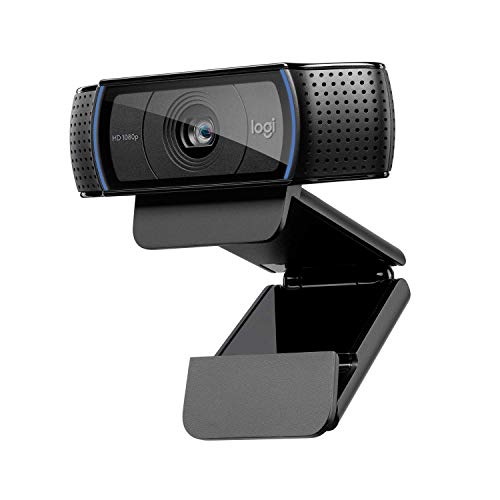
- 1080p widescreen video at 30 fps
- Autofocus and automatic low-light correction
- Noise reduction with broad operating-system compatibility
Best For: Everyday desktop calls and Full HD recording
Best Everyday 1080p Webcam

- 1080p Full HD video with automatic light balance
- Integrated slide privacy cover
- Built-in mic and plug-and-play USB-A connection
Best For: Remote work and everyday video calls
Best for Professional Video Calls

- 1080p video with HD autofocus
- Dual omnidirectional microphones
- 78-degree field of view and attachable privacy screen
Best For: Office meetings and remote professionals
Best Budget 720p Webcam
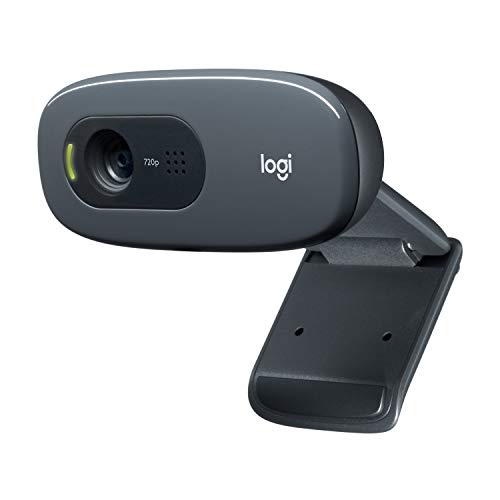
- 720p video at 30 fps
- Noise-reducing built-in microphone
- Adjustable universal mounting clip
Best For: Basic calls and budget-friendly setups
Best Value USB Webcam

- 1080p video with a wide-angle lens
- Noise-reducing mic and auto light correction
- Plug-and-play setup with privacy cover
Best For: Affordable video calls, teaching, and casual streaming
Reliable All-Rounder

- Full HD 1080p video at 30 fps
- Autofocus glass lens with light correction
- Stereo microphones and privacy shutter
Best For: Remote work, video calls, and general recording
Best for Streaming

- 1080p/30fps or 720p/60fps video modes
- Autofocus and HD light correction
- Includes 3-month XSplit VCam license
Best For: Streaming, gaming, and social video creation
Best All-Around Choice – Logitech C920x HD Pro
The Logitech C920x is a dependable pick among USB webcams for video calls, recording, streaming, and everyday laptop or desktop use. It delivers Full HD 1080p video at 30 fps, autofocus, and automatic lighting adjustment for clearer results in changing light.
Best For: Remote work, video conferencing, streaming, and users who want versatile 1080p performance.
Pros:
- Full HD 1080p video at 30 fps with autofocus.
- Automatic lighting adjustment helps in low-light settings.
- Dual microphones capture natural-sounding audio.
- Includes a three-month XSplit VCam license and supports Nintendo Switch 2 GameChat.
Cons:
- Does not include a privacy shutter.
- Its 78-degree viewing angle may be less suitable for larger groups.
The C920x balances image quality, audio, and compatibility well, making it a practical mainstream option when you want a capable 1080p webcam without moving to 4K.
Best Budget Privacy Pick – EMEET C960 1080P Webcam
The EMEET C960 is a straightforward choice among USB webcams for calls and online meetings. Its 1080p camera uses automatic exposure adjustment, includes a removable privacy cover, and connects through USB Type-A or the included A-to-C adapter.
Best For: Video calls, online classes, and users who prioritize a built-in privacy cover and wide framing.
Pros:
- Records 1920 x 1080 video with a 90-degree wide-angle lens.
- Built-in cover provides a simple privacy option.
- Dual omnidirectional microphones support clear communication.
- Plug-and-play USB Type-A and A-to-C connectivity.
Cons:
- Fixed focus works within an 11.8- to 118.1-inch range.
- Best image performance requires normal or good lighting.
- Does not support Windows Hello, TVs, tablets, or game consoles.
The C960 emphasizes convenience and privacy over advanced controls. It is a sensible fit for standard calls, especially when a wide field of view and flexible USB connection matter more than professional image refinement.
Best 4K Upgrade – Logitech Brio Ultra 4K
The Logitech Brio is a premium option among USB webcams for users who want sharper video and more framing flexibility. It supports up to 4K at 30 fps, offers three diagonal field-of-view presets, and uses RightLight 3 to adjust exposure and contrast.
Best For: Professional meetings, high-detail streaming, Windows Hello login, and users who want adjustable framing.
Pros:
- Up to 4K video at 30 fps with autofocus.
- Three field-of-view options: 65, 78, and 90 degrees.
- Dual noise-canceling microphones capture audio from up to 1.2 meters away.
- Supports Windows Hello and includes an attachable privacy shutter.
Cons:
- Its advanced features may be unnecessary for basic 1080p calls.
- Digital zoom is limited to 5x rather than optical zoom.
The Brio is the strongest choice here for resolution and customization. Its 4K capability, low-light assistance, adjustable framing, and Windows Hello support make it particularly well suited to demanding workstations and streaming setups.
Classic 1080p Value – Logitech HD Pro Webcam C920
The original Logitech C920 remains a practical option among USB webcams for widescreen calling and recording. It combines Full HD 1080p video at 30 fps with autofocus, automatic low-light correction, and noise reduction for everyday computer use.
Best For: Users seeking established 1080p performance for desktop video calls and recording.
Pros:
- Full HD 1080p video at 30 fps.
- Autofocus and automatic low-light correction.
- Auto noise reduction supports clearer calls.
- Compatible with Windows, macOS, Chrome OS, and Android 5.0 or later.
Cons:
- It has no listed privacy shutter.
- The included specification lists no warranty.
- It provides 1080p rather than 4K resolution.
The C920 is a proven, uncomplicated choice for standard video calling and recording. Choose it when reliable Full HD features are the priority and you do not need newer privacy or ultra-high-resolution extras.
Best Everyday 1080p Webcam – Logitech Brio 101
The Logitech Brio 101 is a practical pick among USB webcams for video calls, remote work, and casual streaming. It provides 1080p Full HD video, automatic light correction, a built-in microphone, and a slide privacy cover in a simple plug-and-play design.
Best For: Remote workers and everyday video callers who want Full HD video with straightforward privacy controls.
Pros:
- 1080p Full HD video with automatic light balancing to reduce shadows.
- Integrated slide cover provides quick, visible lens privacy.
- Built-in microphone and USB-A plug-and-play connectivity work with Zoom, Microsoft Teams, and Google Meet.
- Made with a minimum of 77% post-consumer recycled plastic.
Cons:
- Fixed-focus lens may be less flexible for users who move frequently.
- USB-A connection may require an adapter for devices without USB-A ports.
The Brio 101 keeps the essentials simple: clear 1080p video, automatic exposure assistance, an integrated privacy cover, and broad platform compatibility. Its fixed focus and USB-A connection are worth checking against your setup before buying.
Best for Professional Video Calls – Logitech C920e
The Logitech C920e is one of the more meeting-focused USB webcams, combining 1080p video with autofocus, automatic light correction, and two integrated omnidirectional microphones. Its 78-degree field of view is designed to frame an individual user while leaving room to show nearby work materials.
Best For: Office users and remote professionals who want autofocus, a wider meeting frame, and workplace platform compatibility.
Pros:
- 1080p video with built-in HD autofocus and automatic light correction.
- Two integrated microphones capture audio from up to one meter away.
- 78-degree fixed field of view balances a clear portrait with room for projects.
- Includes an attachable privacy screen and supports monitor, laptop, or tripod mounting.
Cons:
- The privacy screen is attachable rather than integrated into the webcam body.
- USB connectivity may require an adapter on devices without a compatible port.
The C920e is a strong fit for structured video meetings where autofocus, audio pickup, and a balanced field of view matter. Its Zoom certification and compatibility with Microsoft Teams and other popular calling apps add convenience for workplace setups.
Best Budget 720p Webcam – Logitech C270
The Logitech C270 is a straightforward choice among USB webcams for basic video calling. It delivers 720p video at 30 frames per second, automatic light correction, a noise-reducing microphone, and an adjustable clip that can sit on a laptop, monitor, or shelf.
Best For: Budget-conscious users who need a simple webcam for occasional calls, online meetings, or compatible gaming chat.
Pros:
- 720p video at 30 fps is suitable for everyday video calls.
- Noise-reducing microphone helps capture voices clearly from up to 1.5 meters away.
- RightLight 2 automatically adjusts to lighting conditions.
- Adjustable universal clip supports laptops, monitors, or shelf placement.
Cons:
- 720p resolution is lower than the 1080p output offered by the other listed models.
- Fixed-focus design provides less flexibility for changing distances.
- Its 55-degree field of view is narrower for group framing.
The C270 focuses on dependable basics rather than higher-resolution video. It makes sense when affordability, simple mounting, and plug-and-play calling matter more than Full HD detail or a wider viewing angle.
Best Value USB Webcam – TRAUSI TW05 1080P Webcam
The TRAUSI TW05 is a practical choice among usb webcams for everyday video calls, online teaching, streaming, and content creation. It combines 1080p video, a wide-angle lens, automatic light correction, and a built-in noise-reducing microphone in a plug-and-play USB design.
Best For: Buyers seeking an affordable, easy-to-use webcam with privacy protection and useful lighting adjustments.
Pros:
- 1080p video at 30 fps with a wide-angle lens.
- Automatic light correction helps adjust brightness and color in changing conditions.
- Built-in noise-canceling microphone and included sliding privacy cover.
- Works with USB 2.0, 3.0, 3.1, and OTG connections without extra drivers.
Cons:
- Fixed-focus lens does not offer autofocus.
- Its supplied details do not specify a stereo microphone or advanced background features.
The TW05 covers the core needs of a home office or casual streaming setup without adding complicated software. Its fixed focus and 1080p/30fps limit make it less suited to buyers seeking premium camera controls, but the privacy cover and plug-and-play setup add everyday convenience.
Reliable All-Rounder – Logitech C920S HD Pro Webcam
The Logitech C920S is a dependable pick among usb webcams for Full HD video calls, recording, and conferencing. Its glass lens, autofocus, automatic light correction, and dual stereo microphones are designed for clear video and natural-sounding audio, while the privacy shutter covers the lens when needed.
Best For: Remote workers and frequent video-call users who want proven 1080p performance with autofocus and a physical privacy shutter.
Pros:
- Full HD 1080p video calls and recording at 30 fps.
- Glass lens with autofocus and automatic light correction.
- Dual microphones capture stereo audio for calls and recordings.
- Privacy shutter provides physical lens coverage when the camera is not in use.
Cons:
- Limited to 30 fps at 1080p.
- Compatible with USB 2.0 devices, which may be less flexible for newer setups.
- The listed package does not include the 3-month XSplit VCam license.
The C920S is a balanced option for users who prioritize consistent Full HD calls and straightforward privacy controls. It lacks the higher-frame-rate mode found on some streaming-focused models, but its autofocus, glass lens, and stereo audio make it a strong general-purpose webcam.
Best for Streaming – Logitech C922x HD Pro Webcam
The Logitech C922x stands out among usb webcams for users who want flexible video modes for calls and streaming. It records at 1080p/30fps or 720p/60fps, adds autofocus and HD light correction, and includes a 3-month XSplit VCam license for background removal, replacement, and blur without a green screen.
Best For: Streamers, social video creators, and gamers who want 60fps capture at 720p plus software-based background effects.
Pros:
- Offers Full HD 1080p at 30 fps or 720p at 60 fps.
- Autofocus and automatic light adjustment support clear images in low light.
- Dual microphones provide stereo audio for calls and recordings.
- Includes a 3-month XSplit VCam license for background effects without a green screen.
Cons:
- Does not include a privacy shutter.
- Its 60fps mode is limited to 720p rather than 1080p.
- Background effects depend on the included software and compatible setup.
The C922x is the most flexible choice here for streaming-oriented use, especially when smoother 720p motion matters. Buyers who want a built-in privacy cover or 1080p at 60fps should look elsewhere, but autofocus, low-light adjustment, and XSplit VCam make it versatile for creator workflows.
How We Picked These USB Webcams
We selected webcams across several budgets and use cases, prioritizing image resolution, frame-rate options, autofocus or image-correction features, microphone performance, viewing angle, privacy controls, and plug-and-play compatibility. The list includes dependable 720p models, versatile 1080p cameras, and a 4K option for creators or users who want extra detail.
We also considered practical setup. A good USB webcam should work with common computers and applications without complicated drivers, while offering a stable mount and controls that suit its intended environment.
Quick Comparison
| Best For | What to Look For |
|---|---|
| Everyday video calls | 1080p resolution, reliable autofocus, and a built-in microphone |
| Budget setups | 720p or entry-level 1080p video with plug-and-play USB support |
| Streaming | 1080p at higher frame rates, good exposure control, and software compatibility |
| Professional meetings | Clear imaging, balanced audio, a practical field of view, and privacy features |
| Detailed video production | 4K capture, strong lighting, and a computer that can handle larger video files |
Key Buying Factors for USB Webcams
Resolution and Frame Rate
1080p is the best all-around choice for most meetings and recordings. A 4K webcam can provide more detail and cropping flexibility, but it may require better lighting, more bandwidth, and stronger computer hardware. For motion-heavy streaming, 60fps at a lower resolution can look smoother than 30fps.
Microphones and Field of View
Built-in microphones are convenient, but they vary considerably in clarity and noise handling. Dual microphones or noise-reduction processing can help in quiet home offices. A wider field of view works well for presentations or multiple people, while a narrower view keeps attention on one speaker and reduces background distractions.
Lighting, Focus, and Privacy
Auto light correction is useful when room lighting changes, though no webcam can fully replace a front-facing lamp or soft light. Autofocus helps when you move closer to the camera, while fixed-focus models can be sufficient at a desk. A physical privacy shutter or cover is a worthwhile feature for users who leave the webcam connected.
Compatibility and Mounting
Confirm that the webcam supports your computer’s USB connection or use an appropriate adapter. Check compatibility with Zoom, Microsoft Teams, Google Meet, OBS, and other software you use. A hinged monitor clip and standard tripod thread add flexibility for laptops, monitors, and dedicated stands.
Who Should Buy Which USB Webcams?
Choose an affordable 720p model for occasional calls, basic classes, or a secondary computer. Most remote workers, students, and families should choose a 1080p webcam for a noticeable improvement over typical laptop cameras. Look for a wider view and dual microphones if you regularly present or include another person in the frame.
Streamers and content creators should prioritize frame-rate options, image control, and compatibility with their broadcast software. Choose a 4K model when you need detailed recordings, cropping flexibility, or a more polished production setup. If privacy is a major concern, prioritize a model with a built-in cover and unplug it when it is not in use.