
Choosing the right monitor stand can make a beginner sim rig feel instantly more immersive and much easier to live with. A good stand keeps your screen stable, your viewing angle dialed in, and your cockpit layout cleaner.
Below, we focus on beginner-friendly options that balance adjustability, footprint, and compatibility so you can match your display size and racing space without overbuying.
Best 10 Sim Racing Monitor Stand for Beginners Picks for 2026
Budget-Friendly Adjustable Pick
Marada Racing Cockpit Monitor Stand for 24-60 Inch
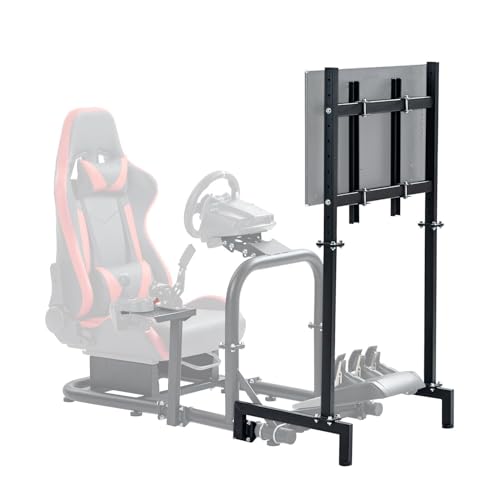
- Supports 24 to 60 inch displays
- Height and position adjustable
- Square steel tube frame with floor mount
Best For: Beginners wanting an adjustable single-screen stand
Heavy-Duty Immersion Pick
SimFab Single TV Floor Stand Model HD

- Supports larger 42 to 65 inch TVs
- Height, tilt, and roll adjustment
- Spread-leg design wraps around the cockpit
Best For: Beginners building a large-screen cockpit setup
All-in-One Starter Cockpit
ARES WING Racing Simulator Cockpit with Monitor Mount

- Cockpit and detachable monitor mount in one
- Supports up to a 50 inch screen
- Fully adjustable seat, wheel, pedal, and shifter positions
Best For: Beginners who want an all-in-one sim rig
Premium Multi-Screen Pick
Next Level Racing Elite Free Standing Quad Monitor Stand

- Built for four monitors up to 43 inches
- Wide VESA support up to 200x200mm
- Includes cable management and premium hardware
Best For: Beginners aiming for a premium quad-monitor rig
Starter-Friendly Floor Mount
SimFab Monitor Mount Floor Stand

- 24"-49" monitor support
- Height, tilt, and roll adjustment
- Fits around a sim cockpit
Best For: New sim racers wanting a simple single-monitor floor stand
Wide-Range Adjustable Bracket
Racing Simulator Display Bracket Monitor Stand

- Adjustable width and height
- Supports up to 60-inch displays
- May need DIY fitting
Best For: Beginners using larger displays and a DIY-friendly cockpit setup
Mobile Heavy-Duty Pick
Marada Pro Sim Racing Monitor Stand

- Locking casters for mobility
- Supports 27"-65" displays
- 220 lbs max load capacity
Best For: Beginners who want a stable stand they can move and upgrade
Thermaltake GR300 Upgrade

- Attaches directly to the GR300 frame
- Supports 32" to 50" screens up to 35 kg
- Includes tilt and up to 50 mm height adjustment
Best For: GR300 owners wanting an integrated single-monitor mount
Marada Cockpit 37 Mount
Adjustable 32" to 55" TV Frame
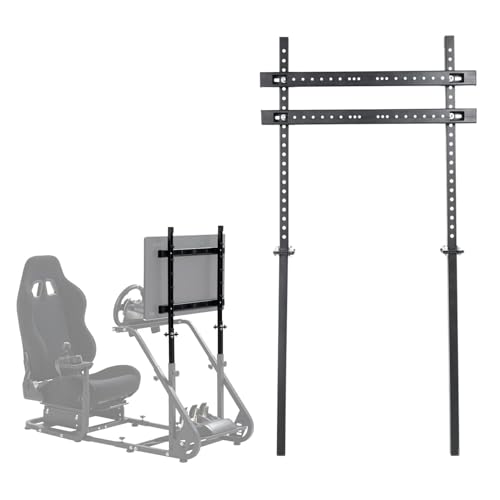
- Proprietary fit for Marada Cockpit 37
- Supports 32" to 55" displays with VESA support
- Adjustable height and TV position
Best For: Cockpit 37 users wanting a rigid, compatible monitor mount
Dardoo Full-Motion Stand
Mobile 27" to 65" Monitor Mount
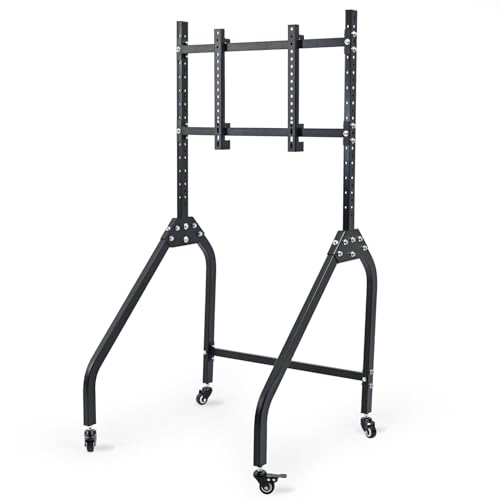
- Lockable casters simplify positioning beside the rig
- Height, tilt, and spacing are all adjustable
- Supports 27" to 65" screens up to 200 lbs
Best For: Beginners who want a flexible, mobile stand that can grow with their setup
Budget-Friendly Adjustable Pick – Marada Racing Cockpit Monitor Stand for 24-60 Inch
If you want a sim racing monitor stand for beginners, this Marada option keeps things straightforward: it supports 24 to 60 inch displays, works with VESA 75×75 to 400x400mm, and offers height plus position adjustment to help you dial in a comfortable viewing angle. The square steel tube frame and floor-mount design make it a practical add-on for a starter cockpit setup.
Best For: New sim racers who want a sturdy, adjustable floor stand for a single monitor or TV.
Pros:
- Fits a wide range of 24 to 60 inch screens
- Height and position adjustments help improve viewing comfort
- Sturdy square steel tube construction
- Includes pre-drilled holes and installation accessories
Cons:
- Assembly may require on-site drilling if holes do not align perfectly
- Monitor or TV is not included
This is a sensible beginner-friendly choice if you want flexibility without moving into a more complex multi-screen setup. It focuses on compatibility, adjustability, and a simple floor-mounted footprint.
Heavy-Duty Immersion Pick – SimFab Single TV Floor Stand Model HD
If you are shopping for a sim racing monitor stand for beginners but want something more substantial from the start, this SimFab floor stand is built around larger TVs and a wraparound cockpit layout. It supports 43 to 65 inch screens, offers height, tilt, and roll adjustment, and uses spread legs designed to sit around a sim racing cockpit or flight pit for better immersion and field of view.
Best For: Beginners planning a larger single-TV setup around a dedicated racing or flight simulator cockpit.
Pros:
- Supports larger TVs from 42 to 65 inches
- Height, tilt, and roll adjustment for setup tuning
- Legs are spread to wrap around your cockpit for better immersion
- Lifetime warranty noted in the product details
Cons:
- Less suited to smaller monitor sizes; 75×75 and 100×100 VESA users are directed to another model
- Single stand only, so it is not a multi-monitor solution
This is a strong pick if your beginner setup is already aimed at a large-screen simulator environment. The tradeoff is size and weight, but the payoff is a more immersive, cockpit-centered layout.
All-in-One Starter Cockpit – ARES WING Racing Simulator Cockpit with Monitor Mount
For a sim racing monitor stand for beginners who want the cockpit and display solution in one package, this ARES WING setup combines a racing seat with a detachable monitor mount. The monitor arm supports up to a 50 inch screen and 77 lbs, and the cockpit itself offers adjustable wheel, pedal, shifter, and seat positions to help you find a comfortable driving posture.
Best For: First-time buyers who want a complete adjustable cockpit with an integrated monitor mount.
Pros:
- Integrated monitor mount keeps the display paired with the cockpit
- Supports screens up to 50 inches and 77 lbs
- Seat, wheel, pedals, shifter, and monitor mount are adjustable
- Compatible with Fanatec, Thrustmaster, Logitech, Moza, PS5, PS4, Xbox, and PC
Cons:
- Shifter, pedals, steering wheel, and TV are not included
- Much larger and heavier than a standalone monitor stand
This is the most bundled option in the group, so it makes sense if you are starting from scratch and want a coordinated rig. It is less about simple monitor mounting and more about creating a full racing seat and display environment.
Premium Multi-Screen Pick – Next Level Racing Elite Free Standing Quad Monitor Stand
Next Level Racing Elite Free Standing Quad Monitor Stand - Black Edition (NLR-E037)
Check Price On AmazonIf your goal is to grow beyond a basic sim racing monitor stand for beginners, this Next Level Racing model is built for a more advanced four-screen setup. It supports four monitors from 21 to 43 inches, uses universal VESA mounting solutions from 75×75 to 200x200mm, and includes cable management plus black anodized hardware for a cleaner cockpit look.
Best For: Beginners who know they want a premium quad-monitor setup and plan to expand over time.
Pros:
- Supports four monitors for a true multi-screen rig
- Works with a wide VESA range up to 200x200mm
- Includes cable management and custom black hardware
- High-strength anodized aluminum extrusion construction
Cons:
- More complex and substantial than a single-monitor stand
- Monitors are limited to 21 to 43 inches
This is the most future-proof option here, but it is also the least beginner-simple in terms of setup and scope. It makes sense when you already know a quad-screen layout is the end goal.
Starter-Friendly Floor Mount – SimFab Monitor Mount Floor Stand
If you want a sim racing monitor stand for beginners that feels straightforward but still gives you room to grow, this floor-mounted SimFab option is a practical pick. It supports common monitor sizes from 24″ to 49″ and uses adjustable height, tilt, and roll so you can dial in a comfortable viewing angle without overcomplicating setup.
Best For: Beginners building a single-monitor sim rig who want a stable, adjustable floor stand with broad size compatibility.
Pros:
- Supports monitors from 24″ to 49″, including ultrawide curved screens.
- Adjustable height, tilt, and roll for easier alignment.
- Floor-mount design with slightly spread legs to wrap around a cockpit.
- Works with VESA up to 100x100mm and M4/M5 hardware.
Cons:
- Single-monitor stand only.
- TVs with VESA over 100x100mm need the heavier-duty bracket option.
- At 35 pounds, it is not the lightest stand to move around.
This is a solid entry point if you want one stand that can cover a wide range of common displays while helping improve immersion and field of view around a cockpit.
Wide-Range Adjustable Bracket – Racing Simulator Display Bracket Monitor Stand
This sim racing monitor stand for beginners is aimed at users who want maximum flexibility without needing a highly polished, plug-and-play design. It supports monitors up to 60 inches and offers width and height adjustment, plus pre-drilled holes for quick installation or DIY drilling and welding if the fit is not exact.
Best For: Beginners who are comfortable with a more DIY-style setup and need a monitor stand that can adapt to larger displays.
Pros:
- Adjustable width and height to fit different monitor sizes.
- Supports displays up to 60 inches.
- Includes multiple pre-drilled holes for installation flexibility.
- Non-slip feet help keep the stand stable.
Cons:
- Only matches perfectly with the store’s Big Round Tube gaming stands.
- May require DIY drilling or welding if hole patterns do not match.
- Monitor stand only; other cockpit accessories are not included.
For beginners who prioritize adjustability and large-screen support, this stand offers strong flexibility, but it is best suited to buyers who are comfortable with some hands-on fitting work.
Mobile Heavy-Duty Pick – Marada Pro Sim Racing Monitor Stand
If you want a sim racing monitor stand for beginners that can handle a more permanent setup now and upgrades later, this Marada Pro stand is built for that job. It fits 27- to 65-inch displays, uses a low-center triangular base for stability, and adds locking casters so you can move the rig and then secure it in place.
Best For: Beginners who want a heavy-duty stand with easy mobility and room to upgrade to larger monitors later.
Pros:
- 360° locking casters make it easier to move and lock the stand.
- Low-center triangular base is designed for better stability.
- Adjustable height from 32.9 to 58.5 inches.
- Supports 27- to 65-inch displays with up to 220 lbs capacity.
Cons:
- Larger and heavier-duty than many beginner-first stands.
- Only fits VESA 75×75 to 400×400 patterns.
- Its size may be more than needed for a basic single-monitor starter rig.
This is the most future-proof option in the group, especially if you expect to move your setup occasionally or upgrade to a much larger screen later.
Thermaltake GR300 Upgrade – 32" to 50" Frame-Mount Stand
If you want a sim racing monitor stand for beginners that keeps the screen close to the cockpit without overcomplicating setup, the Thermaltake GR300 mount is a straightforward upgrade. It attaches directly to the GR300 frame, supports 32″ to 50″ displays, and gives you tilt plus height adjustment for a more immersive view.
Best For: GR300 cockpit owners who want an easy, integrated monitor mount for a single screen.
Pros:
- Frame-mount design keeps the display positioned right with the cockpit
- Supports 32″ to 50″ flat or curved screens up to 35 kg / 77 lbs
- Works with several common VESA sizes, including 75×75 and 400×200
- Offers up to 50 mm of height adjustment for dialing in viewing position
Cons:
- Made as an optional upgrade for the GR300 cockpit, not a universal stand
- Screen size range may be too large if you only plan to use a smaller monitor
Overall, this is a solid pick if you already have the matching Thermaltake cockpit and want a simple way to mount a single monitor or TV. It is more about convenience and fit than maximum flexibility, which can actually be ideal for beginners.
Marada Cockpit 37 Mount – Adjustable 32" to 55" TV Frame
The Marada stand is a practical sim racing monitor stand for beginners if you are using the matching Cockpit 37 and want a simple display holder. It supports 32″ to 55″ screens, offers adjustable TV position and height, and uses standard VESA patterns for broad monitor compatibility.
Best For: Marada Cockpit 37 owners who want a sturdy, position-adjustable display mount.
Pros:
- Designed as a proprietary part for the Marada Racing Cockpit 37
- Supports 32″ to 55″ screens, with 27″ and 32″ recommended
- Fits many standard VESA patterns, including 75×75 through 400×400
- Solid carbon steel tube construction adds rigidity
Cons:
- Built specifically for Cockpit 37, so it is not a universal standalone choice
- Movement type is fixed, so it is less flexible than full-motion stands
This is a good match if you already own the correct Marada cockpit and want a stable, easy-to-position monitor frame. For beginners, the main appeal is simple compatibility rather than advanced adjustment features.
Dardoo Full-Motion Stand – Mobile 27" to 65" Monitor Mount
If you are looking for a sim racing monitor stand for beginners that is easy to place beside a rig, the Dardoo single stand stands out for mobility and adjustability. It uses lockable brake casters, supports 27″ to 65″ monitors, and lets you fine-tune height, tilt, and screen spacing for a more comfortable setup.
Best For: Beginners who want a flexible, full-motion monitor stand with easy repositioning.
Pros:
- Lockable casters make it easy to roll into position and then secure
- Full-motion adjustability covers height, tilt, and spacing
- Wide 27″ to 65″ screen support gives room to upgrade later
- Rated to handle up to 200 lbs for larger screens
Cons:
- Heavier at 29 pounds, so it is less minimal than simpler stands
- More adjustment options may be more than a beginner needs at first
For a first sim-racing monitor stand, this one is appealing because it is easy to move, easy to lock down, and built for future screen upgrades. It is the most flexible option here, especially if you want one stand that can adapt as your setup grows.
How We Picked the Best Sim Racing Monitor Stand for Beginners
For a Sim Racing Monitor Stand for Beginners, the most important factors are stability, adjustability, display compatibility, and ease of setup. We favored stands that support common screen sizes, offer useful height and distance adjustments, and work well with both single-monitor and cockpit-mounted layouts.
We also looked for practical details that matter to first-time buyers, such as VESA support, wheeled bases or locking casters where relevant, and construction that reduces wobble when you’re braking hard or using direct-drive force feedback.
Quick Comparison
In simple terms: floor stands give you flexibility, cockpit-mounted stands can save space and keep the screen aligned with the wheel, and multi-monitor stands are best for users who already know they want a more advanced wraparound setup. If you’re starting out, single-monitor floor or cockpit stands are usually the safest value choice.
Key Buying Factors for a Sim Racing Monitor Stand for Beginners
Screen Size and VESA Compatibility
Make sure the stand supports your exact monitor or TV size and VESA pattern. Many beginner mistakes come from buying a stand that is too small for ultrawide panels or too limited in adjustment range.
Stability and Base Design
A stable base matters more than flashy features. Look for steel construction, wide feet, locking casters, and a design that won’t shift when you move your wheel or pedals aggressively.
Adjustability
Height, tilt, and distance adjustment help you align the display with your wheel and seating position. The best beginner options make it easy to fine-tune without requiring a full rebuild of your rig.
Space and Placement
If your setup shares a room with other uses, a floor stand may be easier to reposition. If you want a compact, dedicated cockpit, a mount that integrates with the rig can create a cleaner and more immersive view.
Who Should Buy Which Sim Racing Monitor Stand for Beginners?
If you want the simplest upgrade from a desk setup, choose a single-monitor floor stand. If you already have a cockpit and want the screen locked into the racing position, a cockpit-mounted option is a smart fit. If you plan to grow into a more serious sim racing setup later, pick the most adjustable and rigid stand you can reasonably afford so you won’t outgrow it quickly.
For most first-time buyers, the best approach is to prioritize compatibility and stability first, then choose the layout that best matches your room and your long-term sim racing plans.