
Choosing the right logic analyzer for beginners can make digital debugging far less frustrating. The best starter models balance easy software, enough channels, and reliable capture without overwhelming you.
In this roundup, we focus on beginner-friendly options that cover common needs like I2C, SPI, UART, and CAN, with picks ranging from compact handheld units to higher-speed USB analyzers.
Best 10 Logic Analyzer for Beginners Picks for 2026
Best Portable Pick
MINIWARE LA104 Pocket Logic Analyzer

- Handheld design with built-in screen and battery
- 4 channels at up to 100 MSa/s
- SPI, I2C, and UART protocol support
Best For: Beginners and hobbyists who want a portable digital debugging tool.
Best for Easy Breadboard Hookup
LONELY BINARY 8-Channel 24MHz Logic Analyzer Kit

- 8 channels and 24MHz capture for common digital protocols
- Breadboard adapter and base module simplify beginner setups
- Includes clips, jumper wires, cables, and storage case
Best For: Students and hobbyists who want an approachable, breadboard-friendly analyzer for embedded debugging.
Best for Protocol Coverage
USB Logic Analyzer LA2016 16-Ch 200MHz

- 16 channels with 200MHz sampling and deep memory
- Auto-decodes I2C, SPI, UART, CAN, and more
- English software works on Windows, MacOS, and Linux
Best For: Beginners who need a versatile analyzer for multiple common digital protocols.
Best for High-Speed Learning
DSLogic Plus 16-Channel USB Logic Analyzer

- 400MHz buffer-mode sampling for faster captures
- 16 channels with stream and buffer modes
- DSView software supports many protocol decoders
Best For: Beginners who want a fast, flexible analyzer with room to grow.
Best Entry-Level 8-Channel Pick
HiLetgo USB Logic Analyzer 24MHz 8CH

- 8-channel design with up to 24MHz sampling
- Supports UART, IIC, and SPI debugging
- Good fit for 5V and 3.3V beginner projects
Best For: New users learning serial protocols and basic embedded debugging.
Best for Multi-Channel Debugging
LA1010 USB Logic Analyzer 16-Channel 100MHz

- 16 channels for capturing multiple digital lines at once
- 100MHz sampling for common MCU and bus debugging
- Decodes 30+ protocols and supports Windows, Mac, and Linux
Best For: Beginners and hobbyists who want a capable multi-channel logic analyzer for embedded debugging.
Best High-Speed Capture
DSLogic U3Pro16 USB Logic Analyzer

- 16 channels with stream and buffer modes
- Very high sample rates with deep memory
- Cross-platform DSView software with decoders
Best For: Beginners who want a fast, expandable logic analyzer for more advanced projects.
Best Portable Starter Pick
6022BL 16-Channel Handheld USB Oscilloscope
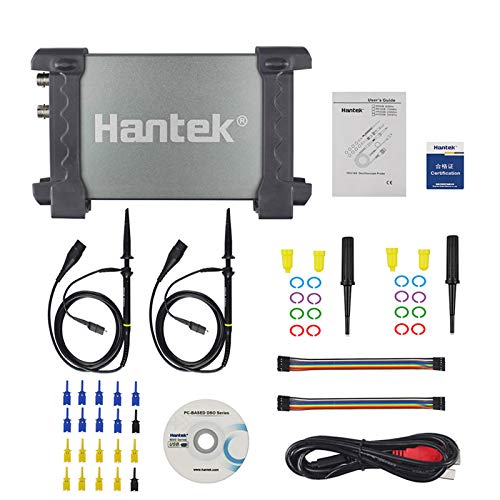
- USB-powered with no external supply needed
- 16 channels and 48MSa/s for basic digital capture
- Durable aluminum case for portable use
Best For: Beginners needing a portable USB oscilloscope and logic analyzer for light troubleshooting.
Best for High-Speed Protocol Exploration
DSLogic Plus 16-Ch USB Logic Analyzer
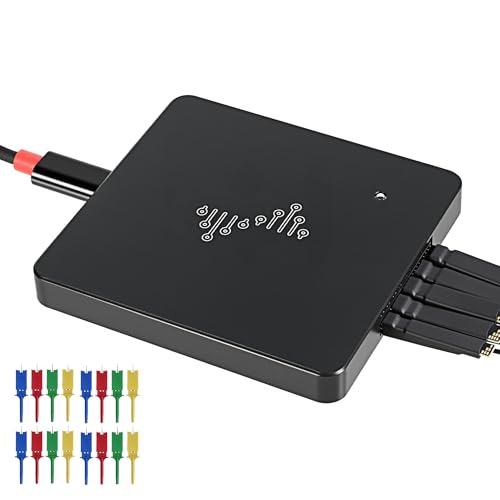
- 16 channels for more complex digital debugging
- Stream and buffer modes for flexible captures
- Windows, macOS, and Linux compatibility
Best For: Beginners and hobbyists who want room to grow into advanced protocol analysis.
Best High-Speed Starter
DSLogic U3Pro32 USB Logic Analyzer

- 32 channels for larger digital projects
- Up to 1GHz sampling with dual capture modes
- DSView software supports major OSes and many decoders
Best For: Beginners who want a capable logic analyzer they can keep using as projects get more advanced.
Best Portable Pick – MINIWARE LA104 Pocket Logic Analyzer
If you want a logic analyzer for beginners that you can actually take to the bench, the MINIWARE LA104 is a compelling handheld option. It combines four channels, up to 100 MSa/s sampling, and support for common protocols like SPI, I2C, and UART in a compact unit with its own screen and battery.
Best For: Hobbyists, students, and repair-minded users who want a pocketable logic analyzer for quick debugging and learning on the go.
Pros:
- Portable handheld design with built-in display and rechargeable battery
- 4 channels and 100 MSa/s capture for everyday digital signal testing
- Supports common beginner-friendly protocols: SPI, I2C, and UART
- 8 MB storage plus micro USB export for reviewing waveform data on a computer
Cons:
- 4 channels may feel limiting for more advanced projects
- Small screen is practical, but not as convenient as a full desktop analyzer
- Must not be charged during measurement, which adds a bit of planning
Overall, the LA104 stands out as a logic analyzer for beginners who value portability and straightforward protocol decoding over maximum channel count. It is a smart pick if you want an affordable-feeling, self-contained tool for learning digital debugging without needing a laptop at the bench.
Best for Easy Breadboard Hookup – LONELY BINARY 8-Channel 24MHz Logic Analyzer Kit
If you want a logic analyzer for beginners that still feels useful as your projects grow, this kit stands out for its easy connections and generous accessory bundle. The 8-channel, 24MHz design is a practical step up from very basic analyzers, and the included base module, breadboard adapter, and clip options make setup less intimidating.
Best For: Students, hobbyists, and first-time users who want a beginner-friendly logic analyzer with breadboard support and enough channels for real protocol debugging.
Pros:
- 8 channels at up to 24MHz for I2C, SPI, UART, and similar digital debugging
- Breadboard breakout board and base module make connections simpler
- Includes test clips, alligator clips, jumper wires, and a storage case
- USB-A and USB-C cables add easy compatibility across common systems
Cons:
- Not the smallest option if you only need a super-basic analyzer
- Accessory-rich kits can be overkill for very simple one-off tests
For a logic analyzer for beginners, this kit is appealing because it reduces setup friction without limiting you to toy-level capability. It is a strong pick if you want something approachable now and flexible enough for Arduino, ESP32, and other embedded projects later.
Best for Protocol Coverage – USB Logic Analyzer LA2016 16-Ch 200MHz
If you want a logic analyzer for beginners that still has room to grow, the LA2016 stands out for its wide protocol support and straightforward English software. It captures 16 channels at up to 200MHz with deep memory, so you can follow more signals at once without immediately outgrowing the tool.
Best For: Beginners and hobbyists who want a versatile, cross-platform logic analyzer for decoding common buses like I2C, SPI, UART, and CAN.
Pros:
- 16-channel capture with 200MHz sampling and 1Gbits memory
- English software with automatic decoding for many common protocols
- Works across Windows, MacOS, and Linux
- Includes probes, hook clips, and USB cable for getting started quickly
Cons:
- More capable than many true starter models, so it may feel overkill for very simple jobs
- Learning digital debugging still takes some time for first-time users
For a logic analyzer for beginners who want better long-term value, this is a strong pick because it combines approachable software with serious channel count and protocol decoding. It is especially appealing if you expect to work on multiple embedded interfaces rather than just one simple bus.
Best for High-Speed Learning – DSLogic Plus 16-Channel USB Logic Analyzer
If you want a logic analyzer for beginners that can still grow with you, the DSLogic Plus is a strong pick. It combines 16 channels, very fast buffer-mode sampling, and DSView software support across Windows, macOS, and Linux, making it a practical tool for learning protocols and debugging digital circuits.
Best For: Beginners who want a fast, flexible analyzer with room to advance into more serious protocol work.
Pros:
- Up to 400MHz sampling in buffer mode for capturing faster digital signals
- 16 channels with dual stream/buffer modes for different project needs
- DSView supports nearly a hundred protocol decoders and is open source
- Shielded fly wires and aluminum case help keep waveforms cleaner
Cons:
- More capable than many true entry-level tools, so it may feel overkill for very simple jobs
- High-speed performance depends on the mode and channel count you use
- Software and setup may take a little time for absolute beginners
For a logic analyzer for beginners who care about speed, channel count, and long-term usefulness, the DSLogic Plus stands out as a serious value. It is not the simplest bare-bones option, but it offers the kind of performance and software flexibility that helps you learn faster and debug more confidently.
Best Entry-Level 8-Channel Pick – HiLetgo USB Logic Analyzer 24MHz 8CH
If you want a logic analyzer for beginners that covers the basics without adding much cost, the HiLetgo USB Logic Analyzer is a practical starting point. It offers 8 channels, up to 24MHz sampling, and support for common buses like UART, IIC, and SPI, which makes it useful for simple microcontroller debugging and protocol checks.
Best For: New users who want an affordable 8-channel analyzer for learning serial protocols and basic embedded debugging.
Pros:
- 8 channels with up to 24MHz sampling for common hobbyist and embedded tasks
- Supports UART, IIC, and SPI, making it versatile for beginner projects
- Works with 5V and 3.3V systems, plus includes USB and Dupont cables
Cons:
- Not the best choice for advanced high-speed capture needs
- 1.8V operation is only mentioned as possible, not recommended
For a logic analyzer for beginners, this model hits a good balance of price, channel count, and straightforward protocol support. It is especially appealing if you mainly need to inspect low-speed digital signals and learn how bus traffic behaves before moving to more advanced tools.
Best for Multi-Channel Debugging – LA1010 USB Logic Analyzer 16-Channel 100MHz
If you want a logic analyzer for beginners that still has room to grow, the LA1010 is a strong pick. It combines 16 channels, 100MHz sampling, and broad protocol decoding, so you can start with simple digital checks and move into more serious embedded debugging as your projects get more complex.
Best For: Students, hobbyists, and new embedded developers who want an affordable multi-channel analyzer with cross-platform support.
Pros:
- 16 channels make it easier to compare multiple digital signals at once
- 100MHz sampling gives solid headroom for common MCU and bus debugging
- Decodes 30+ protocols including I2C, SPI, UART, and CAN
- Works with Windows, macOS, and Linux with included PC software
Cons:
- Not as beginner-friendly as simpler single-purpose tools if you only need basic checks
- Requires a PC for viewing waveforms and decoding
- Feature set may be more than casual users need for one-off projects
For a logic analyzer for beginners, the LA1010 stands out because it bridges the gap between entry-level usability and real debugging capability. If you expect to work on multiple digital lines or common serial protocols, it offers a practical balance of value, channel count, and software features.
Best High-Speed Capture – DSLogic U3Pro16 USB Logic Analyzer
If you want a logic analyzer for beginners that still leaves room to grow, the DSLogic U3Pro16 is a strong choice thanks to its 16 channels, dual capture modes, and very high sampling rates. It’s a better fit for users who expect to move beyond basic checks into deeper protocol work or longer captures.
Best For: Beginners who want a capable USB logic analyzer with more headroom for advanced projects, protocol decoding, and long-duration captures.
Pros:
- Up to 16 channels with flexible stream and buffer modes
- High sample rates and large memory for demanding captures
- DSView software works on Windows, macOS, and Linux
- Nearly 100 protocol decoders plus open-source support
Cons:
- More analyzer than a true entry-level pick for casual users
- Best features may be unnecessary for simple hobby projects
- Learning curve is higher than basic budget analyzers
For a logic analyzer for beginners who already know they’ll tackle faster buses and longer traces, the U3Pro16 offers an impressive mix of speed, depth, and software support. It’s especially appealing if you want a beginner-friendly starting point that won’t feel limiting later.
Best Portable Starter Pick – 6022BL 16-Channel Handheld USB Oscilloscope
If you want a logic analyzer for beginners that also doubles as a portable scope, the 6022BL is a practical entry-level option. Its USB-powered design keeps setup simple, while the 16-channel logic analyzer and 20MHz bandwidth give you enough capability for basic digital debugging and classroom or bench work.
Best For: Beginners who want an affordable, portable USB oscilloscope and logic analyzer for light troubleshooting, learning, and notebook-based use.
Pros:
- USB 2.0 powered, so there’s no separate power supply to manage
- 16 channels and 48MSa/s sampling for basic digital signal capture
- Compact aluminum case is durable and easy to carry
- Good fit for laptop-based bench work and field maintenance
Cons:
- 20MHz bandwidth is limited for more demanding electronics work
- Best suited to entry-level use rather than advanced analysis
This is a solid logic analyzer for beginners if you value portability and simplicity over top-end speed. It’s not the most powerful choice, but it covers the basics well for learning, light diagnostics, and on-the-go use.
Best for High-Speed Protocol Exploration – DSLogic Plus 16-Ch USB Logic Analyzer
If you want a logic analyzer for beginners that can still grow with your projects, the DSLogic Plus stands out for its mix of channel count, high sampling capability, and broad OS support. It’s a practical pick for learning digital signals, debugging buses, and moving into more advanced protocol work without upgrading too soon.
Best For: Beginners and hobbyists who want a capable USB logic analyzer for digital debugging, protocol decoding, and future growth.
Pros:
- 16 channels give you room for multi-signal debugging and larger bus captures.
- Dual stream and buffer modes offer flexibility for long captures or higher-speed analysis.
- Works with Windows, macOS, and Linux, and supports nearly 100 protocol decoders.
- Open-source support on GitHub makes it appealing for tinkerers and learners.
Cons:
- More capable than many starter analyzers, so the learning curve may be steeper.
- Advanced features may be overkill if you only need very basic UART checks.
For a logic analyzer for beginners who expect to tackle more demanding projects later, this model offers a strong mix of depth, compatibility, and expansion room. It’s not the simplest entry-level option, but it is one of the more future-proof choices in this category.
Best High-Speed Starter – DSLogic U3Pro32 USB Logic Analyzer
If you want a logic analyzer for beginners that won’t feel limiting as your projects get more advanced, the DSLogic U3Pro32 is a strong pick. It combines 32 channels, very high sampling rates, and flexible stream/buffer capture modes, so you can start with simple digital debugging and still have room to grow into faster buses and deeper captures.
Best For: Beginners who want an entry point with serious headroom for learning protocols, capturing longer traces, and handling higher-speed signals.
Pros:
- 32 channels give you plenty of room for multi-signal projects.
- Dual stream and buffer modes balance long captures and high-speed sampling.
- DSView works on Windows, macOS, and Linux with many protocol decoders.
- USB 3.0, shielded leads, and an aluminum case help keep signals cleaner.
Cons:
- Its advanced capabilities may be more than a first-timer needs.
- Best performance depends on using the right mode for your channel count.
- Higher-end features can add complexity versus simpler beginner models.
For a logic analyzer for beginners who expect to tackle faster digital work later, this model stands out for its mix of channel count, depth, and software support. It is not the simplest option, but it is one of the most future-proof choices if you want to learn without quickly outgrowing your tool.
How We Picked the Best Logic Analyzer for Beginners
For a Logic Analyzer for Beginners, the most important factors are straightforward setup, stable software, and enough capability to grow with your projects. We prioritized models that are widely used for common digital protocols, offer practical channel counts, and provide clear documentation or software support.
We also weighed portability, capture speed, memory depth, and compatibility with Windows and Mac where available. For newcomers, the goal is not the highest specs on paper, but the best mix of usability and room to learn.
Quick Comparison
Lower-cost 8-channel USB models are usually the easiest entry point if you only need basic bus debugging. Portable handheld analyzers are better if you want to work away from a desk or prototype quickly on the bench. If you expect to analyze more complex systems, a 16-channel or 32-channel model gives you more visibility and future-proofing.
Speed and memory matter most when you are capturing fast signals, longer bursts, or multiple buses at once. Beginners often do fine with modest specs at first, but upgrading sooner can save time if your projects move beyond simple UART or SPI work.
Key Buying Factors for a Logic Analyzer for Beginners
Channel Count
Start by matching the analyzer to your projects. Four channels can work for simple learning, but 8 channels is a safer minimum for most hobby use. Sixteen channels is ideal if you want more flexibility for simultaneous signals.
Protocol Support
Look for strong support for UART, I2C, and SPI at minimum. If you work with automotive or embedded control systems, CAN support can be helpful too. Protocol decoding should be easy to access in the software.
Sampling Rate and Memory
Higher sampling rates help when signals are fast or timing is tight. More memory depth lets you capture longer events without missing the moment that matters. For beginners, a balanced spec sheet is usually more useful than chasing the top number alone.
Software and Compatibility
Simple software can make a big difference. A clean interface, good trigger tools, and dependable drivers matter more than extra features you may never use. Check OS support carefully if you use Mac or multiple Windows versions.
Portability and Power
Handheld analyzers are convenient for classroom use, field work, or quick checks on the bench. USB models often deliver better integration with PC-based analysis and can be a better value for desktop debugging.
Who Should Buy Which Logic Analyzer for Beginners?
If you want the easiest start, choose a budget-friendly 8-channel USB model with broad protocol support. If you value convenience and mobility, a handheld analyzer is a better fit. If you expect to work on more advanced embedded systems, step up to a 16-channel or higher-speed model so you do not outgrow it too quickly.
For most beginners, the best choice is the model that feels simple on day one while still supporting the kinds of projects you plan to build next.