
Choosing among embroidery machines for home use can feel overwhelming, especially when features like Wi‑Fi, hoop sizes, and built-in designs vary so widely.
This roundup focuses on practical options for real home projects, from simple monograms to larger custom designs, so you can match the machine to your budget and skill level.
Best 10 Embroidery Machines for Home Use Picks for 2026
Combo Starter Pick
Brother SE700 Sewing and Embroidery Machine

- Sewing and embroidery in one machine
- Wireless LAN, USB, and Artspira support
- 135 designs, 103 stitches, 4" x 4" hoop
Best For: Home users who want a flexible combo machine for both sewing and embroidery.
App-First Pick
Brother Skitch Single-Needle Embroidery Machine

- Embroidery-only machine with a compact footprint
- Artspira app connection for drawing and imports
- 4" x 4" area and up to 400 spm speed
Best For: Beginners who want an embroidery-only machine with a mobile-app workflow.
Large-Design Pick
Brother PE900 Wireless Embroidery Machine
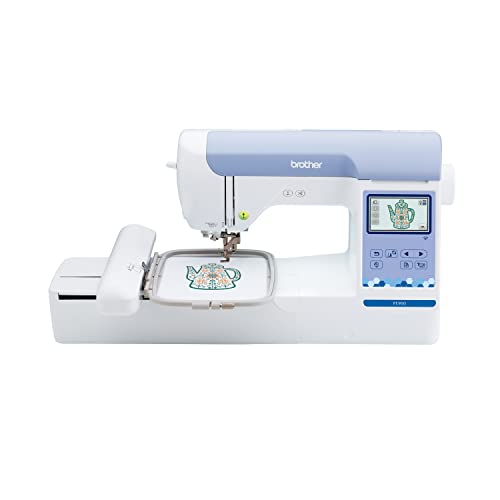
- 5" x 7" embroidery field for larger projects
- Wireless transfer, USB, and 3.7" touchscreen
- 193 designs with Color Sort and thread trimming
Best For: Home users who want a larger embroidery area and efficient design handling.
Beginner Training Pick
Poolin EOC05 Embroidery Machine for Beginners

- Built for beginners and home DIY users
- Large 4 x 9.25 inch embroidery area
- 7-inch touchscreen with Wi-Fi/USB transfer
Best For: First-time users who want guided operation and a bigger home embroidery workspace.
Portable Combo Choice
Brother SE2000 Sewing and Embroidery Machine

- 5" x 7" embroidery field
- 241 sewing stitches and 13 fonts
- Wireless LAN plus USB transfer
Best For: Home users who want one machine for sewing and embroidery
Large-Hoop Pick
Poolin EOC06 Large Hoop Embroidery Machine

- 11 x 7.9 inch max embroidery area
- 7-inch color touchscreen
- Wireless LAN and USB file transfer
Best For: Users who want a large embroidery area for bigger home projects
Starter Combo Bundle
Brother SE700 Combo Embroidery & Sewing Machine

- 4" x 4" embroidery hoop
- 135 built-in embroidery designs
- 40+ accessories included
Best For: Beginners who want a compact combo machine with a full accessory bundle
Beginner-Friendly Starter Pick
PooLin EOC03 4x4 & 4x9.25 Embroidery Machine

- Simple Institch system for beginners
- 130 designs, 8 fonts, and starter kit included
- WiFi transfer plus 4x4 and 4x9.25 areas
Best For: First-time home users who want easy setup and DIY personalization
Wireless Compact Choice
Brother PE545 Wireless Embroidery Machine
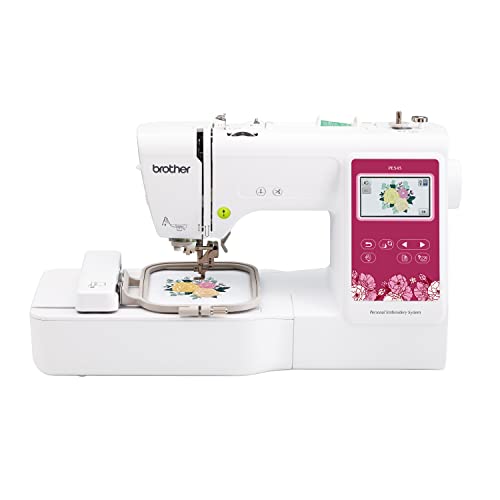
- Wireless LAN and USB transfer options
- 3.7-inch touchscreen for editing and previewing
- 135 designs and 10 fonts built in
Best For: Home embroiderers who want wireless convenience in a compact footprint
Large-Area Upgrade
Poolin EOC07 7-Inch Touchscreen Embroidery Machine

- Large hoop options for bigger designs
- 7-inch touchscreen with clear previews
- 200 built-in patterns and wireless transfer
Best For: Home users tackling larger garments, décor, or custom orders
Combo Starter Pick – Brother SE700 Sewing and Embroidery Machine
If you want one of the more versatile embroidery machines for home use, the Brother SE700 is built to cover both sewing and embroidery in a single setup. It gives beginners a manageable 4″ x 4″ embroidery field, a color touchscreen, wireless file transfer, and enough built-in designs and stitches to support a wide range of home projects.
Best For: Home users who want a combo machine with sewing functions plus approachable embroidery features.
Pros:
- Combines sewing and embroidery in one machine
- Wireless LAN and USB transfer plus Artspira app support
- 135 built-in embroidery designs and 103 sewing stitches
- Includes a 4″ x 4″ hoop, embroidery arm, and 8 sewing feet
Cons:
- 4″ x 4″ embroidery field is smaller than larger dedicated models
- Uses a 120-volt US-only configuration
- May feel more feature-rich than needed if you only want embroidery
The SE700 is a practical pick if you want flexibility without moving into a more advanced machine right away. Its mix of wireless convenience, built-in content, and included accessories makes it a strong all-around option for home sewing and embroidery.
App-First Pick – Brother Skitch Single-Needle Embroidery Machine
The Brother Skitch is a focused choice among embroidery machines for home use if you want embroidery only and prefer doing more from your phone. It works through the required Artspira app, supports 4″ x 4″ embroidery, and keeps the footprint small enough for a compact craft space.
Best For: Beginners and casual makers who want an app-connected embroidery-only machine for small projects.
Pros:
- Embroidery-only design keeps the machine straightforward
- Works with the Artspira app for drawing and file import
- Supports PES, PHC, PHX, and DST imports in the unpaid app version
- Small footprint and up to 400 spm stitching speed
Cons:
- Does not function as a traditional sewing machine
- Embroidery area is limited to 4″ x 4″
- Requires the Artspira app to use the system as intended
The Skitch is a smart fit if your goal is simple, home-friendly embroidery rather than an all-purpose sewing setup. Its app-based workflow and compact size make it especially appealing for small projects and beginner-level personalization.
Large-Design Pick – Brother PE900 Wireless Embroidery Machine
If you need more room for bigger home projects, the Brother PE900 stands out among embroidery machines for home use with its 5″ x 7″ embroidery field. It also adds wireless file transfer, a 3.7″ touchscreen, and built-in editing tools that make it easier to work with larger or more detailed designs.
Best For: Home embroiderers who want a larger field and more built-in editing convenience.
Pros:
- Generous 5″ x 7″ embroidery area for larger designs
- Wireless LAN and USB transfer options
- Advanced Color Sort and Jump Stitch Trimming features
- 193 built-in designs and 13 lettering fonts
Cons:
- Embroidery-only machine, so it does not sew
- Larger designs may still require planning around the 7.4″ needle-to-arm space
- US-only 120-volt model
The PE900 is a strong step up if you want more design space without giving up easy home operation. Its larger hoop size and stitching features make it especially useful for people who want to personalize bigger items more efficiently.
Beginner Training Pick – Poolin EOC05 Embroidery Machine for Beginners
The Poolin EOC05 is aimed at beginners looking for embroidery machines for home use with a simpler learning curve. It offers a large 7-inch touchscreen, Wi-Fi and USB design transfer, and an embroidery-only layout that keeps the experience focused on personal projects rather than sewing.
Best For: Beginners who want a home embroidery machine with guided operation and a larger workspace.
Pros:
- Designed specifically for beginners and home DIY users
- Large 4 x 9.25 inch embroidery area for shirts, bags, and gifts
- 7-inch touchscreen and Institch OS2 for simpler navigation
- Includes free design software plus Wi-Fi and USB transfer support
Cons:
- Embroidery-only machine, so it cannot sew
- Large size may be more machine than very casual users need
- Positioned for personal projects, not commercial mass production
The EOC05 is a practical option if you want guided features and a roomy embroidery area for at-home personalization. The included starter kit and training support make it especially appealing for first-time users who want help getting started.
Portable Combo Choice – Brother SE2000 Sewing and Embroidery Machine
If you want embroidery machines for home use that can also handle everyday sewing, the Brother SE2000 is a flexible all-in-one pick. It pairs a 5″ x 7″ embroidery field with 241 sewing stitches, plus built-in wireless transfer and on-screen editing for practical at-home projects.
Best For: Crafters who want one machine for both sewing and embroidery, with a larger field and wireless design transfer.
Pros:
- 5″ x 7″ embroidery field supports larger designs.
- Wireless LAN and USB options make file transfer convenient.
- 3.7″ touchscreen supports editing, resizing, rotating, and combining designs.
- Includes over 190 built-in and 50 downloadable embroidery designs, plus 13 fonts.
Cons:
- Embroidery-focused features are strong, but it is still a combo machine rather than a dedicated embroidery-only model.
- Supplied notes indicate certain Artspira thread features are sold separately.
The SE2000 is a solid choice if you want a home machine that balances embroidery capability with sewing versatility and modern connectivity. Its larger field and editing tools make it especially appealing for users who plan to grow beyond basic monogramming.
Large-Hoop Pick – Poolin EOC06 Large Hoop Embroidery Machine
Among embroidery machines for home use, the Poolin EOC06 stands out for its large 11 x 7.9 inch embroidery area and beginner-friendly computerized controls. It is built for bigger home projects like clothing, bags, towels, and bedding, with wireless LAN and USB transfer for moving designs.
Best For: Home embroiderers who want a large hoop area and an easy-to-use touchscreen system for bigger projects.
Pros:
- Large 11 x 7.9 inch embroidery area handles bigger designs and projects.
- 7-inch color touchscreen makes editing and adjusting designs easier.
- Includes 200 built-in patterns, 8 fonts, and 10 languages.
- Comes with hoops, thread, bobbins, stabilizers, and needles to start sooner.
Cons:
- At 35 pounds, it is not the lightest option for frequent moving.
- It is primarily embroidery-focused, so it is less of an all-around sewing solution.
The EOC06 is a strong fit if your priority is space and project size rather than compactness. Its large hoop selection and included supplies make it a practical home setup for users ready to tackle more ambitious embroidery work.
Starter Combo Bundle – Brother SE700 Combo Embroidery & Sewing Machine
Brother SE700 Combo Embroidery & Sewing Machine with 4" x 4" Embroidery Hoop and 40+ Accessories
Check Price On AmazonIf you are shopping for embroidery machines for home use and want a smaller, easier-to-manage combo, the Brother SE700 is a practical starter option. It offers a 4″ x 4″ embroidery hoop, wireless LAN, and a color touchscreen, along with a broad accessory bundle for getting started quickly.
Best For: Beginners and home crafters who want a compact sewing-and-embroidery machine with lots of included accessories.
Pros:
- 4″ x 4″ embroidery hoop is manageable for beginner projects.
- 135 built-in embroidery designs and 103 built-in sewing stitches add variety.
- Wireless LAN and Artspira compatibility support modern design access.
- Bundle includes 40+ accessories, plus embroidery design guide and quick reference guide.
Cons:
- Smaller embroidery field is less suited to larger designs.
- May be less ideal for users who want a dedicated large-hoop embroidery machine.
The SE700 is a smart pick if you want a compact machine that still covers both sewing and embroidery. Its smaller hoop keeps it approachable, while the included accessories make it easy to begin household and hobby projects right away.
Beginner-Friendly Starter Pick – PooLin EOC03 4×4 & 4×9.25 Embroidery Machine
If you’re comparing embroidery machines for home use and want a gentle learning curve, the PooLin EOC03 is built to make first projects feel manageable. It combines a simple Institch operating system, two embroidery sizes, and wireless design transfer so you can start personalizing home items without a complicated setup.
Best For: First-time users who want an easy-to-learn machine for DIY gifts, monograms, and everyday home projects.
Pros:
- Institch system and clear controls are designed for beginners.
- Includes 130 built-in designs, 8 fonts, and a starter kit to begin right away.
- Supports both 4×4 and 4×9.25 embroidery areas for more project flexibility.
- WiFi transfer and free software let you send custom designs from home.
Cons:
- Smaller hoop sizes may limit larger home projects.
- Best suited to personal DIY use rather than high-volume work.
- Requires learning embroidery basics, even with beginner-focused guidance.
Overall, the EOC03 stands out as a practical entry-level choice for home embroidery, especially if you value simplicity, included accessories, and support resources while you learn.
Wireless Compact Choice – Brother PE545 Wireless Embroidery Machine
For shoppers narrowing down embroidery machines for home use, the Brother PE545 is a compact embroidery-only option with wireless file transfer and a touchscreen that makes everyday personalization straightforward. Its 4×4 field keeps the footprint manageable, while the built-in designs and fonts give you plenty to work with right out of the box.
Best For: Home users who want a reliable embroidery-only machine with wireless convenience and an easy-to-navigate screen.
Pros:
- Wireless LAN and USB support make design transfer flexible.
- 3.7-inch color touchscreen helps with editing, previewing, and positioning designs.
- 135 built-in designs and 10 fonts provide strong personalization options.
- Includes a hoop and useful accessories to get started at home.
Cons:
- Embroidery-only machine, so it does not sew regular seams.
- 4×4 embroidery field is better for smaller projects.
- Made for 120V US use, which limits compatibility elsewhere.
In practice, the PE545 is a solid home embroidery pick if you want a focused machine with modern wireless features and enough built-in content to start stitching quickly.
Large-Area Upgrade – Poolin EOC07 7-Inch Touchscreen Embroidery Machine
If you need embroidery machines for home use that can handle bigger projects, the Poolin EOC07 offers a much larger embroidery area than entry-level models. Its 7-inch touchscreen, multiple hoop sizes, and wireless/USB transfer options make it better suited to ambitious clothing, home décor, and custom accessory work.
Best For: Home users who want larger hoop sizes, more built-in designs, and room to grow into bigger projects.
Pros:
- Large embroidery areas reduce the need for frequent rehooping.
- 7-inch color touchscreen gives clear previews and progress tracking.
- 200 built-in patterns, 8 fonts, and 10 languages offer broad creative flexibility.
- Wi-Fi, USB, and software-based transfer streamline file handling.
Cons:
- Larger size may take up more space at home.
- More advanced capabilities may be more than casual beginners need.
- Better suited to bigger projects than quick, simple monograms.
The EOC07 is a strong choice if your home embroidery plans go beyond small gifts and into larger garments, accessories, or even side-business work.
How We Picked These Embroidery Machines for Home Use
We prioritized machines that make home embroidery easier to start and easier to grow with. That means a balance of beginner-friendly operation, usable hoop sizes, solid built-in design libraries, and features like wireless connectivity or computerized controls where they add real value. We also looked for models that fit different use cases, from compact single-needle machines to combo sewing-and-embroidery options.
Quick Comparison: What Matters Most
For most shoppers, the biggest differences come down to embroidery area, ease of setup, design transfer options, and how much flexibility you want over time. Smaller hoops are fine for patches, names, and simple motifs, while larger work areas are better for jacket backs, quilt blocks, and more ambitious projects. If you want one machine for multiple tasks, a combo model can save space. If embroidery is your main goal, a dedicated machine may be the better long-term fit.
Key Buying Factors for Embroidery Machines for Home Use
Embroidery Area and Hoop Size
Larger hoops give you more creative room, but they can also increase price and footprint. Choose the biggest size you realistically need rather than buying for a project type you may never do.
Built-In Designs, Fonts, and Editing
A strong built-in library helps you start stitching immediately. Fonts matter if you plan to personalize gifts, towels, or school items. Basic on-machine editing is also useful for resizing and combining designs without extra software.
Connectivity and File Transfer
Wireless LAN, Bluetooth, and USB support can make file transfer simpler. For many users, easy design loading is a bigger convenience than a long list of advanced features.
Learning Curve and Controls
Touchscreens, guided setup, and clear menus can shorten the learning curve. If you are new to embroidery, a machine with straightforward threading and design selection will usually feel less frustrating.
Combo Vs. Dedicated Machines
Combo machines are ideal if you want sewing and embroidery in one footprint. Dedicated embroidery models usually focus more on stitch stability, design handling, and larger embroidery-ready features.
Who Should Buy Which Embroidery Machines for Home Use?
Beginners: Look for easy operation, clear controls, and a manageable hoop size.
Hobbyists: Prioritize design libraries, wireless transfer, and enough embroidery area for giftable projects.
Advanced home users: Choose a larger, more capable machine with more editing flexibility and room to expand.
Space-conscious buyers: A compact combo machine can be the smartest all-around choice.
In short, the best embroidery machine is the one that matches your project scale, experience level, and workflow. If you focus on those three things, it becomes much easier to find a model you’ll actually enjoy using at home.