
Choosing a smart home hub for beginners should feel simple, not technical. The best options make setup easy, connect reliably with popular devices, and leave room to grow later.
In this roundup, we focus on hubs that help new users control lights, sensors, security, and routines without unnecessary complexity.
Best 10 Smart Home Hub for Beginners Picks for 2026
Best for Easy Setup

- Simple plug-in setup with app guidance
- Works with Alexa, HomeKit, and Google Home
- Supports up to 75 Caséta devices
Best For: Beginners who want an easy-to-set-up hub for Lutron lights and fans.
Best Value

- Preinstalled Home Assistant gets you started quickly
- Silent, fanless official hardware from Nabu Casa
- Expandable for Z-Wave, Zigbee, and Thread
Best For: First-time smart home users who want a simple, official Home Assistant hub that can grow over time.
Best for Easy Smart Home Control
Amazon Echo Hub 8" Alexa Control Panel

- 8-inch wall-mount control panel for lights, cameras, and routines
- Supports Alexa-compatible devices plus Matter, Zigbee, Thread, and more
- Handy for beginners who want one central smart home dashboard
Best For: New smart-home users who want a simple, centralized control panel.
Best for Advanced Automation

- All-in-one hub with Zigbee, Thread, Matter, Wi-Fi, Bluetooth, and IR
- Local automations and edge control reduce reliance on the cloud
- Works with Aqara Home plus Apple Home, Alexa, SmartThings, and Home Assistant
Best For: Beginners who want a flexible hub now and room for advanced automation later.
Best for Easy Automations

- IR remote control and smart hub in one
- Built-in temp, humidity, and light sensing
- Works with Alexa, Google Home, Apple Home
Best For: Beginners who want a simple hub for remotes, climate tracking, and basic automations.
Best for Long-Range Coverage

- LoRa-based long-range connectivity
- Simple central controller for YoLink devices
- Strong fit for security sensors and monitoring
Best For: Beginners who want a straightforward hub with exceptional range for YoLink devices.
Best for SmartThings and Multi-Protocol Control

- Works with Matter, Zigbee, Z-Wave, Wi-Fi, Alexa, and Google Home
- SmartThings app keeps setup and automations approachable
- Local automations can improve speed and reliability
Best For: First-time buyers who want broad compatibility and an easy path into smart home automation.
Best with Extra Features
SwitchBot Hub Mini Smart Remote
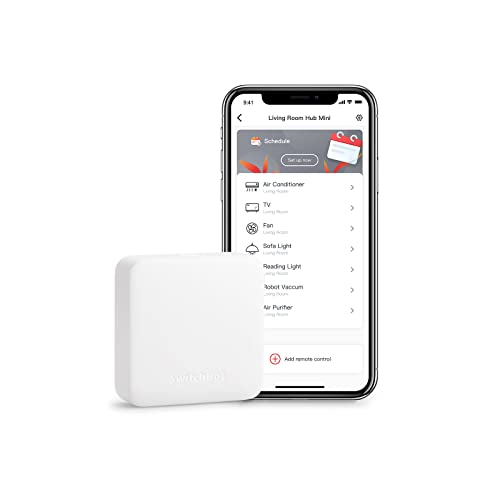
- Copies remotes quickly with smart learning mode
- Controls TV, AC, and other IR devices in one app
- Works with Alexa, Google Assistant, Siri, and IFTTT
Best For: Beginners who want a simple, affordable way to control IR appliances and start a smart home.
Best for Local Automation
Hubitat C-8 Pro Smart Home Hub

- Local automations keep working during internet outages
- Broad support for Matter, Zigbee, Z-Wave, Bluetooth, and Wi-Fi
- Good starter hub that can also grow into advanced custom rules
Best For: New smart home buyers who want reliable local control and room to expand.
Best for Easy Control
SwitchBot Hub 3 Smart Home Hub

- Knob, buttons, and screen simplify daily use
- Supports IR devices, SwitchBot gear, and Matter
- Works with Alexa, Google Home, and Apple Home
Best For: First-time smart home buyers who want a simple, hands-on hub that can grow with their setup.
Best for Easy Setup – Lutron Caseta Smart Hub
If you want a smart home hub for beginners that’s easy to install and works with a wide range of devices, the Lutron Caseta Smart Hub is a strong pick. It plugs into your router, uses a simple app setup, and can control up to 75 Caséta devices while playing nicely with Alexa, Apple HomeKit, and Google Home.
Best For: First-time smart home buyers who want a reliable hub for lights and fans with broad platform support.
Pros:
- Easy plug-in setup with app-based pairing
- Works with major platforms like Alexa, Apple HomeKit, and Google Home
- Supports up to 75 Caséta devices for easy expansion
- Clear Connect technology helps avoid Wi-Fi interference
Cons:
- Caséta dimmers and switches are sold separately
- Primarily designed for Lutron Caséta devices, not a general all-brand hub
For a smart home hub for beginners, this one stands out because it keeps setup straightforward while leaving room to grow. It’s especially appealing if you want dependable lighting control now and the flexibility to add more compatible devices later.
Best Value – Home Assistant Green Hub
Home Assistant Green | Smart Home hub with Advanced Automation | Official Home Assistant Hardware
Check Price On AmazonHome Assistant Green is a strong choice if you want a smart home hub for beginners without the usual setup headache. It arrives with Home Assistant already installed, so you can plug in power and Ethernet, then start building automations from one central dashboard.
Best For: First-time smart home users who want an official, low-maintenance Home Assistant hub with room to grow.
Pros:
- Preinstalled Home Assistant makes setup fast and beginner-friendly
- Official Nabu Casa hardware with fanless, silent operation
- Compact, power-efficient design with Z-Wave, Zigbee, and Thread expandability
- Keeps your home data local on the device
Cons:
- Requires Ethernet, so it is not a wireless plug-and-play hub
- Best value depends on whether you plan to expand with USB radios
For a smart home hub for beginners who want more control than a typical app-based starter kit, Home Assistant Green hits a sweet spot. It is simple to launch, but it still gives you advanced automation, local data storage, and upgrade room as your setup grows.
Best for Easy Smart Home Control – Amazon Echo Hub 8" Alexa Control Panel
If you want a smart home hub for beginners, the Amazon Echo Hub keeps things simple: mount it on the wall, connect it to Wi‑Fi or Ethernet, and start controlling lights, cameras, locks, and routines from one 8-inch screen or with Alexa voice commands.
Best For: New smart-home users who want a centralized, easy-to-learn control panel for everyday device control and security.
Pros:
- Simple dashboard makes it easy to control compatible devices at a glance.
- Works with thousands of Alexa-compatible devices, plus Matter, Zigbee, Thread, Bluetooth, and Sidewalk.
- Useful for home security, with quick access to cameras, sensors, and arming/disarming supported systems.
- Wall-mount design creates a dedicated, always-available smart home control point.
Cons:
- Not a portable tablet-style device; it needs a mounted or stationary setup.
- Some cable-hiding and tabletop accessories are sold separately.
For a smart home hub for beginners, Echo Hub is a practical pick because it reduces app juggling and puts the most-used controls in one place. It’s especially appealing if you want a clean family-friendly dashboard rather than a complicated DIY setup.
Best for Advanced Automation – Aqara Smart Home Hub M3
If you want a smart home hub for beginners that still leaves room to grow, the Aqara Smart Home Hub M3 is a strong pick. It combines Zigbee, Thread, Matter, Wi-Fi, Bluetooth, PoE, and IR in one box, so you can start simple and expand into more advanced routines later.
Best For: New smart home users who want one hub that can handle Aqara devices, Matter setup, and some serious automation potential.
Pros:
- Supports Zigbee, Thread, Matter, Wi-Fi, Bluetooth, and IR in one hub
- Local automation and edge control help keep routines running even when the cloud is limited
- Can bridge Aqara devices into major ecosystems like Apple Home, Alexa, SmartThings, and Home Assistant
- PoE and USB-C options make placement and backup power more flexible
Cons:
- Some features are more advanced than a true plug-and-play starter hub
- Only supports Aqara Zigbee devices, not third-party Zigbee devices
- IR and Matter thermostat behavior can depend on the app and device setup
The M3 stands out if you want a smart home hub for beginners that won’t feel limiting a few months down the road. It is especially appealing for users who value local control, broad ecosystem support, and the ability to unify multiple device types in one place.
Best for Easy Automations – SwitchBot Hub 2
If you want a smart home hub for beginners that does more than just connect devices, the SwitchBot Hub 2 is a strong starter pick. It combines IR remote control, temperature and humidity monitoring, light sensing, and app-based automations in one compact unit, so you can simplify control without building a complicated system.
Best For: Beginners who want an easy first hub for smart remotes, basic climate monitoring, and simple automations.
Pros:
- All-in-one hub with IR control, thermometer/hygrometer, and light sensor.
- Works with Alexa, Google Home, Apple Home, and Matter-supported SwitchBot devices.
- Useful for simple scenes, geo-fencing, and button-based controls for family members.
- Compact, tabletop-friendly design with included accessories for quick setup.
Cons:
- 2.4GHz Wi-Fi only, so it won’t work on 5GHz networks.
- Some of the best automations make the most sense if you already use SwitchBot products.
For a smart home hub for beginners, the Hub 2 stands out because it bundles several practical functions into one device instead of asking you to buy separate gadgets. If you mainly want an approachable hub for controlling remotes and triggering simple automations, it’s an easy one to recommend.
Best for Long-Range Coverage – YoLink Hub Smart Home Bridge
If you want a smart home hub for beginners that focuses on reliability rather than complexity, the YoLink Hub is an easy place to start. It acts as the central controller for YoLink devices and uses LoRa for unusually long-range communication, making it a practical choice for larger homes, garages, sheds, and outdoor sensors.
Best For: Beginners who want a simple hub for YoLink devices and need strong range for security sensors or hard-to-reach areas.
Pros:
- Very long wireless range for covering distant spots around the home.
- Simple central hub for YoLink smart devices and automations.
- Good fit for home monitoring, sensors, and security use cases.
- Compact bridge design keeps the setup straightforward.
Cons:
- Works best inside the YoLink ecosystem, so it is less universal than some hubs.
- Not the most advanced option for users who want deep smart-home customization.
For a smart home hub for beginners, YoLink stands out if range and dependable sensor coverage matter more than broad compatibility. It is especially appealing for first-time buyers building a simple monitoring setup that still reaches farther than many typical hubs.
Best for SmartThings and Multi-Protocol Control – Aeotec Smart Home Hub
If you want a smart home hub for beginners that can grow with your setup, the Aeotec Smart Home Hub is a practical starting point. It brings SmartThings control plus Matter, Zigbee, Z-Wave, Wi-Fi, Alexa, and Google Assistant support into one hub, so you can connect a wide mix of devices without making the system overly complicated.
Best For: First-time buyers who want an easy-to-manage hub with broad device compatibility and room to expand.
Pros:
- Supports Matter, Zigbee, Z-Wave, Wi-Fi, Alexa, and Google Home compatibility
- SmartThings app makes setup, automations, and daily control straightforward
- Local automation support can improve speed and reliability
- Ethernet or Wi-Fi setup gives you flexible installation options
Cons:
- Z-Wave Plus support is limited to the V3 model only
- North America-focused design may not suit international buyers
- Requires the SmartThings app, so it is not a fully standalone hub experience
Overall, this is a strong smart home hub for beginners who want wide compatibility without a steep learning curve. It is especially appealing if you plan to mix brands and want a hub that can handle simple automations now and more advanced device combinations later.
Best with Extra Features – SwitchBot Hub Mini Smart Remote
If you want a practical smart home hub for beginners, the SwitchBot Hub Mini is an easy way to bring IR devices like TVs and air conditioners into one app. Setup is simple, it supports 2.4GHz Wi‑Fi, and its smart learning mode can copy many remotes in seconds.
Best For: Beginners who want a straightforward entry point into smart home control for TVs, AC units, and other infrared appliances.
Pros:
- Fast, beginner-friendly setup with smart learning mode
- Controls multiple IR appliances from one app
- Works with Alexa, Google Assistant, Siri, and IFTTT
- USB-powered and easy to place anywhere
Cons:
- Only supports 2.4GHz Wi‑Fi, not 5GHz
- Needs a clear line of sight for reliable IR control
- Works best within the SwitchBot ecosystem
For a smart home hub for beginners, the Hub Mini stands out because it keeps the learning curve low while still adding useful automation and voice control. It is a solid pick if you mainly want to upgrade existing appliances without replacing them.
Best for Local Automation – Hubitat C-8 Pro Smart Home Hub
If you want a smart home hub for beginners that can start simple and still scale up, the Hubitat Elevation C-8 Pro is a strong pick. It focuses on local control, so automations keep running during internet outages, while broad support for Matter, Zigbee, Z-Wave, Bluetooth, Wi-Fi, and voice assistants gives you plenty of room to expand.
Best For: New smart home buyers who want reliable local automations now and the flexibility to grow into more advanced setups later.
Pros:
- Runs automations locally for faster response and better outage resilience
- Supports Matter 1.5, Z-Wave 800 LR, Zigbee 3.0, Bluetooth, and Wi-Fi
- Works with 1,000+ devices across 100+ brands, including voice assistants and Ring support
- Can handle both simple schedules and advanced custom rules without subscriptions
Cons:
- More capable than some beginners may need at first
- Setup can feel technical if you want a very plug-and-play experience
Overall, the C-8 Pro is a smart home hub for beginners who care most about reliability and future-proofing. It is easy enough to start with basic routines, but its local automation engine and wide compatibility make it a better long-term hub than many entry-level options.
Best for Easy Control – SwitchBot Hub 3 Smart Home Hub
SwitchBot Hub 3 is a strong smart home hub for beginners who want one simple place to manage IR appliances, SwitchBot devices, and Matter-compatible gear. The built-in screen, knob, and buttons make it easier to control than app-only hubs, while still supporting Alexa, Google Assistant, Apple Home, and automations like scenes and geofencing.
Best For: First-time smart home buyers who want a central hub with physical controls, broad compatibility, and room for future automation.
Pros:
- Physical knob, screen, and buttons make everyday control simple
- Works with 100,000+ IR devices plus SwitchBot and Matter products
- Built-in temperature and humidity monitoring adds useful at-a-glance info
- Supports Alexa, Google Home, and Apple Home integration
Cons:
- Requires 2.4GHz Wi-Fi for setup and stable use
- IR-only for legacy appliances, so it won’t control RF devices like some fans or garage openers
- Some advanced features work best when you already own other SwitchBot devices
For beginners who want a more hands-on way to run a smart home, SwitchBot Hub 3 stands out as a smart home hub for beginners because it reduces app juggling and makes core controls easier to understand. It is especially appealing if you want a hub that can grow with your setup instead of feeling like a one-device accessory.
How We Picked the Best Smart Home Hub for Beginners
We prioritized hubs that are approachable for first-time users while still offering enough compatibility to avoid a fast upgrade. That means easy onboarding, broad device support, clear app experiences, and automation features that make everyday use more convenient instead of more confusing.
We also gave extra weight to hubs with strong ecosystem support, local control where available, and clear paths for expansion as your smart home grows.
Quick Comparison
For a Smart Home Hub for Beginners, the easiest choice is usually the one that matches the devices and ecosystem you already use. Alexa-first households may prefer a display-style controller, while Apple, Google, SmartThings, Matter, Zigbee, Z-Wave, and Thread support matter more if you want flexibility across brands. If you want a more advanced setup later, local automation hubs can be a smarter long-term pick.
Key Buying Factors for Smart Home Hub for Beginners
Compatibility
Check whether the hub supports your existing bulbs, plugs, locks, sensors, cameras, and voice assistants. Matter support is helpful for future-proofing, but it does not replace every older protocol.
Ease of Setup
Beginners should look for guided onboarding, simple app controls, and reliable pairing. A hub that is technically powerful but hard to configure may create frustration early on.
Automation Style
Some hubs are designed around simple scenes and schedules. Others support deeper rules, local processing, and more advanced triggers. Choose based on whether you want basic convenience or a system you can expand and customize.
Connectivity and Range
Wi-Fi hubs are often easiest for new users, while Zigbee, Z-Wave, Thread, and LoRa can improve reliability or range depending on the devices you plan to use. If your home is larger, signal coverage matters as much as features.
Control Method
App-only control works fine for many homes, but a physical screen, voice support, or quick-access buttons can make daily use easier for family members and guests.
Who Should Buy Which Smart Home Hub for Beginners?
If you want the simplest start, choose a hub that integrates with the ecosystem you already use most. Alexa users may like a control-panel style hub, Apple Home users should favor strong HomeKit support, and SmartThings-style buyers often want broader multi-protocol compatibility.
If you care most about automation depth and local control, a more advanced hub can be worth the learning curve. If you only need to control a few lights or remotes, a compact bridge-style hub may be all you need. For a Smart Home Hub for Beginners, the best pick is usually the one that feels easiest today and still fits your plans a year from now.