
Reading naturally on camera is easier when your script stays close to the lens. The best teleprompters for laptops help creators, presenters, educators, and remote professionals maintain eye contact without memorizing every line.
This roundup includes laptop-, tablet-, monitor-, and camera-compatible designs, from compact portable models to larger kits with dedicated displays. Use the guide below to match screen size, mounting style, glass quality, and workflow to your recording setup.
Best 10 Teleprompters for Laptops Picks for 2026
Professional Stage Pick

- Supports displays up to 17 inches
- 60/40 beam splitter glass
- Telescopic conference stand included
Best For: Corporate presentations, broadcasts, and larger-device prompting
All-in-One Streaming Pick

- Built-in 9-inch display
- Works like an extra monitor
- Supports scripts, chat, and video calls
Best For: Streaming, conferencing, and desk-based content creation
Travel-Ready Tablet Pick
Desview T12S 12.9-Inch Teleprompter
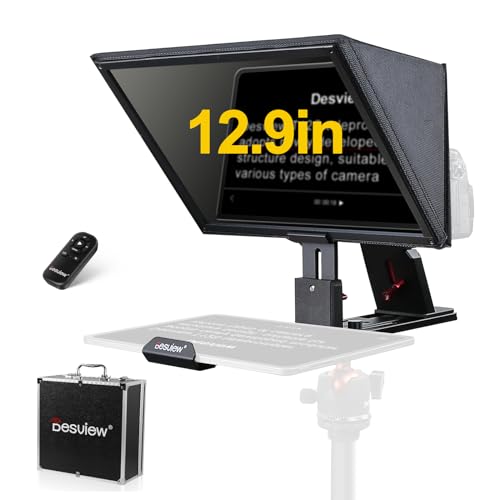
- Fits tablets up to 12.9 inches
- Bluetooth remote and app control
- Aluminum carry case included
Best For: Mobile creators using tablets for recording and livestreaming
Dual-Display Value Pick
NEEWER X11 Monitor Teleprompter
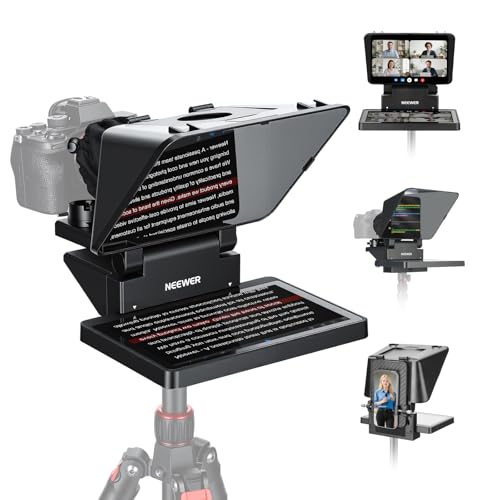
- Built-in LCD monitor
- Works with Windows and macOS computers
- Supports camera, webcam, and phone setups
Best For: Flexible streaming, conferencing, and multi-device prompting
Wide-Angle Creator Pick

- Supports tablets up to 12.9 inches and several camera types.
- Colorless beam-splitter offers a clear, wide viewing angle.
- Includes app control and Bluetooth remote.
Best For: Large-script setups, studio recording, and wide-angle camera use
Portable Aluminum Pick
NEEWER X12 14-Inch Teleprompter

- Collapsible aluminum design includes a carrying case.
- Reads text from up to 10 feet with 75% light transmittance.
- Includes remote control, app support, and accessory mounts.
Best For: Portable tablet prompting with compatible cameras and lenses
Most Versatile Mobile Pick

- Works with phones, tablets under 11 inches, and DSLR cameras.
- Includes 49mm–82mm adapter rings and Bluetooth remote.
- App supports TXT/DOCX files, formatting, and countdowns.
Best For: Multi-device streaming, vlogging, and mobile video production
Best for Mobile Creators
LENSGO TC12P Wide-Angle Teleprompter
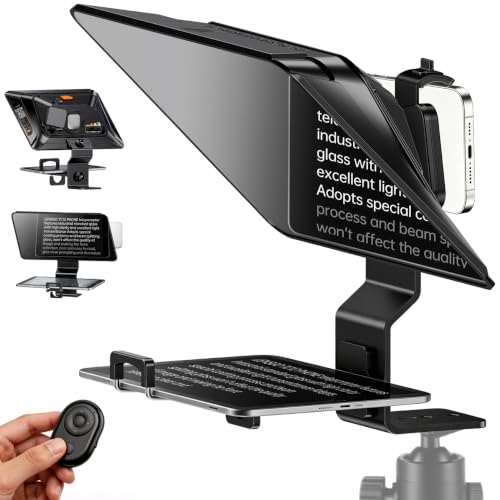
- 14.5-inch HD beam-splitter glass
- Supports phones and tablets up to 7.3 inches
- Bluetooth remote and iOS/Android app control
Best For: Portable smartphone and tablet recording
Best All-in-One Kit
GVM 12-Inch Collapsible Teleprompter
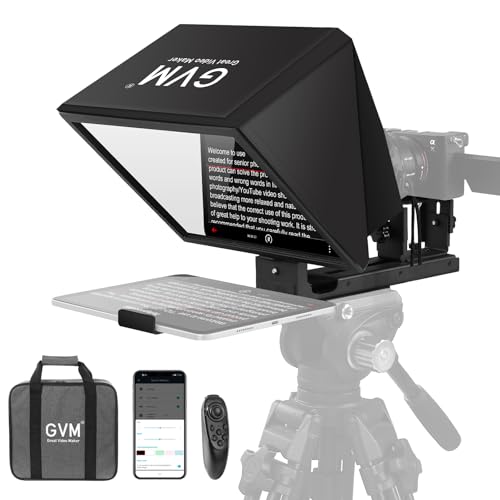
- Installation-free, collapsible tripod design
- Supports tablets up to 8.6 inches and multiple camera mounts
- Includes app control, remote, and carry bag
Best For: Multi-device home studios and mobile video crews
Best for Camera Flexibility
Desview T3 Wide-Angle Teleprompter

- Supports devices up to 10 inches
- Includes nine camera adapter rings
- 97% light-transmission beam-splitter glass
Best For: Phone, tablet, DSLR, and mirrorless-camera recording
Professional Stage Pick – Proaim Laptop Teleprompter
For presentations, broadcasts, and productions that need a larger display, this Proaim model is one of the more flexible teleprompters for laptops. It supports devices up to 17 inches and pairs a 60/40 beam splitter with a height-adjustable conference stand.
Best For: Corporate presentations, conferences, broadcasts, training sessions, houses of worship, and studio or on-location video production.
Pros:
- Supports tablets, laptops, and monitors up to 17 inches.
- 60/40 beam splitter glass helps maintain script visibility and natural eye contact.
- Included telescopic stand provides adjustable height positioning.
- Designed for professional presentation and production environments.
Cons:
- At 18.5 pounds, it is less convenient to transport than compact models.
- Its 31.5-inch length and full stand setup require substantial space.
The Proaim is a strong choice when stability, larger-device support, and presentation ergonomics matter more than portability. Its included stand makes it especially suitable for fixed venues and formal speaking setups.
All-in-One Streaming Pick – Elgato Prompter
The Elgato Prompter is a convenient all-in-one option for creators seeking teleprompters for laptops without adding a separate tablet or phone screen. Its built-in display works like an extra monitor, while the desktop-controlled setup supports scripts, chat, video calls, and camera-based recording.
Best For: Streamers, video creators, remote presenters, and users who want to read scripts or chat while maintaining camera eye contact.
Pros:
- Built-in 9-inch FHD display eliminates the need for a separate prompting device.
- Drag-and-drop monitor workflow lets users place windows or apps on the display.
- Compatible with DSLR cameras, webcams, smartphones, personal computers, and laptops.
- Supports camera viewing for Twitch chat, scripts, Zoom, and Teams calls.
Cons:
- Mac users need free DisplayLink software, and Android users need DisplayLink Presenter.
- The 9-inch screen may provide less text area than larger tablet-based prompters.
Choose the Elgato when simple computer control and an integrated screen are priorities. It is particularly appealing for desk-based streaming and conferencing, where switching between scripts, chat, and camera views is useful.
Travel-Ready Tablet Pick – Desview T12S 12.9-Inch Teleprompter
For creators who already use a tablet, the Desview T12S offers a portable approach to teleprompters for laptops and other devices. It accommodates tablets up to 12.9 inches, includes Bluetooth app control, and uses a metal body with a fitted aluminum carry case.
Best For: YouTubers, podcasters, educators, livestreamers, and mobile production teams using cameras and tablets.
Pros:
- Supports iPads and tablets up to 12.9 inches, plus DSLR, mirrorless, and camcorder setups.
- Bluetooth remote and Desview app allow script editing, text-size changes, and scrolling-speed adjustments.
- Beam splitter glass is designed for high-definition text with reduced ghosting.
- Tool-free assembly and included aluminum carry case support location work.
Cons:
- It requires a compatible tablet or phone for displaying scripts.
- At 3 kg, it is heavier than some compact desktop-oriented options.
- The supplied details list a 12.9-inch screen limit, so larger laptops are not supported.
The T12S makes the most sense for users who value tablet compatibility and travel protection. Its remote-controlled app workflow is useful for recording and livestreaming, while the metal construction is suited to repeated on-location use.
Dual-Display Value Pick – NEEWER X11 Monitor Teleprompter
The NEEWER X11 combines a camera teleprompter with a built-in monitor, making it a versatile option for teleprompters for laptops. It can connect to a computer as a second display, mirror supported phones, or show prompts without requiring a separate tablet.
Best For: Beginners, streamers, video-conference users, and creators who want flexible computer, phone, webcam, or camera connections.
Pros:
- Built-in HD LCD monitor can display prompts without a separate phone or tablet.
- Connects to compatible Windows and macOS computers as an external monitor.
- Supports lens threads up to 72 mm and focal lengths from 35 to 200 mm.
- Includes phone clamp, hood, quick-release plate, and data cable set.
Cons:
- Some connection methods require drivers or separately downloaded apps.
- Phone mirroring is limited to iPhone and Android devices with DP protocol support.
- Voice synchronization is not supported.
The X11 is a practical choice for users who want one system to cover computer display, phone mirroring, and camera prompting. Check your computer ports, phone protocol, and camera mounting requirements before buying.
Wide-Angle Creator Pick – GVM TQ-L 18-Inch Teleprompter
For creators comparing teleprompters for laptops and larger tablet-based scripts, the GVM TQ-L offers an 18-inch setup with a sturdy aluminum frame and a colorless beam-splitter designed for a clear, wide viewing angle. It supports tablets up to 12.9 inches and works with DSLRs, camcorders, digital cameras, and DV machines.
Best For: Vloggers, online instructors, interviewers, and studio users who want a large tablet display and broad camera compatibility.
Pros:
- Supports tablets up to 12.9 inches and multiple camera types.
- Colorless beam-splitter coating is designed for clear text with no ghosting.
- GVM app and Bluetooth remote offer font, speed, background, pause, and start/stop controls.
- Solid aluminum construction provides a sturdy setup.
Cons:
- At 16.12 pounds, it is less convenient for frequent transport.
- The large 18-inch design may require more setup space than compact models.
This is the most substantial option of the group, making it appealing when readability and equipment flexibility matter more than portability. Its included remote and app controls also help keep hands off the camera during recording.
Portable Aluminum Pick – NEEWER X12 14-Inch Teleprompter
The NEEWER X12 is a practical choice for shoppers seeking teleprompters for laptops or tablets in a collapsible format. Its aluminum-alloy body, carrying case, remote, and accessory mounts suit mobile video setups, while the beam splitter reflects text that can be read from up to 10 feet away.
Best For: Tablet-based creators, online teachers, vloggers, and live streamers using compatible cameras and lenses.
Pros:
- Collapsing design supports storage and transport.
- Includes an RT-110 remote, phone holder, and carrying case.
- Supports tablets and smartphones up to 9.84 by 8.68 inches.
- Dual cold shoes and 1/4-inch threads accommodate microphones, lights, and accessories.
Cons:
- Not compatible with wide-angle lenses or camera lenses with focal lengths of 28mm or less.
- Not intended for phone shooting and does not support the 12-inch iPad Pro.
The X12 balances portability and expandability, but camera and device fit should be checked carefully before purchase. Its remote app control and accessory mounts make it well suited to organized solo shooting.
Most Versatile Mobile Pick – Desview T5 Teleprompter
The Desview T5 is a flexible option for teleprompters for laptops, tablets, and phones, supporting tablets under 11 inches, smartphones, and DSLR cameras. Its broad set of adapter rings, coated glass, and free app make it useful for creators who switch between mobile and camera-based recording.
Best For: Streamers, vloggers, and video creators who use multiple phones, tablets, or DSLR lenses.
Pros:
- Includes adapter rings from 49mm through 82mm for broad lens compatibility.
- Supports horizontal and vertical smartphone shooting.
- App handles TXT and DOCX scripts, formatting, mirroring, rotation, and countdowns.
- Coated glass, light-sealing foam, and adjustable panel support clearer prompting.
Cons:
- Tablet support is limited to devices under 11 inches.
- Its feature set may be more than needed for a simple single-device setup.
The T5 stands out for creators who need one teleprompter for several shooting devices. The adapter-ring range and mobile shooting adjustments reduce the need for separate rigs, while the included one-year warranty and lifetime maintenance add support after purchase.
Best for Mobile Creators – LENSGO TC12P Wide-Angle Teleprompter
The LENSGO TC12P is a practical choice among teleprompters for laptops and mobile-focused recording setups, especially when you want to read scripts while filming with a smartphone or tablet. Its 14.5-inch glass, adjustable holder, and Bluetooth remote support walk-and-talk videos, Zoom calls, TikTok content, and vlogging.
Best For: Smartphone and tablet creators who need a portable teleprompter for horizontal or vertical shooting.
Pros:
- Supports smartphones and tablets up to 7.3 inches in landscape orientation.
- Large 14.5-inch HD glass provides a spacious reading area.
- Includes a Bluetooth remote for play/pause and scroll-speed adjustments.
- Quick assembly, adjustable front panel, and light-sealing foam aid mobile use.
Cons:
- Designed for smartphone and tablet shooting rather than a dedicated laptop display.
- Not water resistant.
The TC12P stands out for creators who value quick setup and flexible phone-first recording. Its wide glass and remote make longer scripts easier to follow, while the compact design is better suited to mobile production than a traditional studio configuration.
Best All-in-One Kit – GVM 12-Inch Collapsible Teleprompter
The GVM 12-Inch Teleprompter is a convenient option for teleprompters for laptops and broader camera setups, with an installation-free design that folds for transport. It supports phones, tablets, DSLRs, mirrorless cameras, and video recorders, making it useful for presentations, live streams, and recorded video.
Best For: Creators who want a ready-to-mount teleprompter that works with multiple device and camera types.
Pros:
- Installation-free collapsible design mounts to a tripod without assembly.
- 12-inch optical glass offers a stated reading range of up to 15 feet.
- Supports tablets up to 8.6 inches and cameras using 1/4-inch or 3/8-inch mounts.
- Includes a wireless remote, app control, and carry bag.
Cons:
- At 5.68 pounds, it is heavier than some portable alternatives.
- The tablet size limit may exclude larger displays.
The GVM is a strong fit when flexibility matters more than minimum weight. Its foldable aluminum-alloy construction and included bag simplify transport, while camera-mount compatibility lets the kit adapt as your recording setup changes.
Best for Camera Flexibility – Desview T3 Wide-Angle Teleprompter
The Desview T3 is a versatile pick among teleprompters for laptops and camera-based production, supporting smartphones, tablets up to 10 inches, DSLRs, and mirrorless cameras. Its coated beam-splitter glass and wide-angle guidance are useful for YouTube, interviews, TikTok, and live streaming.
Best For: Creators who need one teleprompter for both compact mobile devices and interchangeable-lens cameras.
Pros:
- Supports tablets up to 10 inches and includes nine camera adapter rings.
- 70/30 beam-splitter glass provides up to 97% light transmittance.
- Supports wide-angle shooting from 24mm horizontally and 35mm vertically, according to the specifications.
- Bluetooth remote and free app provide scrolling, playback, and speed controls.
Cons:
- Not intended for 12.9-inch iPads or point-and-shoot cameras without lens filter threads.
- Wide-angle use requires attention to the stated focal-length limits.
The T3 is a capable middle ground for users moving between phone and camera recording. Its adapter-ring selection and wide-angle support offer more setup flexibility, while the 2.2-pound weight keeps it relatively manageable for travel and tabletop production.
How We Picked the Best Teleprompters for Laptops
We focused on teleprompters that can work with a laptop directly or alongside a laptop-based recording and presentation setup. Selection criteria included device compatibility, reflective glass quality, viewing area, camera clearance, portability, assembly, included accessories, and ease of controlling scroll speed.
We also considered whether each design suits common use cases such as video calls, YouTube production, online courses, livestreaming, interviews, and professional presentations. A teleprompter is only useful if the script remains readable while the camera can still capture a clear, natural-looking image.
Quick Comparison
| What to compare | Best for | What matters most |
|---|---|---|
| Compact tablet or smartphone prompter | Travel and occasional recording | Low weight, quick setup, adjustable mounting |
| Dedicated-screen prompter | Frequent creators and presenters | Built-in display, brightness, app or remote control |
| Large aluminum prompter | DSLR or mirrorless camera rigs | Glass size, lens clearance, stability |
| Laptop-based workflow | Webinars, courses, and remote presentations | Screen placement, viewing angle, software compatibility |
Key Buying Factors for Teleprompters for Laptops
Compatibility and Placement
Check whether the prompter is designed to hold a laptop, tablet, phone, monitor, or a separate display. Some models sit in front of a camera, while others are built around a webcam or monitor. Confirm the maximum supported device size and ensure your laptop can remain open without blocking the camera or making the setup unstable.
Glass Quality and Reading Distance
Beam-splitter glass affects both text clarity and image quality. Coated or optical glass generally produces a cleaner reflection and less distracting glare than basic transparent panels. A wider viewing area is helpful when you need to sit farther from the camera or use larger fonts.
Camera and Lens Clearance
Before buying, measure your camera body and lens diameter. DSLR and mirrorless users should verify that the included adapter rings fit the lens. Wide-angle lenses may require a larger opening or a prompter designed to avoid vignetting.
Controls, Software, and Setup
Remote controls and compatible prompting apps make it easier to adjust speed, pause, or move through a script while recording. For regular use, prioritize tool-free assembly, secure mounts, a carrying case, and straightforward access to cables and camera controls.
Who Should Buy Which Teleprompters for Laptops?
Choose a compact smartphone or tablet model if portability and occasional recording are your priorities. These are practical for short-form videos, travel, and small cameras.
Choose a dedicated-screen model if you record frequently and want a self-contained workflow with fewer devices to position. Larger aluminum kits are better for studio setups, full-size cameras, and presenters who need a generous reading area.
For laptop-centered webinars or online teaching, prioritize a design that keeps the script close to the webcam while leaving enough room for your laptop, microphone, and lighting. The best choice is the one that fits your complete setup—not simply the model with the largest screen.